I have used Autodesk Fusion since Autodesk first made it free for makers, and it changed the way I design and build things. It has also been central to much of the work in The Makers Workbench's CAD & Design section. That history is exactly why SolidCraft caught my attention. After spending a few days with it, I did not feel like I was learning an unfamiliar open-source CAD experiment. I felt like I had opened a younger, rougher version of a workflow I already knew.
SolidCraft is a free, open-source parametric three-dimensional computer-aided design application. Parametric CAD means that a part is built from dimensions, constraints, and ordered features. Change the width of the first sketch, and the extrusion, holes, fillets, and other later features can rebuild around that new value. If you already work this way in Fusion or Onshape, SolidCraft's logic feels immediately familiar.
That familiarity is the important part. FreeCAD is powerful, mature, and open source, but I have always found its learning curve steeper than it should be. SolidCraft puts common sketch tools, modeling commands, a component browser, and a feature timeline where a Fusion or Onshape user expects to find them. I was able to stop thinking about the interface fairly quickly and concentrate on the model.
An open-source parametric CAD application
SolidCraft began under the public GitHub account bherbruck and is now maintained in the Tangency Labs organization. The complete SolidCraft source repository is written in Rust, a programming language designed around performance and memory safety, and its code is available under your choice of the MIT or Apache 2.0 license. Those licenses allow people and companies to use, study, modify, and redistribute the program under their stated conditions.
The project is moving at a speed that makes any static feature list age quickly. As I write this on October 21, 2026, the GitHub releases page lists SolidCraft 0.18.4 as the current release. Some official website pages still display 0.12.0, which is a good reminder to check the releases page before downloading or writing about a specific build.
The project's own README calls SolidCraft "early but usable for simple parts." That is fair, but it also undersells how much is already present. SolidCraft supports constrained sketches, parameter-driven dimensions, and an editable feature timeline. Its current modeling toolset includes extrude, revolve, sweep, loft, fillet, chamfer, shell, draft, holes, threads, patterns, mirror, split, and combine operations. It also has configurations, assemblies, joints, motion studies, interference checking, mass properties, sheet-metal tools, and a small set of plastic-enclosure features.
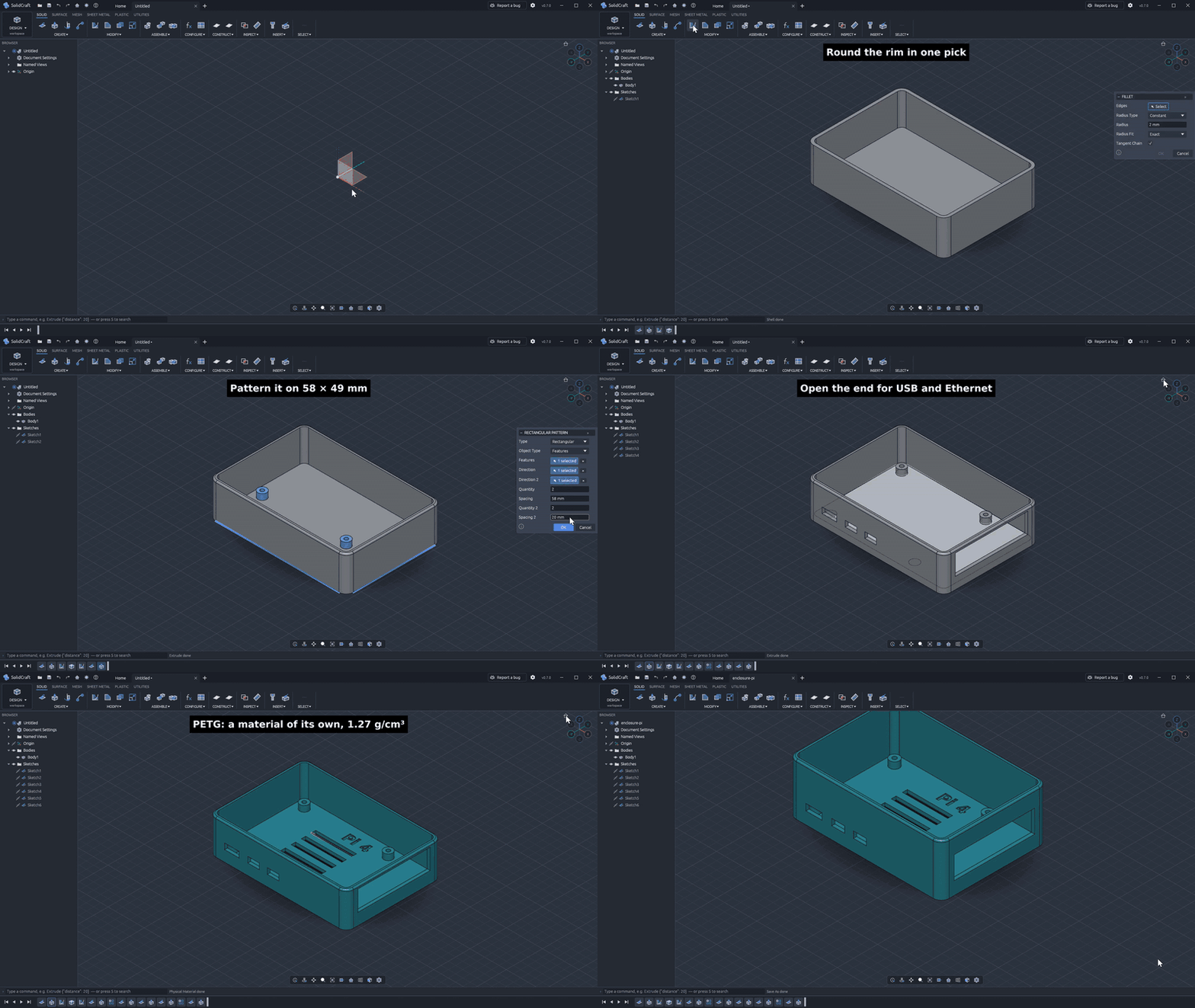
SolidCraft's official enclosure demonstration starts with a constrained sketch and builds a Raspberry Pi case with shell, fillets, standoffs, cutouts, vents, text, material properties, and editable height parameters. Credit: SolidCraft contributors, MIT OR Apache-2.0.
For exchanging designs, SolidCraft works with its native .solidcraft format and supports STEP, IGES, STL, OBJ, 3MF, glTF, DXF, and URDF through its documented file and export tools. A STEP or IGES import brings in boundary-representation geometry, which describes a solid through its connected faces, edges, and vertices. It does not recreate another CAD program's original timeline. Mesh files such as STL and OBJ stay meshes after import, unless the geometry fits one of SolidCraft's supported conversion paths.
That distinction matters to anyone migrating an old library. Neutral formats can move the shape, but they usually cannot bring every sketch, parameter, and feature along with it.
The Fusion and Onshape workflow feels familiar
The basic loop is the same one many makers already know. Start a sketch on an origin plane or planar face. Draw a profile. Add dimensions and geometric constraints so the shape behaves predictably. Finish the sketch, turn it into a solid, then add the rest of the part through later features. The timeline keeps those operations in order, and named parameters let one value control several parts of the design.
This is why SolidCraft was much easier for me to pick up than FreeCAD. I am not claiming every dialog matches Fusion or that every edge case behaves the same way. It does not. The project is still young, and the developers are open about gaps in its geometry and workflows. The overall mental model is familiar, though, and that saves a surprising amount of time.
The interface also feels designed for people who want to make parts, rather than people who want to learn the history of the program. Tools are grouped into recognizable sketch and solid-modeling areas. The model tree and timeline tell you where the part came from. If you have designed a bracket, enclosure, adapter, or printer modification in Fusion or Onshape, the first steps in SolidCraft will make sense.
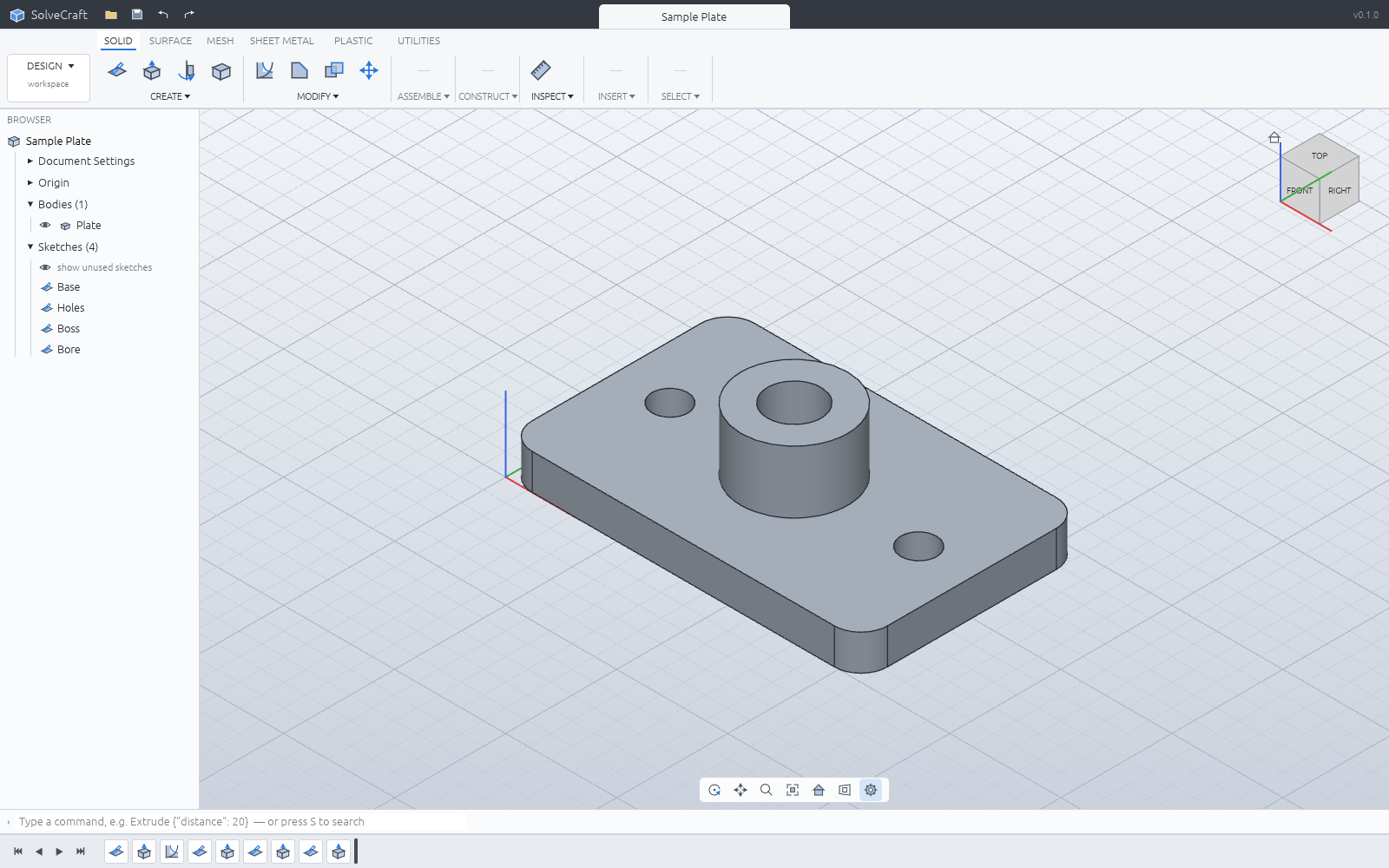
The official SolidCraft sample plate shows the application's modeling viewport and interface. Credit: SolidCraft contributors, MIT OR Apache-2.0.
The browser version changes the comparison
SolidCraft is available as a desktop application for Windows, macOS, Linux, and FreeBSD. It also runs in a modern web browser through WebAssembly, a way of compiling an application so it can run inside the browser at near-native speed. No installation is required for the official browser build.
That makes SolidCraft more than a Fusion alternative. It puts the project in the same conversation as Onshape, especially for makers using a school computer, a workshop laptop, or a machine where installing another desktop program is inconvenient.
There is a major privacy difference for free users. Onshape's current subscription documentation says its free plan cannot create private documents. Designs made under that plan are public to other Onshape users, who can view them and make copies. SolidCraft's web app saves designs in that browser's private storage. The files are not uploaded into a public design catalog merely because the software is free.
Private browser storage has its own practical warning. Clearing the site's data can remove those designs. SolidCraft's file guide recommends downloading a .solidcraft copy when you want a durable backup or need to move the design to another device. The browser build gives you privacy and portability, but it does not remove the need for backups.
CAD that an AI agent can operate
SolidCraft is also built to be driven by an AI coding agent. Its Model Context Protocol server, or MCP server, exposes modeling, inspection, measurement, parameter, screenshot, save, and export commands to compatible tools. MCP is a standard connection that lets an AI assistant call a program's tools instead of guessing where to click.
With the desktop application and command-line tool installed, Claude Code can be connected with a documented command. Other compatible agents can use the same local server. SolidCraft's agent can build a feature, inspect the result, change a parameter, measure the geometry, and check the model again. The regular interface and the agent use the same command engine, so the resulting design remains editable in SolidCraft.
The newest desktop builds go further with a documented agent-chat panel for tools such as Claude Code, Codex, OpenCode, and locally hosted models. That integrated chat is currently a desktop feature. The official website explicitly says it does not offer browser-agent sessions.
There is another form of agentic control that matters just as much. The whole application is open source. If SolidCraft lacks a feature I need, I can fork the repository and use Claude Code or another coding agent to help add it. I still have to define the requirement, review the change, test it, and pay any model-usage cost. That is real work. Still, I would rather have the option to fund development that directly improves a tool I use every day than remain permanently dependent on one vendor's product plan. This is one example of the broader shift I cover in The Agentic-Coded Application Revolution.
What SolidCraft does not replace yet
SolidCraft does not currently generate computer-aided manufacturing toolpaths. Computer-aided manufacturing, or CAM, turns a model into the cutting moves used by a CNC mill, router, or lathe. The project's roadmap defers the entire Manufacture/CAM workspace, along with full two-dimensional drawings, simulation, PCB design, advanced mesh and form modeling, and several broader surface-modeling workflows. Readers interested in those fabrication workflows can also explore TMWB's CNC and laser section.
Those are not small omissions. A shop that relies on Fusion for three-axis or five-axis machining cannot move that work to SolidCraft today. A company producing controlled engineering drawings will also need another tool. Some advanced fillets, shells, imports, and complex geometry remain areas where the project is still improving robustness.
The release packages are not signed yet. Windows SmartScreen or macOS Gatekeeper may warn on first launch. Newer SolidCraft versions open old files, but an older version may refuse a design saved in a newer file format. These are manageable issues for an early open-source project, but they matter if you are deciding whether to trust it with production work.
A strong fit for the 3D-printing community
Most people designing for a 3D printer do not need five-axis CAM or a formal drawing package. They need sketches, dimensions, extrusions, holes, shells, fillets, patterns, and reliable STL or 3MF export. SolidCraft already covers that core workflow.
It is especially appealing for brackets, electronics enclosures, adapters, mounts, replacement parts, and printer modifications. Those parts benefit from parameters because the first version is rarely the last. If a board changes width or a hole needs another half millimeter of clearance, editing one named value is much better than pushing faces around and hoping nothing else breaks.
The web interface lowers the barrier further. A new maker can open the program without an installer, create a private design, download the native file, and export a mesh for a slicer. They do not have to publish the source design to the world as the price of using a free browser CAD tool.
Will I stop using Fusion?
Not yet. I have thousands of designs in my Fusion library, and Fusion still combines CAD, CAM, electronics, simulation, and mature data management in a way SolidCraft does not. Autodesk currently lists the base Fusion subscription at $680 per year, or $85 when paid month to month. The free personal-use edition remains available for qualifying non-commercial users, but it carries limits on editable documents, file formats, advanced manufacturing, and other features.
I can appreciate what Fusion has done for makers and still be uncomfortable with the direction of permanent subscriptions. Those two thoughts can coexist.
SolidCraft is not a finished replacement for every Fusion or Onshape user. It is already a serious parametric modeler, and its pace of development makes it worth watching closely. I will keep using Fusion for the library and manufacturing work I already depend on. I will also use SolidCraft more, especially for new 3D-printing projects where private browser storage, a familiar workflow, and an open file format matter.
For the maker community, that is enough to make SolidCraft one of the most interesting CAD projects I have seen in years. TMWB's existing Fusion tutorials on exporting DXF from sketches and exporting DXF from planar faces also show the kind of everyday fabrication workflow an open CAD alternative eventually needs to support. In Part 2 of the Agentic App Revolution, I explain how agentic tools are already helping me finish games, simulators, and other maker projects.
Disclosure
Disclosure: This article is not sponsored. The Makers Workbench did not receive payment or a review license for this coverage. SolidCraft is free and open-source software. Charles's comments about usability are based on several days of personal use, not a controlled feature-by-feature benchmark.