
Virtual Workbench
Explore a growing collection of maker resources, including links to the Velxio virtual electronics lab, practical calculators, and other tools designed to make your workflow faster and easier.
The Microcontroller Lab
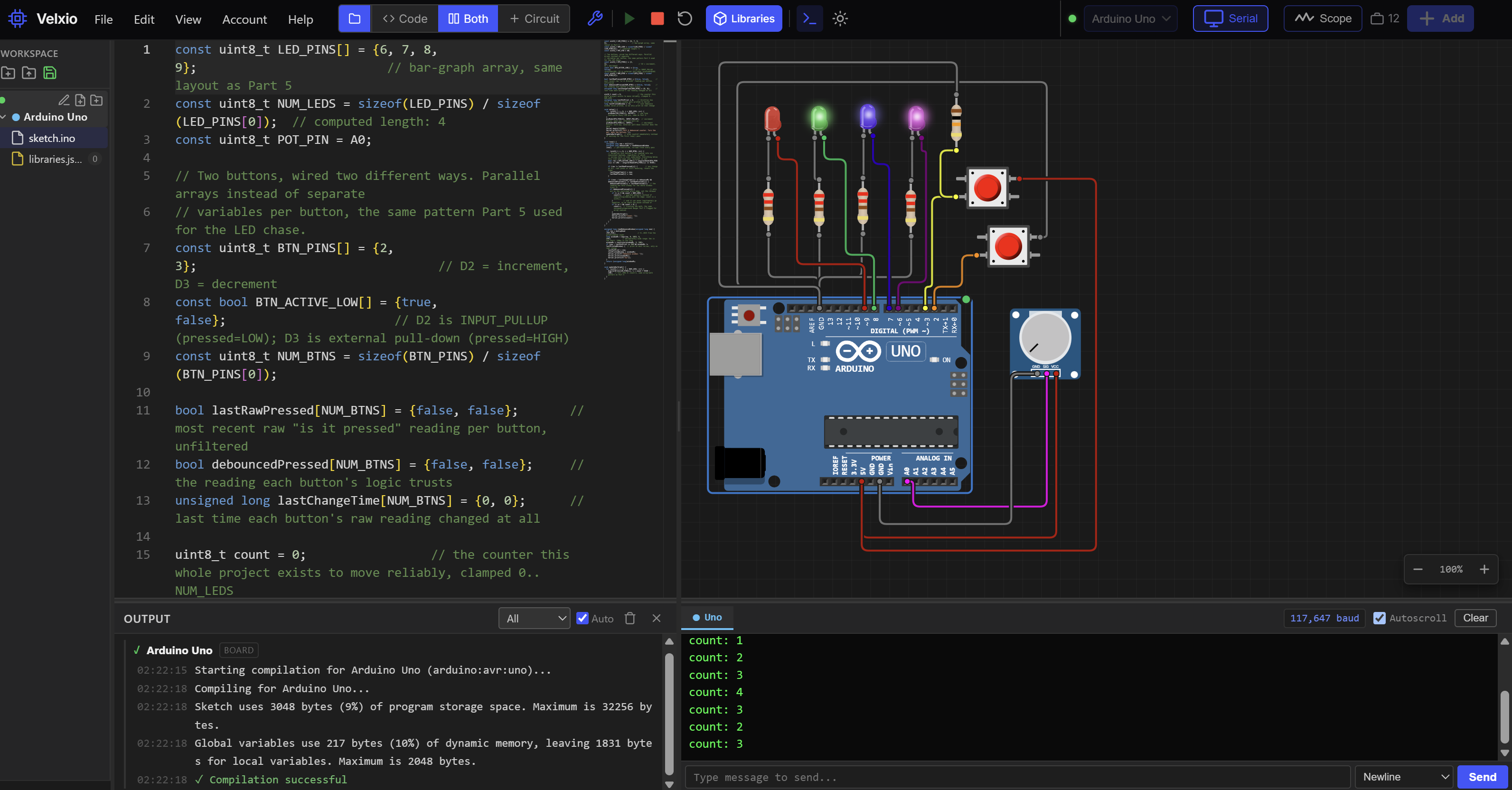
Velxio is an open-source virtual electronics workbench for building and testing embedded projects without waiting on hardware. It brings a circuit canvas, code editor, real toolchains, CPU emulation, interactive components, and virtual instruments together in the browser for Arduino, ESP32, Raspberry Pi Pico, STM32, and more.
THE MICROCONTROLLER LAB
Design, program, and simulate electronics right in your browser.
Get StartedPowered by Velxio
Like The Lab?
The Virtual Lab is nice, but Velxio also offers downloadable stand-alone versions for your device, along with documentation and open-source project resources. This allows you more features, and the ability to use Velxio without an internet connection.
Pinout Finder
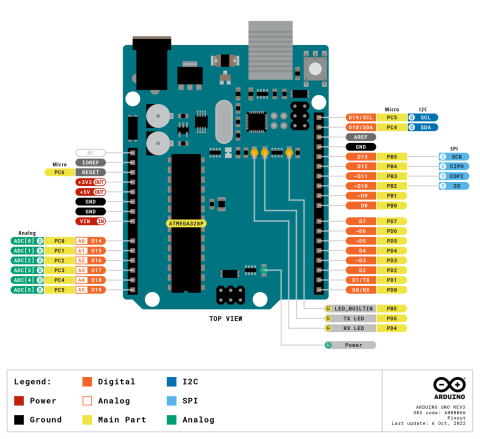
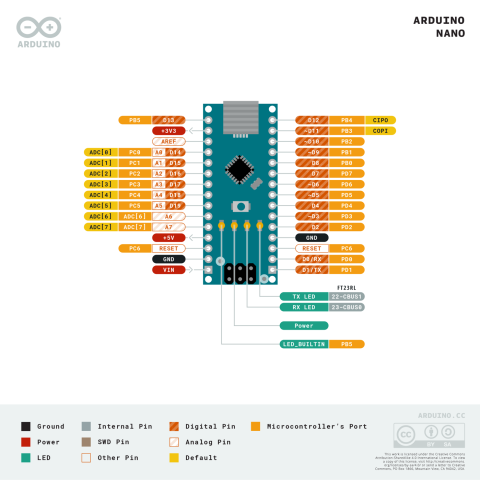
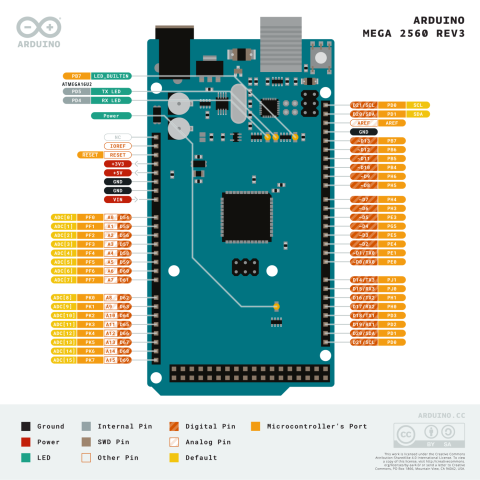
Look up the pinout for a microcontroller board or a common chip. Browse 159 diagrams covering Arduino, Raspberry Pi, ESP32, Teensy, AVR and PIC chips, logic ICs, transistors, regulators and more, each linked back to the datasheet it came from.
- Search for a board or part by name, like Uno, ESP32, 555 or 74HC595.
- Open a result to see the full diagram, then zoom in to read every pin label.
- Follow the datasheet, buy and parts links under the diagram.
Popular boards
 Arduino UNO R3
 Arduino Nano
 Arduino Mega 2560
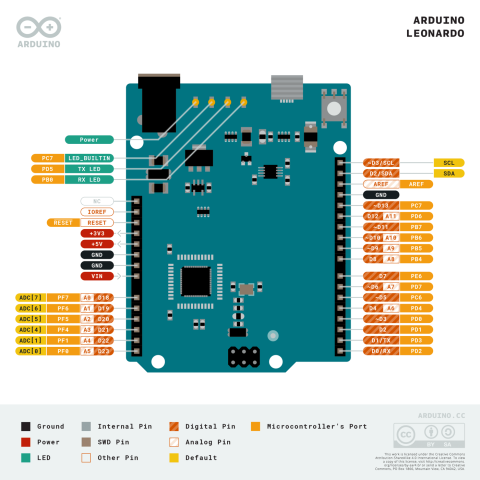 Arduino Leonardo
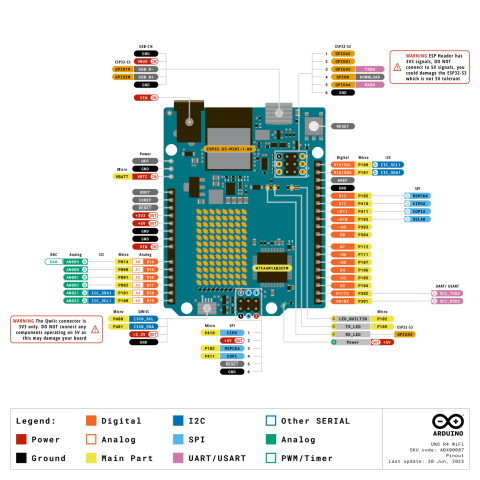 Arduino UNO R4 WiFi
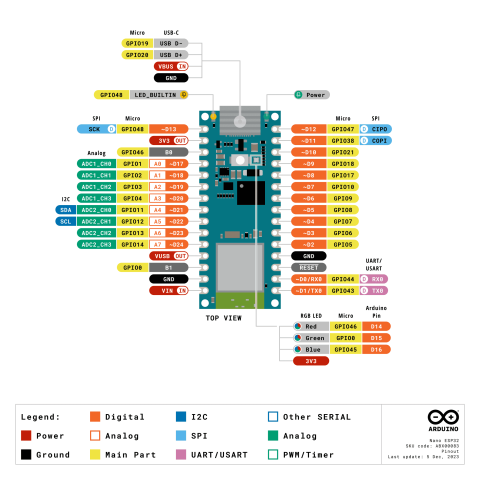 Arduino Nano ESP32
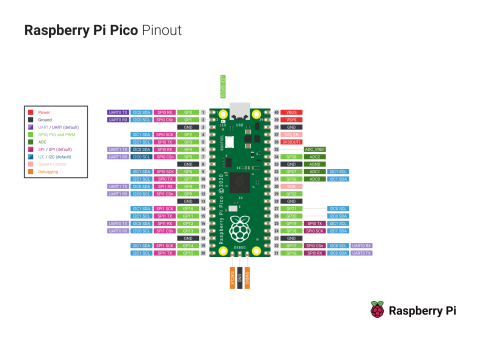 Raspberry Pi Pico
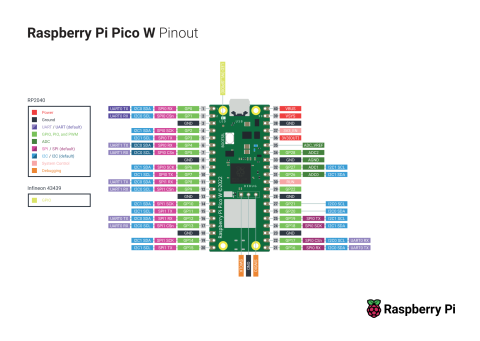 Raspberry Pi Pico W
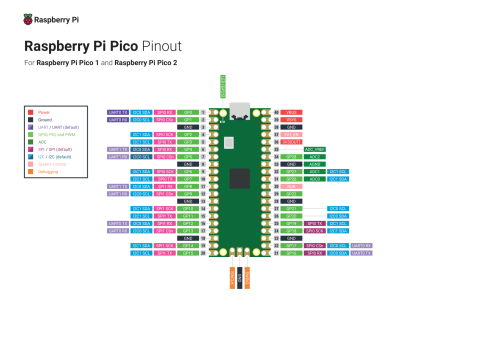 Raspberry Pi Pico 2
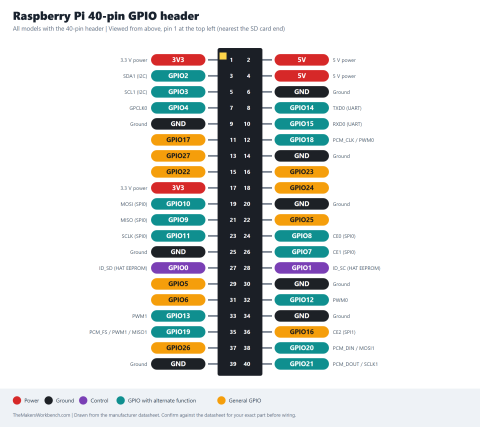 Raspberry Pi 40-pin GPIO header
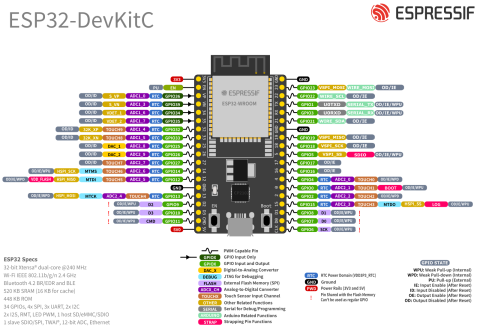 ESP32-DevKitC V4
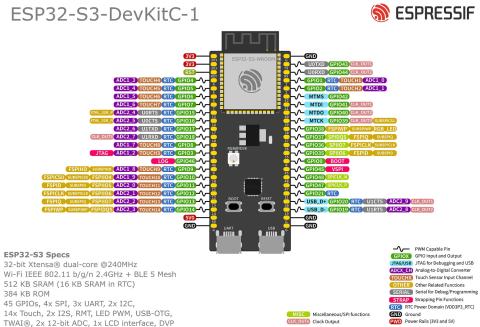 ESP32-S3-DevKitC-1
Decode Your Components
Read the colors, numbers, and markings printed on resistors, capacitors, inductors, diodes, transistors, crystals, fuses, and more. Pick the tab for your part, type the marking or choose the colors, and see the value, tolerance, rating, and polarity. User Guide · Source on GitHub
What the Component Marking Decoder can read
The Component Marking Decoder is a free tool that decodes the color bands, numbers, and markings printed on electronic parts. Choose the tab for your part, enter the marking or pick the colors, and it shows the value, tolerance, rating, and polarity, with a labeled picture of the part and the steps it used to read the code.
- Resistor color bands: 3, 4, 5, and 6 band color codes with tolerance and temperature coefficient, plus a reverse mode that turns a value into bands.
- SMD resistor codes: 3-digit, 4-digit, EIA-96 (such as 01C), and R-notation (such as 4R7) markings, plus zero-ohm jumpers.
- Potentiometers and trimmers: Value codes such as 103 and taper letters such as A and B.
- Resistor networks: SIP, DIP, and SMD resistor array codes, bussed or isolated.
- Capacitor markings: Ceramic, film, SMD, tantalum, and electrolytic codes, tolerance letters, voltage codes, EIA-198, and pF, nF, and µF conversion.
- Trimmer capacitors: Printed capacitance ranges.
- Inductors: Number codes such as 473J, R and N notation, color bands, and SMD marking dots.
- Ferrite beads: Impedance codes and Murata BLM part numbers.
- Diodes, transistors, MOSFETs, regulators, and ICs: A lookup of about 120 common parts by part number or SMD marking code, with polarity, pinout, and ratings.
- Crystals, resonators, and oscillators: Frequency markings, load capacitors, and a ceramic filter lookup.
- Varistors, thermistors, and fuses: MOV codes such as 14D471K, NTC and PTC markings, and IEC 60127 fuse codes.
Values are checked against datasheets and standards, and the tool says where manufacturers differ. Always confirm with the datasheet for your exact part. Read the User Guide · Source code on GitHub
Calculators
Free electronics calculators for the math you do at the bench: Ohm's law, LED resistors, voltage dividers, filters, timers, regulators, and more. Type your values and get the answer with the working shown.
What the Electronics Calculators cover
The Electronics Calculators are a free set of electronics calculators for makers. Pick a tab, type your values with prefixes like 4.7k, 100n, or 20m, and the answer updates as you type, with the formula and every step shown.
- Ohm's law and power: Enter any two of voltage, current, resistance, and power. Shows the resistor wattage to use, the safety margin, and automatic engineering notation.
- LED resistor: Series or parallel LEDs, the nearest standard resistor value, the actual current, the resistor power, and a drawn circuit.
- Voltage divider: Finds E12, E24, E48, or E96 resistor pairs for a target output, with error, divider current, resistor power, loaded output, and output impedance.
- Series and parallel resistors: Any number of resistors, plus a search for the closest combination to a target value.
- Series and parallel capacitors: Any number of capacitors, plus a search for the closest combination to a target capacitance.
- RC filter: Time constant, cutoff frequency, and charge times, plus a designer that finds R or C for a target cutoff.
- LC resonance and reactance: Resonant frequency, reactance, and the Q and bandwidth of a resonant circuit.
- 555 timer: Astable frequency and duty cycle, and monostable pulse length.
- LM317 regulator: Find the resistor for a target voltage, the voltage from the resistors, or the resistor for a constant-current source.
- Wire gauge and voltage drop: AWG size, resistance, voltage drop, and power lost over a run of copper wire.
- I2C pull-up resistors: The allowed pull-up range for 100 kHz, 400 kHz, and 1 MHz buses from the NXP I2C specification.
- Battery life: Run time from capacity and load, including sleep current and duty cycle.
- BJT switch: Base resistor for saturating an NPN transistor with a forced beta of 10.
- MOSFET switch: Conduction loss, voltage drop, and a gate resistor for a logic-level MOSFET.
- Op-amp gain: Inverting, non-inverting, summing, and difference stages, with the resistors for a target gain.
- Zener regulator: Series resistor and power ratings for a simple zener regulator.
- Divider tolerance: The worst-case output of a voltage divider for a given resistor tolerance.
- Current shunt: Shunt resistor value, power, and amplifier gain for measuring current.
- NTC thermistor: Temperature from resistance, and resistance from temperature, using the Beta equation.
- Decibels: Voltage and power ratios, dB, dBm, and watts.
The formulas are the standard textbook and datasheet ones and describe ideal parts. Real components have tolerance and drift, so confirm anything critical with the datasheet and a meter.
What the Power and Battery Tools covers
The Power and Battery Tools are a free set of tools for powering projects. Pick a tab, type your values with prefixes like 470u or 2.2k, and the answer updates as you type, with the formula shown.
- Linear regulator heat: Power lost as heat, junction temperature, and the heatsink a 7805, LM317, or LDO needs.
- Capacitor discharge and bleeder: How long a resistor takes to discharge a capacitor, or the bleeder resistor for a set time, with the stored energy.
- Battery pack designer: Voltage, capacity, and energy of a series and parallel pack (3S2P and similar) for Li-ion, LiFePO4, NiMH, alkaline, and lead-acid cells.
- Battery life with a regulator: Run time from active and sleep currents and times, counting a linear or switching regulator.
- Rectifier filter capacitor: The smoothing capacitor for a power supply, or the ripple a given capacitor leaves.
The formulas are standard textbook and datasheet ones. Thermal figures and cell voltages vary by part, so confirm them in the datasheet, and never rely on a calculation alone around mains, high-voltage capacitors, or lithium batteries.
What the PCB and Wiring Tools covers
The PCB and Wiring Tools are a free set of tools for circuit board and wire design. Pick a tab, type your values, and the answer updates as you type, with the formula shown.
- Trace width: The copper trace width for a current, copper weight, and temperature rise, using IPC-2221, for outer and inner layers.
- Trace resistance: Resistance, voltage drop, and heat of a copper trace from its length, width, and copper weight.
- Via current: An estimate of the current a plated via can carry, and its resistance.
- Trace spacing: Minimum spacing between conductors for a voltage, from IPC-2221 Table 6-1.
- Wire gauge: AWG to mm squared conversion, and the voltage drop and power lost in a run of copper wire.
The trace and via formulas are the IPC-2221 curves, a conservative starting point. Confirm with the standards and your board maker, and never rely on the spacing table alone for mains designs.
Other Tools
Quick tools to keep open while you build: converters, a standard-value finder, an I2C address book, and printable cheat sheets.
What the Bench Tools covers
The Bench Tools are a free set of converters, finders, and printable reference sheets for electronics builders. Pick a tab, type your values with prefixes like 4.7u or 2.2k, and the answer updates as you type.
- Value converter: Turn a value into every common prefix, for example 0.0000047 F into 4.7 microfarads.
- Frequency, period, and wavelength: Convert between frequency and period, and find wavelengths and antenna lengths.
- Number bases: Convert between decimal, hexadecimal, binary, and octal, with signed values and ASCII.
- E-series finder: Find the nearest standard resistor or capacitor value in the E6, E12, E24, E48, and E96 series, and the best combinations.
- I2C address book: Search common sensor and display chips by name or address, and find what is at the addresses a scanner found.
- Printable cheat sheets: Resistor color code, capacitor codes, standard values, AWG wire sizes, logic levels, and basic formulas.
The I2C addresses are the usual ones for common breakout boards and can change with jumpers and variants. Reference tables follow the usual standards. Confirm anything critical with the datasheet.
Workbench Toolbox
Every decoder and calculator on this page also comes as a free app, so they keep working in the garage, at a hackerspace, or anywhere the Wi-Fi gives up. Grab the installer for Windows, Mac, Linux or Android. On iPhone and iPad, open the web version in Safari and choose Add to Home Screen.
- Component Marking DecoderResistors, capacitors, diodes and more
- Electronics Calculators20 everyday calculators
- Embedded Systems ToolkitTimers, baud rates and bit math
- Power and Battery ToolsRuntime, regulators and current
- PCB and Wiring ToolsTrace width, vias and wire gauge
- Bench ToolsConverters, I2C addresses, cheat sheets
Prefer not to install anything? Open the web version.