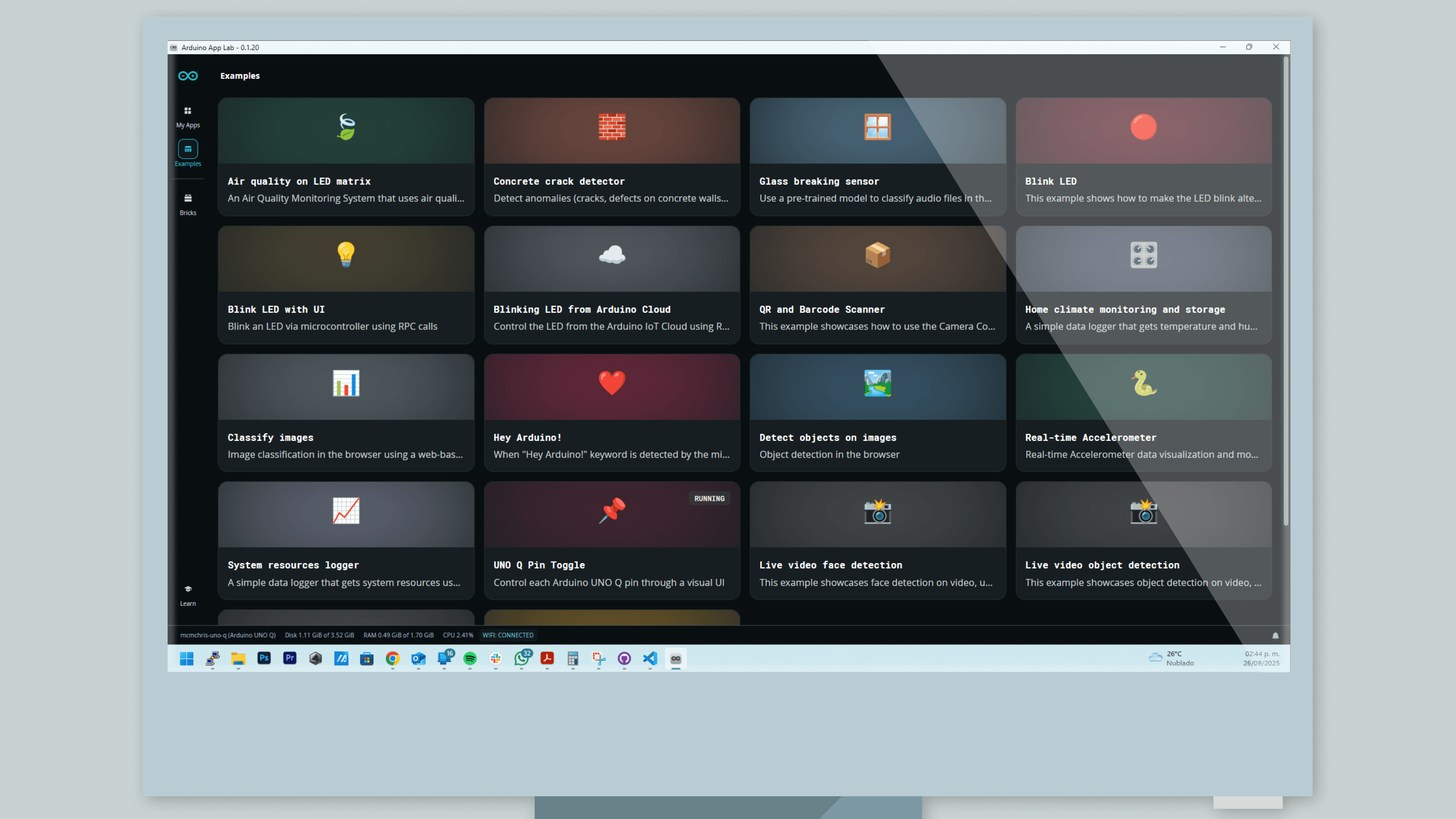
Arduino introduced App Lab on October 7, 2025, alongside the dual-processor UNO Q. The new development environment was designed to let one project include a Linux application, Python code, an Arduino sketch, and artificial-intelligence components without forcing the user to assemble a separate toolchain for each layer.
That goal sounds ambitious because the underlying systems are genuinely different. A sketch runs on a microcontroller and interacts directly with pins. A Python program may run under Debian Linux and use files, networking, or a camera. An AI model adds its own runtime, data formats, and dependencies. App Lab treats those pieces as parts of an Arduino App rather than unrelated programs.
The environment is most relevant to the UNO Q, which combines a Qualcomm Dragonwing application processor with an STM32 microcontroller. Linux runs on the Qualcomm side. The sketch runs on the real-time microcontroller. App Lab provides a visible place to build, configure, and run the software that spans both.
What is an Arduino App?
In App Lab, an Arduino App is a project made from one or more cooperating parts. The microcontroller portion can use the familiar Arduino sketch structure. The Linux portion can include Python and packaged services. Messages pass between the two sides through Arduino's routing and remote procedure call system.
A remote procedure call, or RPC, allows one program to request work from another. For example, a Python application could ask the microcontroller for a sensor value. The sketch could report that value without the developer designing a custom stream of comma-separated serial text and writing parsers on both sides.
This is a valuable layer of glue, but it is not magic. The application still needs a clear contract between processors. Developers must choose what data is exchanged, how often it moves, and what each side should do when communication fails. App Lab reduces repeated setup so more attention can go to those design decisions.
How Python and Arduino sketches divide the work
Python is popular because it is readable and supported by a large library ecosystem. Under Linux, it can work with web frameworks, databases, image-processing tools, network services, and machine-learning runtimes. It is a good language for coordinating high-level application behavior.
An Arduino sketch is better suited to direct and time-sensitive electronics. It can sample an input on a regular schedule, produce a precisely timed output, or move a motor while the Linux side handles a web interface. The important design choice is to assign each task to the environment that can perform it reliably.
Consider a camera-based parts counter. Linux can capture frames and run a model that identifies an object. The sketch can read a physical trigger sensor, track an encoder, and activate a diverter at the correct instant. Python sends a decision, but the microcontroller owns the timing.
Trying to put everything in Python could make physical timing less predictable. Trying to put the camera pipeline and model on the microcontroller could exceed its memory and computing capacity. App Lab exists for the middle ground where both sides are necessary.
What are Bricks?
Arduino uses the term Bricks for modular, ready-made software components that can be added to an App Lab project. A Brick may provide an AI model, a service, a database connection, or another packaged capability. The idea is similar to adding a library, but with more of the surrounding runtime and integration prepared for the user.
Reusable components can shorten the path from an example to a working prototype. A maker can start with a known model or service rather than spending the first day resolving installation steps. This matters in AI projects, where compatible versions of a model, framework, and system libraries can otherwise become a project of their own.
The tradeoff is abstraction. Every prepared component has assumptions about inputs, outputs, versions, licenses, and resource use. Before relying on a Brick, check where its model came from, what data it was trained on, how large it is, and whether its license permits the intended use. For a network service, check what data leaves the device. Convenience should make these questions easier to answer, not make them invisible.
Why one environment can be better than several
Before an integrated tool, a dual-processor project might involve an Arduino IDE for the microcontroller, a terminal and text editor for Linux, a Python virtual environment, container commands, and a separate deployment script. Each tool can work well, but their boundaries create opportunities for version drift and setup errors.
App Lab's value is not that it replaces every expert tool. It gives the whole project a common home. Examples can describe both sides of an application. A beginner can see that the sketch and Python program are related. A team can share a project without relying on a page of unwritten local setup steps.
The launch version should still be treated as the beginning of the platform. Early development environments often have a narrower set of supported hardware, packages, and workflows than mature command-line tools. Developers with specialized build systems, unusual native libraries, or strict deployment requirements may still need to work outside the integrated path.
Where AI fits into the workflow
App Lab puts AI beside normal application code rather than treating it as a remote specialty. That can make computer vision, sound classification, and sensor-based anomaly detection more approachable. Anomaly detection means identifying inputs that differ meaningfully from the patterns a model has learned.
The best first project is narrow and measurable. Instead of asking a board to "understand the workshop," ask it to distinguish two known machine states under controlled lighting or sound conditions. Collect representative samples, test false positives and false negatives, and decide what happens when confidence is low.
Local inference can improve privacy and response time because raw camera or microphone data does not have to be uploaded for every decision. It does not automatically make a system private. An application might still save inputs, transmit results, or expose a network service. Review the full data path.
Resource use also matters. A Linux model competes for memory, processor time, storage, and power with the rest of the application. Measure performance on the actual board instead of assuming a desktop result will transfer unchanged.
What makers should check before starting
Begin with a supported App Lab example and the exact UNO Q software image recommended by Arduino. Confirm the basic communication path before adding a camera, cloud service, or custom model. When something fails, test the Linux program and sketch separately, then inspect the messages between them.
Keep responsibilities explicit. The microcontroller should maintain safe hardware behavior if Linux reboots. The Linux side should handle missing or stale sensor values without crashing. Configuration and model files should be versioned with the project whenever their licenses permit it.
Connected Linux devices also need a maintenance plan. Pin important software versions, apply security updates deliberately, and decide how a deployed device can recover from a failed update. App Lab can make development more coherent, but shipping a reliable product still requires operational discipline.
App Lab's larger contribution is a more inclusive definition of Arduino programming. The sketch remains, but it becomes one part of an application that can also use Python, Linux, reusable services, and local AI. For makers who have been wiring separate computers and microcontrollers together, that unified view may be as important as the UNO Q hardware itself.
Sources and image credits
- Arduino announcement: A new chapter for Arduino with UNO Q and App Lab
- Arduino App Lab documentation
- Arduino App Lab source repository
- App Lab screenshot from Arduino's open documentation repository, credited to Arduino documentation contributors under CC BY-SA 4.0.
- Square and vertical card artwork generated with OpenAI's built-in image generation tool.