Code Composer Studio 20 is the release where Texas Instruments' Theia-based development environment becomes the main full-featured CCS release. TI's December 2024 release notes call version 20.0.0 the first complete CCS built on Theia and say no further feature releases are planned for the older CCS 12.x line.
That makes CCS 20 more than another numbered update. It closes the long Eclipse era for new feature development and brings TI's compilers, project system, flash tools, debuggers, trace support, and device views into an interface modeled on modern VS Code workflows.
Developers gained a familiar editor and command structure, but migration still required care. Projects were compatible; Eclipse workspaces were not. Host support, probe drivers, extensions, versions of the SDK (software development kit, the bundle of compilers, libraries, and device-support files TI ships for a given chip family), and imported metadata all needed verification.
What version 20 makes full-featured
CCS Theia 1.x had established the new framework. CCS 20 filled in views and workflows needed for broader production use. Additions included modules, connected targets, profile clock, stack usage, memory maps, memory allocation, GEL scripting (General Extension Language, TI's built-in scripting language for automating debug and setup tasks), external flash programming, and improved target-setup testing.
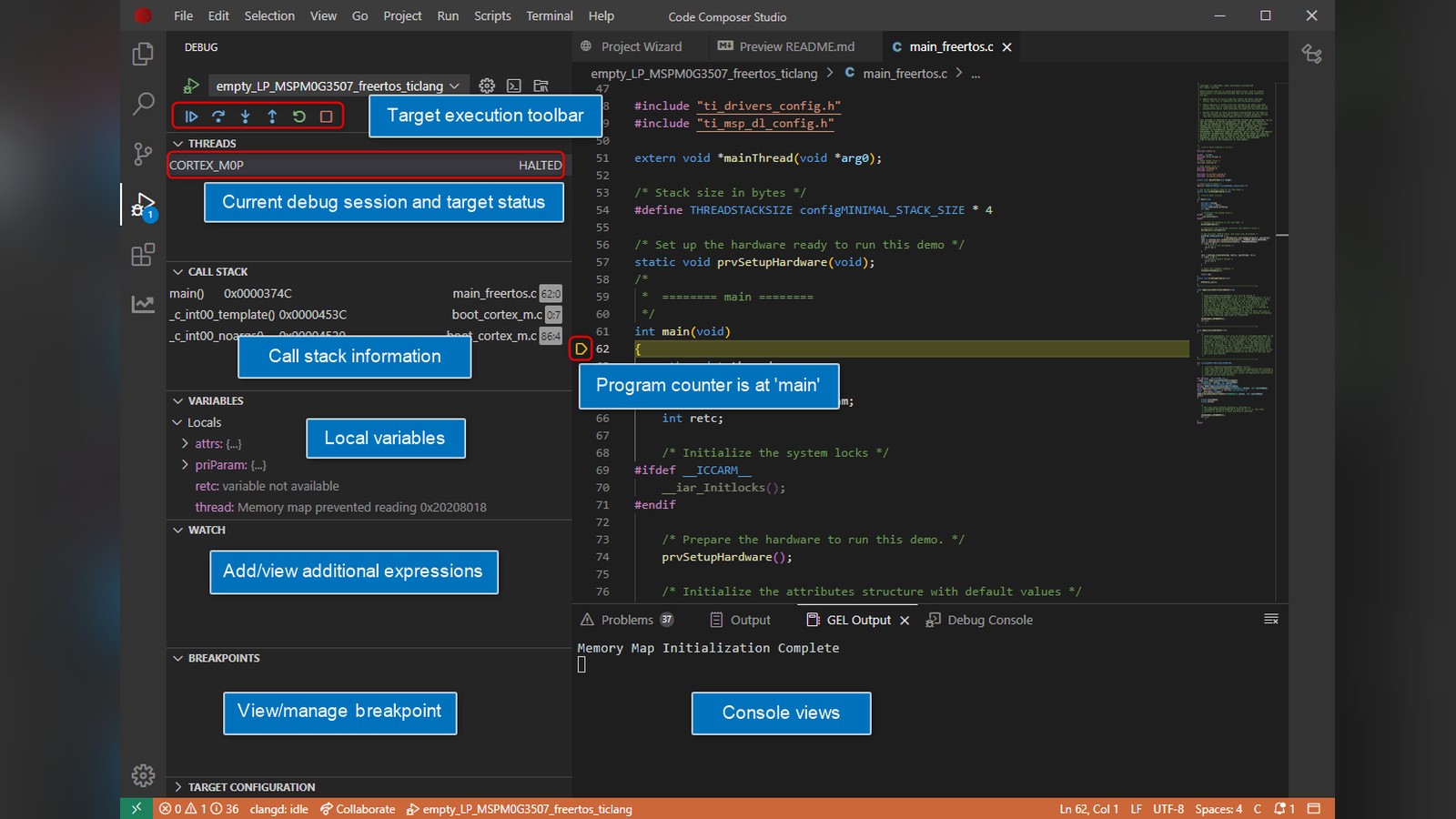
The debugger could identify connected probes, flash a project without starting a full debug session, load symbols without loading code, control which cores were visible, and trace several TI and Arm processor families.
These features earn their place because embedded programs are constrained by memory, timing, and hardware state. A normal editor can show source code. An embedded IDE (integrated development environment, the single application that bundles the code editor, compiler control, and debugger together) must explain where code and data were placed, how much stack remains, what each core is doing, and why a peripheral register has a particular value.
The interface is familiar, not identical to VS Code
CCS 20 uses a modified Eclipse Theia framework. Its editor, activity bars, side panels, integrated terminal, command palette, and folder model resemble VS Code. TI added target-specific project, build, debug, analysis, and configuration components.
The similarity helps developers transfer navigation habits and keyboard workflows. It does not make CCS an extension of Microsoft's VS Code, nor does it guarantee that every VS Code extension works. CCS uses Theia-compatible extensions, generally obtained through Open VSX.
Teams should test essential plug-ins and record them as part of the development environment. The core toolchain should remain usable without depending on a long chain of cosmetic or unmaintained extensions.
Migration starts with projects, not workspaces
TI documented compatibility with existing CCS projects and SDK examples. Developers can import those projects into CCS 20. Workspaces created by the Eclipse-based CCS are not compatible because Theia organizes settings and folders differently.
The safe workflow begins in version control. Commit the working CCS 12 project, preserve linker files and generated configuration inputs, and record the exact compiler, SDK, and device-support versions. Create a new CCS 20 workspace and import a copy.
Build the old and new versions, then compare map files, warnings, section sizes, and binary output. A changed compiler may improve code while also exposing undefined behavior or altering timing. Hardware regression testing is necessary even when both builds succeed.
Debug and analysis improvements justify the vendor IDE
CCS 20 added or improved stack-usage and memory-allocation searches, runtime object views, trace, energy measurement for MSPM0, and multicore support. These are the areas where a vendor IDE can outperform a generic editor plus command-line compiler.
Stack usage shows how much automatic storage a function path may require. A stack overflow can corrupt unrelated memory and appear as an intermittent hardware fault. Memory maps show how flash, RAM, and reserved regions are arranged. Trace can record execution or data events with less disturbance than printing messages over a serial port.
The available features vary by target and debug probe. A menu entry may not imply hardware support on every device. Verify the exact core, probe, and trace architecture before planning a workflow around it.
Host and installation requirements changed
CCS 20 is a 64-bit application. The initial release supported 64-bit Windows 10 and 11, several Ubuntu releases, and selected macOS versions. Linux installations required separate attention to debug-probe drivers, sometimes installed with elevated privileges after the main IDE was installed as a normal user.
Offline installers remain important in laboratories and corporate networks. Firewalls, antivirus software, proxies, and restricted extension registries can interrupt installation or device discovery. Archive approved installers and checksums for reproducible builds.
An embedded product may be maintained for a decade, while an IDE update cycle is much shorter. Keeping a documented, recoverable toolchain is part of sustaining the product.
The end of CCS 12 feature development
TI's statement that no further feature releases were planned for CCS 12.x provided a clear migration signal. It did not mean every existing project had to move immediately. Security fixes, device needs, operating-system support, and organizational validation schedules all affect timing.
Teams with stable products can preserve the qualified CCS 12 environment while evaluating CCS 20 separately. New device support and improvements will increasingly favor the new branch, so delaying forever creates a larger future jump.
Migration also offers a useful point to separate the editor from the build. A command-line build that can run in continuous integration is easier to reproduce than one that exists only inside a developer's workspace. Record compiler versions, device support packages, SDK releases, linker files, and generated configuration alongside the source. Then use CCS as the interactive window for debugging without making the IDE the only place where the product can be built. This discipline is especially valuable during a platform change because it exposes hidden workspace dependencies before they become long-term maintenance problems.
For individual developers, the transition offers a less intimidating interface and better alignment with other modern tools. For organizations, it offers a chance to standardize setup, version control, automated builds, and extension policies rather than merely reproduce old workspace habits.
Code Composer Studio 20 is significant because it turns TI's experiment with Theia into the official future of its desktop development tools. The value is not simply that the IDE looks like VS Code. It combines that familiar interaction model with the device-aware debugging and analysis required to understand real embedded hardware.
I'd import a copy of a project into CCS 20 and compare the map files and output against the old build before retiring the older tools.
Sources and image credits
- Code Composer Studio 20.0.0 Release Notes, Texas Instruments, December 1, 2024.
- Code Composer Studio 20 Getting Started Guide (debugging workflow screenshot), Texas Instruments, December 1, 2024.
- Square and vertical crops are edited from the same source image.