Texas Instruments released Code Composer Studio Theia 1.5.1 on September 30, 2024, continuing a major change in how developers worked with TI microcontrollers and processors. The new environment replaced the visual conventions of the long-running Eclipse-based Code Composer Studio with a framework deliberately similar to Visual Studio Code.
The release itself was primarily a maintenance update, including bug fixes and improved C29 device support. Its larger significance was the direction of travel. TI was rebuilding its integrated development environment, or IDE (the single application that bundles a code editor, compiler control, and a debugger), around Eclipse Theia, a modern open-source platform that shares many interface ideas and extension technologies with VS Code.
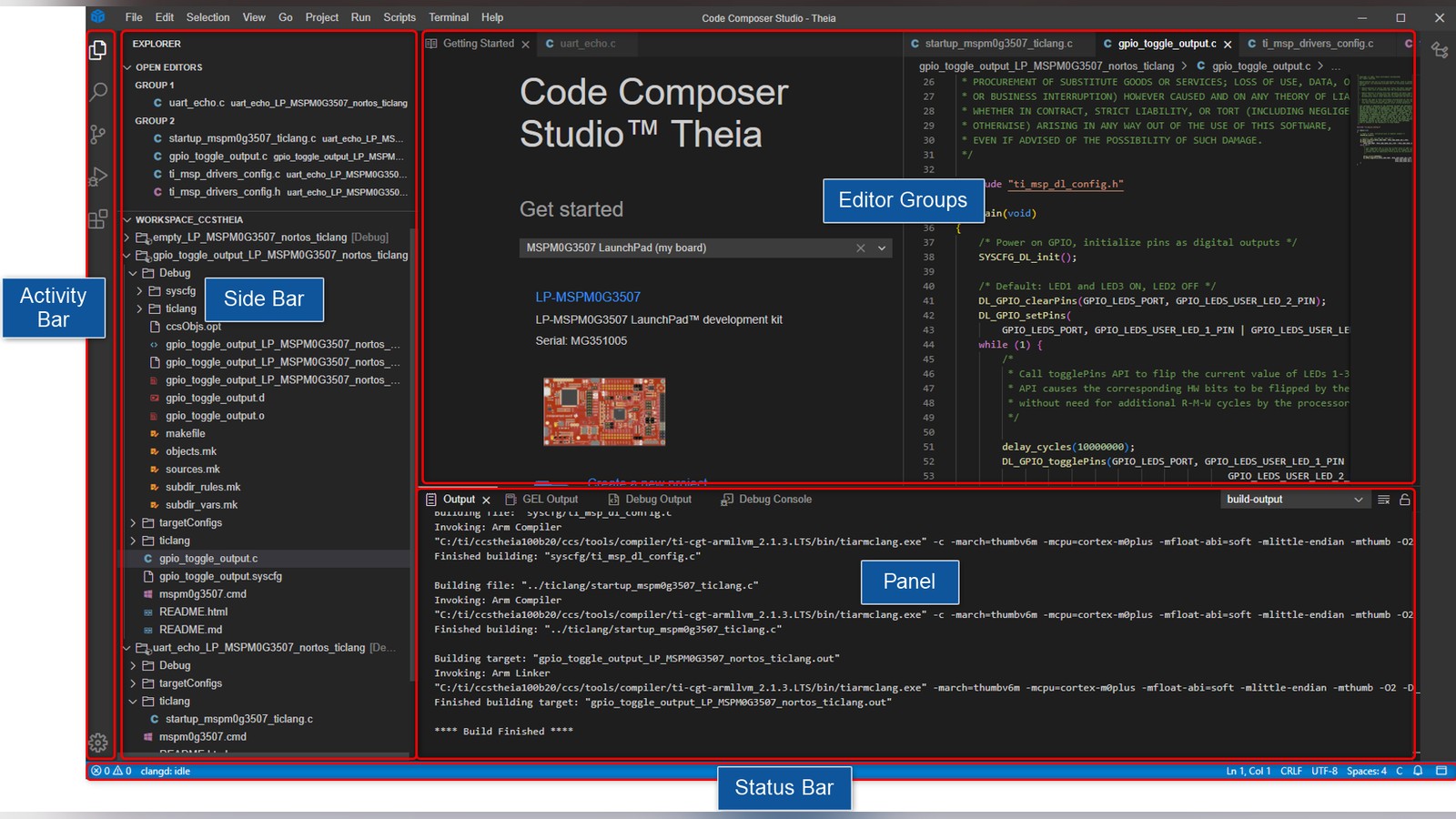
For developers accustomed to a file explorer, command palette, integrated terminal, and side-panel debugger, CCS Theia reduced the conceptual jump into vendor tools. It retained TI compilers, target configuration, programming, and hardware-aware debugging beneath that newer interface.
What Theia changes
Eclipse Theia is a framework for building desktop and cloud development tools. It can use many VS Code extensions through the Open VSX registry, although extension compatibility is not universal. Texas Instruments customized Theia with the device support and debugging features needed for embedded targets.
CCS Theia includes source navigation, breakpoints, call stacks, variable inspection, registers, memory views, graphs, target configuration, and project-less debugging. Project-less debugging lets a developer connect to a target through a configuration file without first creating a complete IDE project.
The interface uses folders and multi-root workspaces in a way familiar to VS Code users. Several folders can be opened together, provided project names are unique. This is useful for firmware split across a bootloader, application, and shared libraries.
Existing projects can move, but workspaces cannot
TI stated that CCS projects and SDK (software development kit) examples could be imported into CCS Theia. Existing source files and project metadata therefore had a migration path. Eclipse workspaces were not compatible because Theia uses a different underlying framework.
That distinction is easy to miss. A project describes how code is built for a target. A workspace stores IDE-level organization and preferences around one or more projects. Developers should import projects into a new Theia workspace rather than copy an old workspace directory and expect it to open unchanged.
Before migration, commit source and project files to version control, export any important settings, and record compiler and SDK versions. Open a copy first, because a newer IDE may update metadata in ways an older release cannot read.
Debugging remains the reason to use CCS
A generic editor can compile C code, but embedded debugging depends on knowledge of the target processor and probe. CCS Theia supports project-based one-click debugging and sessions launched from TI target-configuration files.
Once connected, developers can halt a processor, step through instructions, inspect peripheral registers, view disassembly, and examine memory. Multicore devices add more complexity because several processors may need to be connected, loaded, and synchronized.
Version 1.5.1 included fixes affecting drivers for TI's XDS debug probes (the hardware adapters that connect a PC to a target chip for flashing and debugging) on Windows, and Sitara flash support on macOS. These are reminders that the IDE, probe firmware, host drivers, target configuration, and device SDK form one toolchain. A failure to connect is not necessarily an application bug.
Extension compatibility needs restraint
CCS Theia can access Theia-compatible extensions through Open VSX. Useful additions may cover source control, formatting, task tracking, or language support. An extension built for Microsoft's VS Code marketplace may depend on APIs or licensing that do not carry over.
Treat extensions as development dependencies. Record which ones a project expects, review their publishers and permissions, and avoid filling a production toolchain with unmaintained plug-ins. A theme failure is inconvenient; a compromised build extension is more serious.
Corporate networks may also require proxy configuration before the registry works. Offline installations need a deliberate plan for extensions, SDKs, compiler updates, and probe drivers.
Device support was still selective
TI recommended CCS Theia 1.5.1 for production work with MSPM0, MSP430, wireless-connectivity devices, Sitara microcontrollers, mmWave parts, and C29 devices. Sitara application processors and Jacinto devices were listed as evaluation support rather than recommended production targets.
The bundled toolchains included TI Clang, C2000, C29, C6x, and MSP430 compilers. A familiar interface did not mean every device family had identical capabilities. Developers still needed to check the supported debugger, compiler, trace features, operating system, and SDK for their exact target.
How to evaluate the migration
Start with an SDK example for one supported development board. Import it, build without changes, flash it, and confirm breakpoints, variables, registers, and serial output. This separates environment setup from errors in a custom project.
Next, import a real project and compare the generated binary with the established build. Differences may come from compiler versions, linker command files, generated configuration, or build variables. Do not assume a successful compile proves behavioral equivalence.
Teams should document installation and onboarding while the first migration is fresh. Include driver requirements, workspace creation, proxy settings, extension sources, and recovery steps for probe firmware. Repeatable setup is part of a reliable embedded build.
Extension compatibility deserves its own test. Theia can use the Open VSX registry, but an extension written for desktop VS Code may rely on APIs, bundled services, or licensing terms that do not translate perfectly. Install only the tools the project needs, record their versions, and verify that an update does not alter formatting, code generation, or build behavior. In a team environment, a small approved extension list is easier to support than an unrestricted collection assembled independently on every machine.
Developers should also retain the old environment until the new one has passed a complete hardware test. That means more than reaching main(). Exercise flashing, reset behavior, low-power modes, real-time trace, production images, and recovery from a failed programming attempt. The closer the test resembles the release process, the more confidence the migration earns.
The shift to Theia is notable because embedded developers increasingly expect one interaction model across desktop, web, and vendor environments. CCS Theia does not turn TI development into ordinary VS Code, and it does not remove hardware-specific complexity. It places that complexity inside a more familiar shell.
Version 1.5.1 is a maintenance release rather than a dramatic reinvention, with bug fixes and device-support updates rather than a wholly new feature set. Even so, it signals that TI intends its tools to feel modern, extensible, and approachable without abandoning the deep target support that makes Code Composer Studio useful.
I'd pick one SDK example and get breakpoints, variables, and serial output working before importing anything real.
Sources and image credits
- Code Composer Studio Theia Download and Release Notes, Texas Instruments, September 30, 2024.
- CCS Theia User's Guide (interface screenshot), Texas Instruments, September 30, 2024.
- Square and vertical crops are edited from the same source image.