Arduino's Nano family has always made sense when a full-size development board is simply too large. The tradeoff was that choosing the smaller shape could also mean choosing a different processor or giving up some of the capabilities available on a newer UNO. The Nano R4, announced on July 24, 2025, narrows that gap substantially.
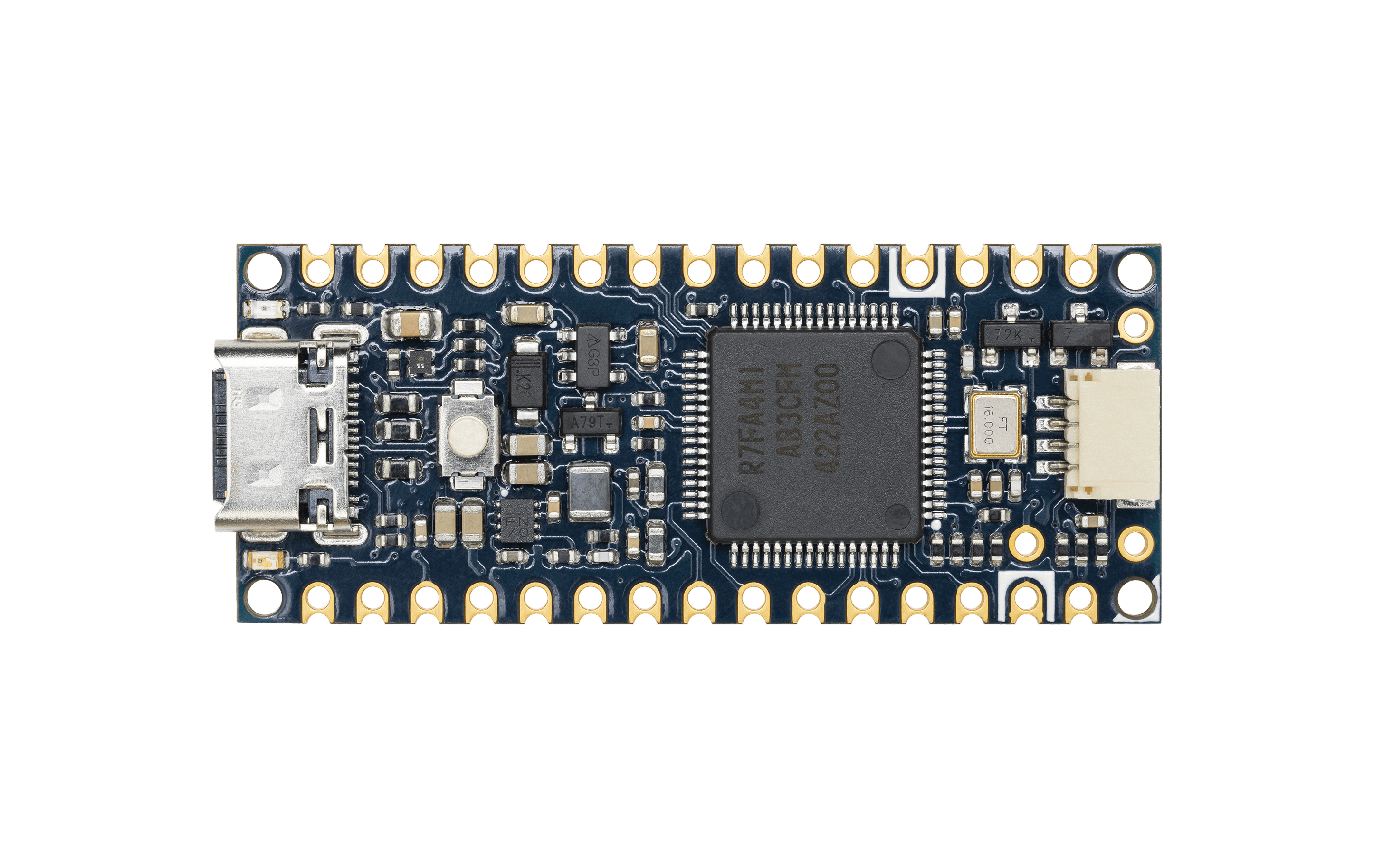
The new board places the same Renesas RA4M1 microcontroller used by the UNO R4 Minima and UNO R4 WiFi into the familiar Nano footprint. That gives the compact board a 32-bit Arm Cortex-M4 processor running at 48 MHz, along with modern analog peripherals, a real-time clock, and a Controller Area Network interface. CAN is the fault-tolerant communication bus widely used in vehicles, machines, and industrial equipment because it keeps working even when individual nodes fail or wiring picks up electrical noise.
This is not a shrunken UNO R4 in every respect. The Nano R4 has its own connector layout, expansion choices, and memory configuration. It is better understood as an R4-class Arduino designed for breadboards, compact prototypes, and products where board area matters.
What hardware is on the Nano R4?
The RA4M1 is the center of the board. It provides 256 kB of flash memory for programs, 32 kB of SRAM for working data, and 8 kB of data flash that Arduino describes as EEPROM. EEPROM is nonvolatile memory intended for small values that must remain stored after power is removed, such as calibration settings or a device identifier.
The 48 MHz clock speed alone does not explain the upgrade. The Cortex-M4 core is a more capable 32-bit design than the 8-bit AVR processors associated with classic Nano and UNO boards. It also includes a floating-point unit, which can perform decimal-heavy calculations more efficiently. That can help with sensor filtering, motor control, and other projects that perform repeated mathematical operations.
Analog hardware is another important part of the R4 platform. The Nano R4 includes a 14-bit analog-to-digital converter, or ADC, for measuring voltages. A higher bit depth can represent smaller differences between input levels, although the quality of a real measurement still depends on the reference voltage, wiring, electrical noise, and sensor. The board also provides a 12-bit digital-to-analog converter, or DAC, that can produce a programmable analog voltage. A DAC is useful for control signals, waveform experiments, and audio-rate projects that do not need a dedicated sound system.
How small-board design changes the practical details
Arduino retained the breadboard-friendly Nano layout, but made several choices that matter beyond prototyping. Components are mounted on one side of the board, and the edges include castellated pads. Castellations are plated half-holes that let a small module be soldered flat onto a larger custom circuit board. That makes the Nano R4 useful as both a development board and a module that can become part of a finished device.
The board is offered with or without pin headers. Headers are convenient on a breadboard. The headerless version is better for surface mounting, low-profile wiring, or a project that needs connectors in a specific orientation.
USB-C handles programming and normal USB connectivity. Arduino also added two small I2C connection options. I2C, short for Inter-Integrated Circuit, is a two-wire bus commonly used by sensors, displays, and other peripherals. One connector follows the 3.3-volt Qwiic format, while another exposes 5-volt I2C. That split is useful, but it also creates a gotcha: the voltage must match the accessory being attached. A convenient connector does not make a 3.3-volt device tolerant of 5-volt signals.
The Nano R4 also includes a programmable RGB LED. Unlike a simple status light, an RGB LED can display different colors and brightness levels under software control. It is a small feature, but it gives projects an immediate way to report modes, warnings, or connection states without adding external hardware.
CAN support still needs extra hardware
The RA4M1 includes a CAN controller, but a complete CAN connection has two major parts. The controller creates and interprets messages. A separate transceiver converts those logic-level signals into the differential electrical signals used on the physical bus. The Nano R4 requires an external CAN transceiver.
That distinction is easy to miss when a specifications table says a board has CAN support. Makers planning to connect the board to a vehicle, robot, or industrial network must add a suitable transceiver and follow the bus's wiring and termination rules. CAN networks usually use a twisted pair and a terminating resistor at each physical end of the bus. Connecting directly from the microcontroller pins is not a substitute.
The same caution applies to voltage levels throughout the board. Nano R4 uses 5-volt operating logic, while many recent sensors and modules are designed for 3.3 volts. Check the documentation for every peripheral, not just the connector shape.
What can makers build with it?
The Nano R4 is a natural fit for projects that have outgrown a classic Nano but do not need a Linux computer. A compact data logger can use the real-time clock to timestamp measurements. A control module can read analog sensors with the higher-resolution ADC and produce an analog command through the DAC. A small robot can combine motor control, sensor processing, and CAN communication without dedicating the space required by a full UNO-sized board.
It also provides a sensible migration path for people who already understand Arduino sketches. A sketch is the program compiled and uploaded through the Arduino development tools. Familiar functions such as setup() and loop() remain, while the processor underneath offers more headroom and newer peripherals.
Compatibility still needs to be evaluated project by project. Code that manipulates AVR registers directly will not transfer unchanged to a Renesas microcontroller. A library may compile for one Arduino architecture but not another, especially if it depends on processor-specific timers, interrupts, or assembly code. Shields designed for the UNO's large connector arrangement also do not physically fit the Nano.
For new projects, the best approach is to verify each required library against the Nano R4 before committing to a board layout. For an older project, start with a simple build that exercises one peripheral at a time. That isolates compatibility problems before they are buried inside a complete application.
How the Nano R4 fits into Arduino's lineup
Arduino has used the Nano name for boards with several different processors and wireless options. The important identity is the compact format, not one fixed architecture. The Nano R4 extends that idea by making the RA4M1 available without requiring the UNO R4's footprint.
It is especially attractive when deterministic, real-time behavior matters. A microcontroller runs one embedded application directly and can respond to pins and timers with predictable timing. A Linux single-board computer offers far more software and networking capability, but its operating system also adds complexity. The Nano R4 sits firmly on the microcontroller side of that divide.
Its strongest feature is balance. The board is small enough for a breadboard or custom carrier, familiar enough for an Arduino user, and capable enough for projects involving precise analog input, a true analog output, timing, or CAN. None of those features is unprecedented by itself. Putting them together in the Nano format is what makes this release useful.
For makers, the July 2025 launch means the choice between small and capable becomes less severe. The Nano R4 does not replace every classic Nano or every UNO R4, but it gives compact embedded projects a modern default worth considering.
Sources and image credits
- Arduino announcement: Introducing the Arduino Nano R4
- Arduino Nano R4 hardware documentation
- Product image from Arduino's open documentation repository, credited to Arduino documentation contributors under CC BY-SA 4.0.
- Square and vertical card artwork generated with OpenAI's built-in image generation tool.