Small microcontroller displays are forgiving. Many contain their own frame memory, so the processor can send an image and return to other work while the screen keeps showing it. Move into larger RGB panels and that comfortable arrangement often disappears. The controller must continuously feed pixel data to the display, much like keeping water flowing through a hose.
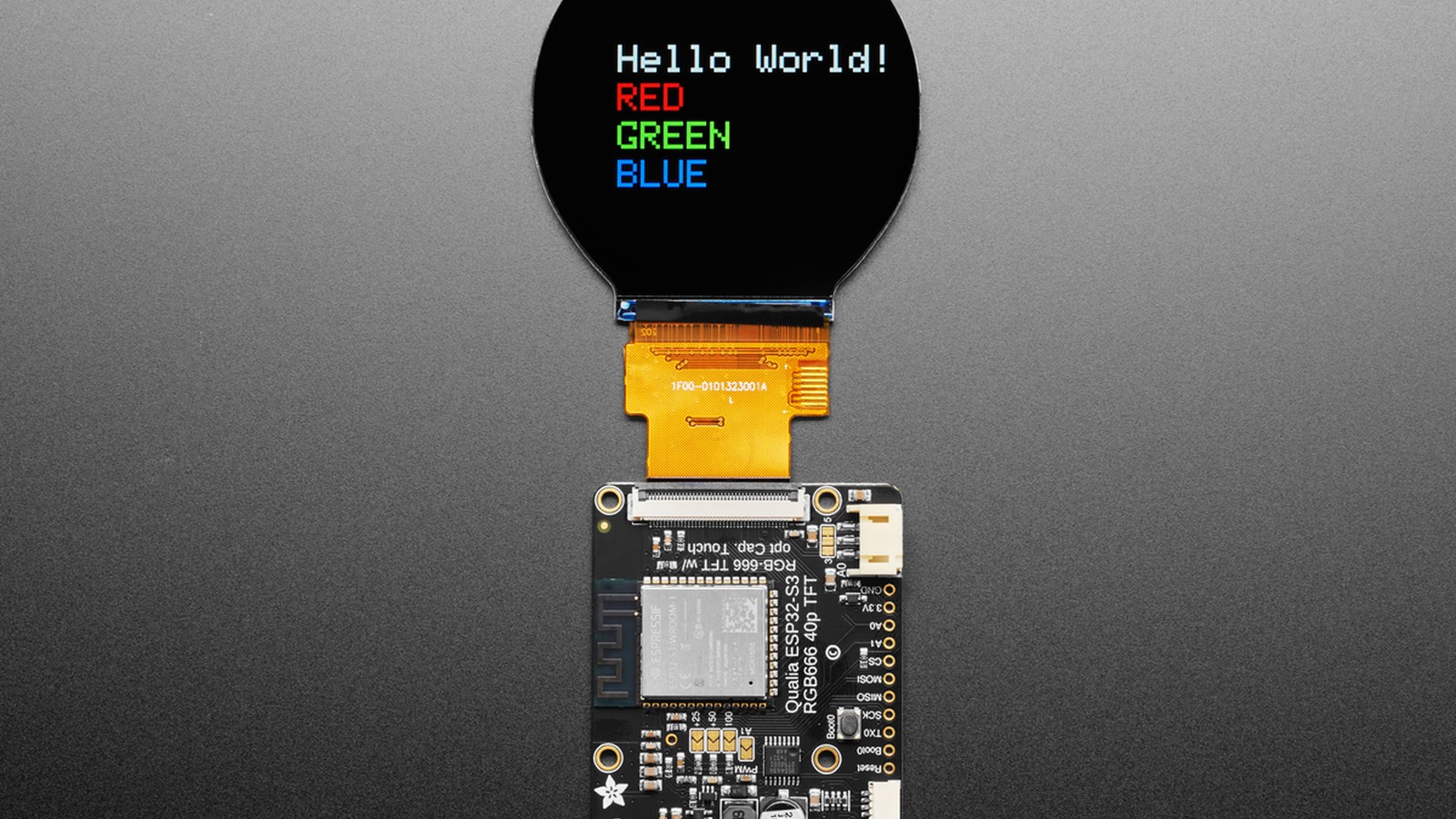
Adafruit's Qualia ESP32-S3 board, documented in October 2023, was designed to make that harder class of display approachable. It pairs an ESP32-S3 module with a 40-pin RGB-666 connector, external memory, touch support, backlight control, and the supporting circuitry needed by large round, square, and bar-shaped TFT panels.
The result sits between a simple display breakout and a full single-board computer. It is still a microcontroller platform, but it can drive screens that would once have pushed a maker toward Linux hardware.
Why do larger TFT displays need different hardware?
TFT stands for thin-film transistor, the active-matrix technology used in many liquid-crystal displays. A small SPI TFT commonly includes a display-controller chip with its own memory. Your program writes pixels into that memory over SPI, and the controller repeatedly sends the stored image to the glass.
Many larger RGB TTL displays do not include a full framebuffer. A framebuffer is a block of memory holding the color value for every pixel on the screen. TTL refers here to the parallel digital signal levels used between the controller and display, not to an Internet protocol.
Without internal frame memory, the display depends on an external processor to deliver pixel data continuously, one line after another. Stop the stream and the visible image fails. The processor needs enough memory for the image, enough pins for the parallel color bus, and a peripheral that can move data at a steady rate without consuming every instruction cycle.
An 800 by 480 image using 24-bit color needs more than one megabyte for a single framebuffer. That is far beyond the internal RAM of many traditional maker microcontrollers. Qualia uses an ESP32-S3 module with 16 MB of flash and 8 MB of octal PSRAM. Octal PSRAM is external working memory accessed over eight data lines, giving the processor room for large graphics buffers and application data.
What does RGB-666 mean?
RGB identifies the red, green, and blue channels used to build a color pixel. The three sixes describe six signal bits for each channel, for a total of 18 color bits. That provides 262,144 possible colors.
The Qualia guide also describes the data arrangement used by its supported panels as 5-6-5 color in some software paths. RGB565 stores red in five bits, green in six, and blue in five, fitting one pixel into 16 bits. Green receives an extra bit because human vision is particularly sensitive to green detail.
The display connection carries more than color data. HSync and VSync mark horizontal and vertical timing boundaries. Data Enable identifies the part of each line containing visible pixels. Pixel Clock tells the panel when to sample each group of color bits. These signals must match the panel's required timing.
That timing is the first major gotcha. A 40-pin connector does not guarantee that every display uses the same pinout, voltage, initialization sequence, or timing values. Connecting an incompatible panel can produce no image and may damage the hardware. Compare the exact display datasheet with Adafruit's supported list before applying power.
What hardware did Adafruit add around the ESP32-S3?
Almost every available ESP32-S3 pin is useful when 18 color signals and several timing signals are connected to a screen. Qualia adds a PCA9554A I/O expander to stretch the remaining capacity. An I/O expander is a chip that provides extra controllable pins through a smaller connection such as I2C, a two-wire bus used to connect sensors and other peripherals.
The expander helps manage display reset and initialization signals, two buttons, and the backlight. The board also exposes a four-pin SPI port, analog-capable pins, and a STEMMA QT connector, Adafruit's small four-pin plug for I2C devices, electrically compatible with SparkFun's Qwiic connectors, for adding I2C sensors.
Backlight power deserves special attention. Large TFT backlights may need a higher voltage than the board's normal logic supply. Qualia uses a constant-current driver that can provide the controlled current required by supported panels, with configuration options from 25 mA upward. Constant-current control is used because LEDs are sensitive to current. Simply connecting a backlight to an arbitrary voltage can overdrive it.
USB-C provides programming and power for the controller, and the ESP32-S3's native USB connection supports firmware installation and serial debugging. A hardware UART transmit pin is also available. UART is a simple serial connection widely used for text logs and device communication.
What can Qualia build?
The unusual screen shapes are a large part of the appeal. A round panel can become an instrument gauge, clock, animated eye, or tabletop status display. A square 720 by 720 panel suits dashboards and control surfaces. A long bar display can fit a shelf label, equipment panel, or narrow information ticker.
Capacitive-touch overlays are supported on compatible displays. Capacitive touch detects a finger by measuring changes in an electric field, similar to a smartphone screen. The touch controller communicates over I2C, allowing a project to respond to taps and gestures as well as display information.
The ESP32-S3 also supplies Wi-Fi, so a Qualia project can retrieve remote data or interact with Adafruit IO. CircuitPython and Arduino support give developers two different routes. CircuitPython emphasizes a quick edit-save-run cycle and readable code. Arduino offers a C++ environment with a broad library ecosystem and closer control over memory and timing.
Large graphics still require careful design. Images consume flash storage, framebuffers consume PSRAM, and frequent network work can compete with drawing. Video is possible in constrained formats, but Qualia is not a drop-in replacement for a GPU-equipped computer. It is best understood as a focused embedded display controller.
What does setup involve?
Begin with a display Adafruit has already documented. The guide supplies working dimensions, timing values, and initialization data for several panels. Initialization data is the command sequence that configures a display-controller chip after power-up.
Next, set the backlight current for the exact panel. More current does not automatically create a better image. Exceeding the display's rating can shorten its life or cause immediate damage.
Finally, expect a large amount of setup code if you work close to the hardware. Display dimensions, timing, GPIO assignments, an initialization sequence, and optional touch settings all have to agree.
Why Qualia is an important maker board
Qualia does not make every TFT interchangeable, and it does not remove the need to read a datasheet. What it changes is the starting point. Instead of designing a high-speed parallel display controller, external-memory system, backlight driver, touch connection, and USB programming circuit, a maker can begin with an assembled board and a documented panel.
That is a familiar Adafruit strategy: take a part that is technically available but awkward to use, then surround it with the circuitry, software, and documentation that let projects begin. With Qualia, the awkward part is not a sensor or a single chip. It is an entire class of displays that has usually lived on the far side of ordinary microcontroller projects.
Before you buy a big round or bar display for Qualia, I'd check Adafruit's supported panel list first. The timing and pinout details are where these projects go wrong.
Sources and image credits
- Qualia ESP32-S3 guide announcement, Adafruit, October 11, 2023.
- Qualia ESP32-S3 guide, Adafruit Learning System.
- Product photo: Adafruit Qualia ESP32-S3 for TTL RGB-666 Displays, Adafruit Industries.
- Square and vertical crops are edited from the same source image.