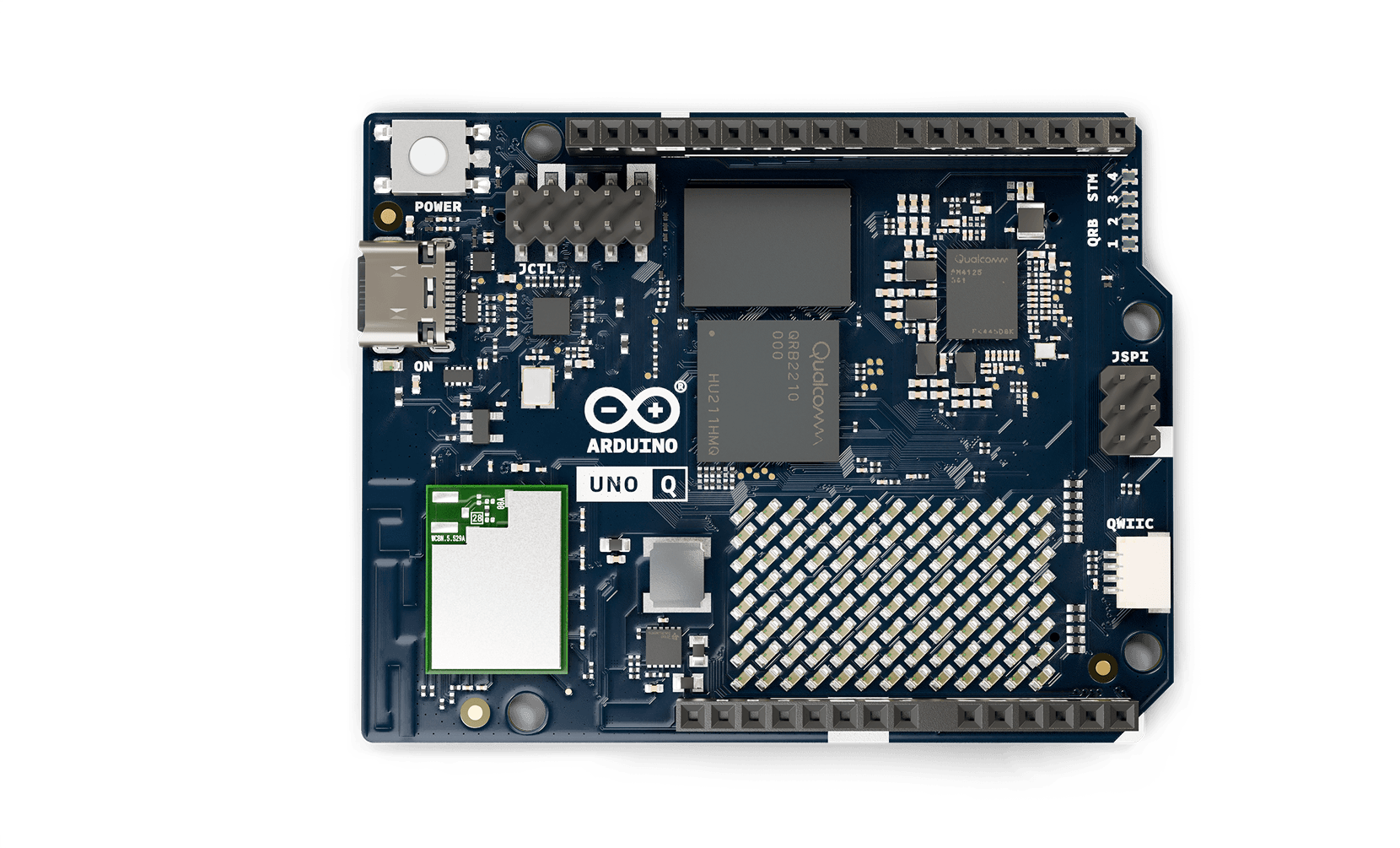
The Arduino UNO Q looks familiar enough to belong on a maker's bench, but its architecture marks a major departure from the classic UNO formula. Announced on October 7, 2025, the board combines a Qualcomm processor that can run Debian Linux with a separate STMicroelectronics microcontroller dedicated to real-time electronics.
That pairing gives one board two different kinds of computing. Linux can manage Python applications, files, networking, cameras, and artificial-intelligence models. The microcontroller can read pins, generate precise timing, and control actuators without depending on the schedule of a full operating system. Arduino calls this a dual-brain design.
It is a practical response to a common maker problem. Advanced projects often use a Linux single-board computer for high-level software and a microcontroller for reliable hardware control. Connecting, powering, programming, and maintaining two separate boards adds friction. UNO Q puts both roles on one supported platform and provides a software path between them.
What processors are on the UNO Q?
The Linux side is built around the Qualcomm Dragonwing QRB2210. It contains four Arm Cortex-A53 CPU cores running at up to 2.0 GHz and an Adreno graphics processor. CPU cores execute general-purpose software, while the graphics processor accelerates visual workloads and some parallel calculations. The board pairs that processor with LPDDR4 memory and eMMC storage, giving Linux space for applications and persistent data.
The real-time side uses an STMicroelectronics STM32U585 microcontroller. Its Arm Cortex-M33 core can run at up to 160 MHz, with 2 MB of flash and 786 kB of SRAM listed in Arduino's documentation. Arduino sketches run on this microcontroller over Zephyr, a real-time operating system designed for embedded devices.
A real-time operating system, or RTOS, schedules small pieces of embedded work with predictable timing. It is much lighter than desktop-style Linux. Predictable does not necessarily mean faster. It means the system is designed so time-sensitive jobs can run when expected.
The division of labor is the important part. Linux might run an image-recognition model and decide that a camera sees a person. The microcontroller might then generate a precisely timed motor command or monitor a safety switch. Each processor handles the work that suits it.
Why not do everything in Linux?
Linux is powerful because it manages many programs and hardware resources at once. That flexibility also means an application does not normally control every microsecond of execution. Background services, storage activity, and network tasks all need processor time.
For a dashboard or database, a slight scheduling delay is harmless. For a tightly timed pulse, a motor-control loop, or a sensor protocol with narrow timing requirements, unpredictability can cause failures. A microcontroller avoids much of that operating-system overhead and interacts directly with embedded peripherals.
The reverse question matters too. Why not do everything on the STM32? A microcontroller has limited memory and storage compared with a Linux system. Installing standard Python packages, handling rich camera pipelines, hosting a modern web service, or managing a large AI model is far easier on the application processor.
UNO Q is useful when a project genuinely needs both sides. A simple temperature display can still be built more cheaply and efficiently with an ordinary microcontroller. Adding Linux where it is not needed increases startup time, power consumption, software maintenance, and security responsibilities.
How the two sides communicate
Two processors only help if data can move between them in a manageable way. Arduino's software architecture uses a routing layer and remote procedure calls, commonly shortened to RPC. An RPC lets one program request a function or service from another program, even when the two run in separate processes or on separate processors.
In practical terms, a Python application on Linux can exchange information with an Arduino sketch on the STM32. The maker does not have to invent a serial-message format from scratch for every project. Arduino App Lab, introduced with the UNO Q, organizes the Linux application, the sketch, and reusable software components as one project.
That convenience should not hide system design. Developers still need to decide what happens if one processor restarts, a message arrives late, or the Linux application stops responding. Safety-critical outputs should default to a safe state on the microcontroller side. Large camera frames should not be passed through a control channel designed for small commands. Good architecture keeps the boundary clear.
What edge AI means on this board
Edge AI means running a machine-learning model on or near the device collecting the data. A camera project might identify an object locally rather than upload every image to a cloud server. A sound monitor might classify a noise without transmitting a continuous audio stream.
Local processing can reduce latency, limit bandwidth use, and keep sensitive raw data on the device. It can also let a project continue working when the internet is unavailable. Those benefits depend on the model and application. An edge device still needs updates, testing, and a clear policy for any data it stores or sends.
The QRB2210 gives the UNO Q substantially more computing capacity than a conventional Arduino microcontroller, but the phrase AI-capable should not be read as unlimited. Model size, input resolution, memory use, inference speed, heat, and power all matter. Inference is the stage where a trained model analyzes new data. A compact image classifier and a large generative model have radically different requirements.
For makers, the useful question is not whether the board "has AI." It is whether a specific model can meet the project's accuracy and response-time needs on the available hardware. Start with the smallest model that solves the problem, measure it with realistic inputs, and test failure cases instead of relying on a polished demonstration.
What projects fit the UNO Q?
Computer vision is an obvious application. Linux can capture and process camera data, while the STM32 controls lights, motors, relays, or alarms. A workshop tool could recognize a setup condition and prevent a motor from starting until a physical interlock is also satisfied. The visual decision and the deterministic safety input remain separate.
Robotics is another strong fit. High-level software can handle mapping, navigation, a user interface, and network communication. The microcontroller can read encoders and produce regular motor commands. Environmental monitoring can combine local data analysis and a web dashboard with low-level sensor acquisition.
The board also works as a bridge for developers moving in either direction. Arduino users can add Linux and Python without giving up the sketch model. Linux developers can reach real-time I/O without attaching and maintaining a second development board.
What to check before choosing it
The UNO name does not guarantee drop-in compatibility with every older shield or sketch. Verify electrical levels, pin functions, power requirements, and software support for the exact accessory. Code written for AVR registers will not run unchanged on the STM32. Linux applications also bring dependencies that need to be pinned and maintained.
Power design deserves attention. A processor, memory, storage, camera, and attached actuators can demand much more current than a classic UNO project. Motors and relays should have properly designed power paths rather than drawing their operating current through development-board pins.
Finally, plan for updates. A connected Linux device is a computer, even when it is mounted inside a robot or instrument. It needs security fixes, controlled software versions, reliable storage, and a recovery strategy. Arduino's integrated tools can reduce setup work, but they cannot remove the operational life of the device.
The UNO Q matters because it joins two established development patterns without pretending they are the same. Makers get Linux where Linux is helpful and a microcontroller where timing and direct control matter. If Arduino can keep that boundary understandable, the board could make advanced connected devices far easier to prototype without making simple projects unnecessarily complicated.
Sources and image credits
- Arduino announcement: A new chapter for Arduino with UNO Q
- Arduino UNO Q hardware documentation
- Qualcomm developer overview of Arduino UNO Q
- Product image from Arduino's open documentation repository, credited to Arduino documentation contributors under CC BY-SA 4.0.
- Square and vertical card artwork generated with OpenAI's built-in image generation tool.