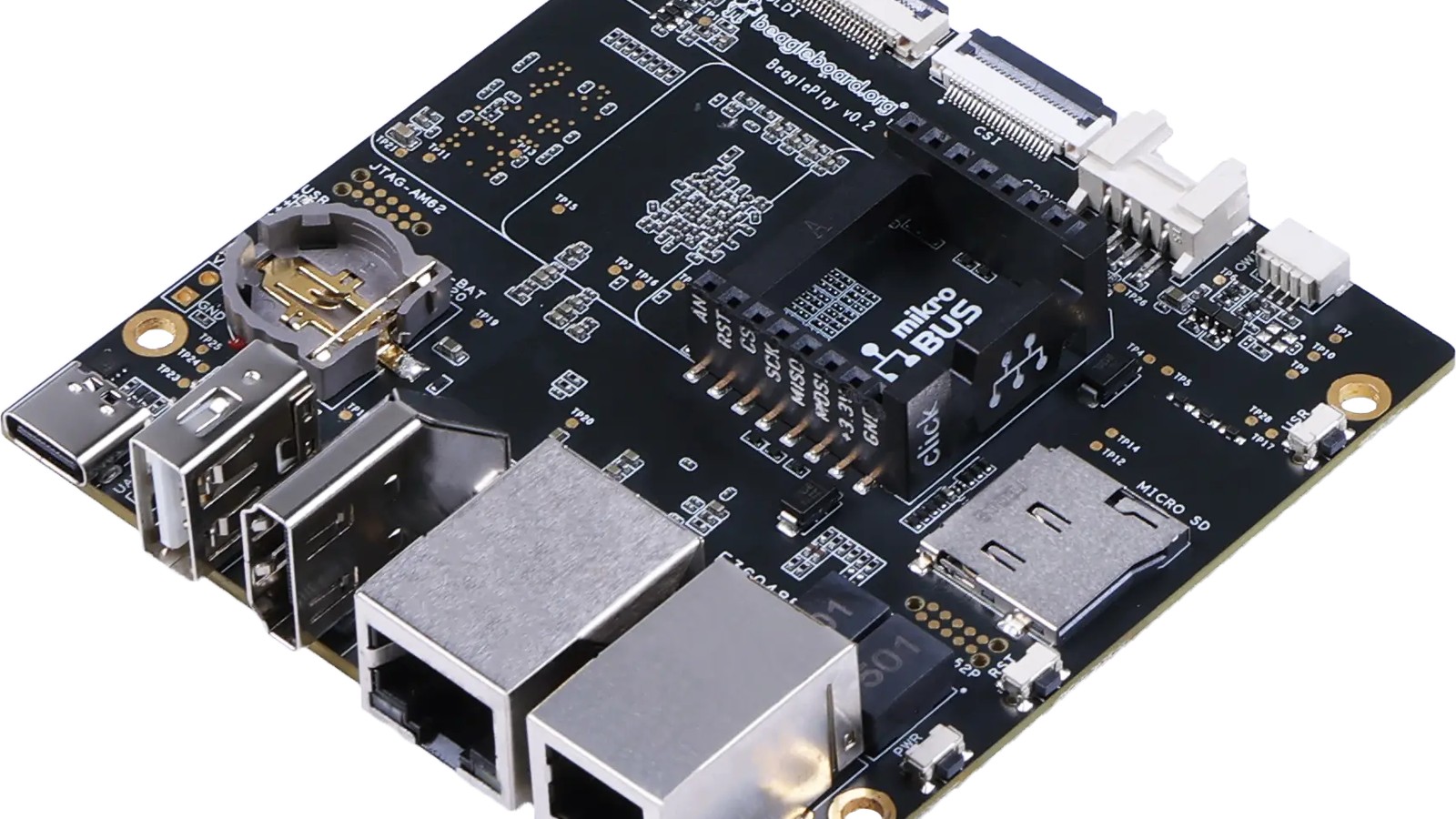
BeaglePlay arrived on March 8, 2023, with an unusually broad answer to a simple embedded question: how should a Linux board connect to the real world? Its feature list spans ordinary USB and Ethernet, low-latency processors, Wi-Fi, Bluetooth Low Energy, sub-GHz radio, single-pair Ethernet, camera and display links, and three popular plug-in sensor ecosystems.
The result is not merely a compact desktop computer. BeaglePlay is a development platform for systems that need Linux and dependable physical I/O in the same design. It can act as a gateway, an industrial interface, a robot controller, a remote sensor hub, or a teaching board without requiring a custom carrier for the first prototype.
The open-hardware design and detailed documentation are equally important. They let developers move beyond a finished board and understand how the platform is assembled.
The AM625 supplies Linux and real-time control
BeaglePlay uses Texas Instruments' AM625 processor. Four 64-bit Arm Cortex-A53 cores run at up to 1.4GHz and handle the Linux environment. A Cortex-M4F microcontroller core and a Cortex-R5F core provide places for firmware that needs tighter timing or separation from the main operating system.
The chip also contains a programmable real-time unit subsystem with two PRU cores running at 333MHz. A PRU is a small processor designed for predictable, low-latency access to pins and peripherals. It can generate or capture timing-sensitive signals that would be awkward to guarantee from normal Linux user space.
This mix is a defining BeagleBoard idea. Linux brings networking, filesystems, package management, and familiar development tools. The real-time processors handle tasks where a delayed response could corrupt a waveform or miss an event.
The AM625 also supplies a 3D graphics processor capable of driving a Full HD display. BeaglePlay includes full-size HDMI, a MIPI CSI (Camera Serial Interface, a high-speed standard for connecting camera sensors) connector, and an OLDI display interface. OLDI is a low-voltage differential display connection used in embedded and industrial panels.
Built-in connectivity is unusually broad
For mainstream networking, BeaglePlay includes Gigabit Ethernet and a WiLink 8 module supporting 2.4GHz and 5GHz Wi-Fi. A separate CC1352P7 wireless microcontroller provides Bluetooth Low Energy and sub-GHz connectivity.
Sub-GHz radios trade bandwidth for range and penetration. They are useful for remote sensors, buildings, agriculture, and low-power telemetry. BeaglePlay can work as a gateway for BeagleConnect Freedom nodes, bringing remote microcontroller I/O into a Linux system.
The board also includes 10Mbit single-pair Ethernet through an RJ11-style connector, with power over the data line. Single-pair Ethernet sends Ethernet over one twisted pair rather than the four pairs used by common Gigabit cabling. In industrial or building systems, that can reduce cable size and provide a direct wired path to distant endpoints.
These radios and network ports do not all serve the same purpose. Wi-Fi and Gigabit Ethernet move relatively large amounts of IP data. Sub-GHz links favor low-rate, long-distance sensors. Single-pair Ethernet provides a dependable wired option. Having them on one board makes protocol and gateway experiments much easier.
Three connector ecosystems lower the wiring burden
BeaglePlay includes mikroBUS, Grove, and Qwiic connectors. Each ecosystem offers ready-made modules for sensors, displays, relays, motor control, and communications.
Qwiic is primarily a four-wire I2C (Inter-Integrated Circuit, a simple two-wire bus that lets several low-speed devices share one pair of lines) connection with power. Grove covers several electrical interfaces through keyed cables. mikroBUS exposes a broader set of signals including SPI (Serial Peripheral Interface, a fast short-distance link), UART (Universal Asynchronous Receiver-Transmitter, a simple point-to-point serial connection), I2C, analog input, PWM (Pulse-Width Modulation, a way to approximate an analog output from a digital pin), reset, and interrupt lines. Their modules are not interchangeable, but together they give developers thousands of off-the-shelf options.
The convenience is practical rather than cosmetic. A keyed cable reduces the chance of swapping power and ground, and a standard pinout makes examples easier to reproduce. Voltage compatibility and software support still need checking. A connector standard does not guarantee that every module is safe or supported on every board.
Memory and storage fit embedded Linux work
The launch configuration provided 2GB of DDR4 memory, 16GB of onboard eMMC flash (embedded MultiMediaCard storage, a persistent flash chip built directly into the board), and a microSD slot. The eMMC can hold a stable system image while removable media supports recovery, testing, or additional storage.
BeagleBoard supplied a customized Debian image with a desktop, Wi-Fi access-point capability, and BeagleConnect gateway features. Debian gives users a familiar package ecosystem, but embedded work often benefits from stripping unused services, protecting the root filesystem, and defining a repeatable update process.
Two gigabytes is enough for many gateways, command-line development tasks, and moderate graphical interfaces. It is not unlimited. Browser-heavy desktops, large containers, and memory-intensive AI models may need more capacity or a different board.
Why BeaglePlay is different from a general-purpose SBC
Many single-board computers emphasize CPU benchmarks, media playback, and desktop replacement. BeaglePlay's distinguishing features are the real-time subsystems, open design, industrial connections, and direct support for sensor ecosystems.
That makes it a strong fit for human-machine interfaces, building automation, laboratory equipment, robotics, distributed sensing, and equipment gateways. A developer can create the interface and network services in Linux while assigning precise I/O to the PRU or microcontroller cores.
The architecture also teaches an important embedded lesson: one processor does not have to perform every job. Dividing responsibilities can make a system more predictable and easier to maintain.
There are tradeoffs. More processors and radios mean more firmware, boot stages, and documentation to understand. A project that needs only a web server and GPIO may not use the board's unusual strengths. BeaglePlay is most compelling when the application genuinely benefits from its mixed compute and connectivity.
A sensible way to begin
Start with the official Debian image and verify the board's power, network, and storage behavior before attaching hardware. Choose one expansion ecosystem and one simple sensor. Confirm its voltage, bus address, and Linux driver or user-space library.
Next, decide which tasks belong on Linux and which require predictable timing. Do not move code to a real-time core merely because it exists. Use it when measurements show that Linux timing is insufficient or when isolation provides a clear reliability benefit.
For networked projects, plan security and updates early. Disable unused services, use unique credentials, record software versions, and test recovery from an interrupted update. A gateway sits between networks and deserves more attention than an isolated prototype.
BeaglePlay modernizes the BeagleBoard concept by making connections the center of the design. Its value is not one headline specification. It is the ability to bring Linux, real-time control, wired infrastructure, long-range radio, cameras, displays, and accessible sensor modules together on a documented platform. For developers building systems rather than simply running applications, that combination is unusually useful.
Pick one connector ecosystem and one simple sensor for your first BeaglePlay project, and keep a recovery microSD card handy. It makes the first evening far less frustrating.
Sources and image credits
- BeaglePlay announcement, BeagleBoard.org, March 8, 2023.
- BeaglePlay board page, BeagleBoard.org.
- Official product image from BeagleBoard.org.
- Square and vertical crops are edited from the same source image.