Arduino CLI is a command-line program. You type commands in a terminal instead of clicking Verify in Arduino IDE 2. A CLI, a command-line interface, is that terminal program. Arduino also uses this same engine under IDE 2 and the Cloud Editor. Installing the standalone copy means you can compile and upload from PowerShell, from a script, or from VS Code.
This page is only the Windows install: MSI vs ZIP, PATH, a new terminal, config init, and a version check. Part 3 of the Mastery Series is still how sketches work. You can install the CLI without having mastered Part 3, but you will want a sketch to compile once PATH works.
Current docs at writing time: Arduino CLI 1.5.1. Grab whatever latest stable the installation page or GitHub releases shows.
MSI or ZIP
MSI (the one I use on a PC I own). Download the Windows 64-bit MSI. Run it. If it offers to add the install folder to PATH, allow that. PATH is the list of folders Windows searches when you type a command name. If arduino-cli.exe is not in a PATH folder, PowerShell says the term is not recognized even when the file is sitting on disk.
ZIP (no admin, or a portable copy). Download arduino-cli_*_Windows_64bit.zip. Unzip to a stable folder such as C:\tools\arduino-cli\. Do not leave it in Downloads. Windows 11 Storage Sense and a bored afternoon of cleanup will delete it. Confirm arduino-cli.exe is in that folder, not nested two zip layers down.
I do not start with community Winget packages for a first install. They drift. Arduino's MSI or ZIP is the copy I can name in a bug report.
Add the ZIP folder to PATH by hand
If you used the ZIP, or the MSI did not add PATH:
- Settings → System → About → Advanced system settings → Environment Variables.
- Under your user variables, select Path → Edit → New.
- Paste the folder that contains
arduino-cli.exe, for exampleC:\tools\arduino-cli. - OK out of every dialog.
Add the folder, not the .exe, and not the .zip.
Close every terminal window you already had open. PATH is read when the terminal starts. An old PowerShell window will keep saying the command is missing.
Prove it
Open a new PowerShell:
# Should print a version string, not a red error
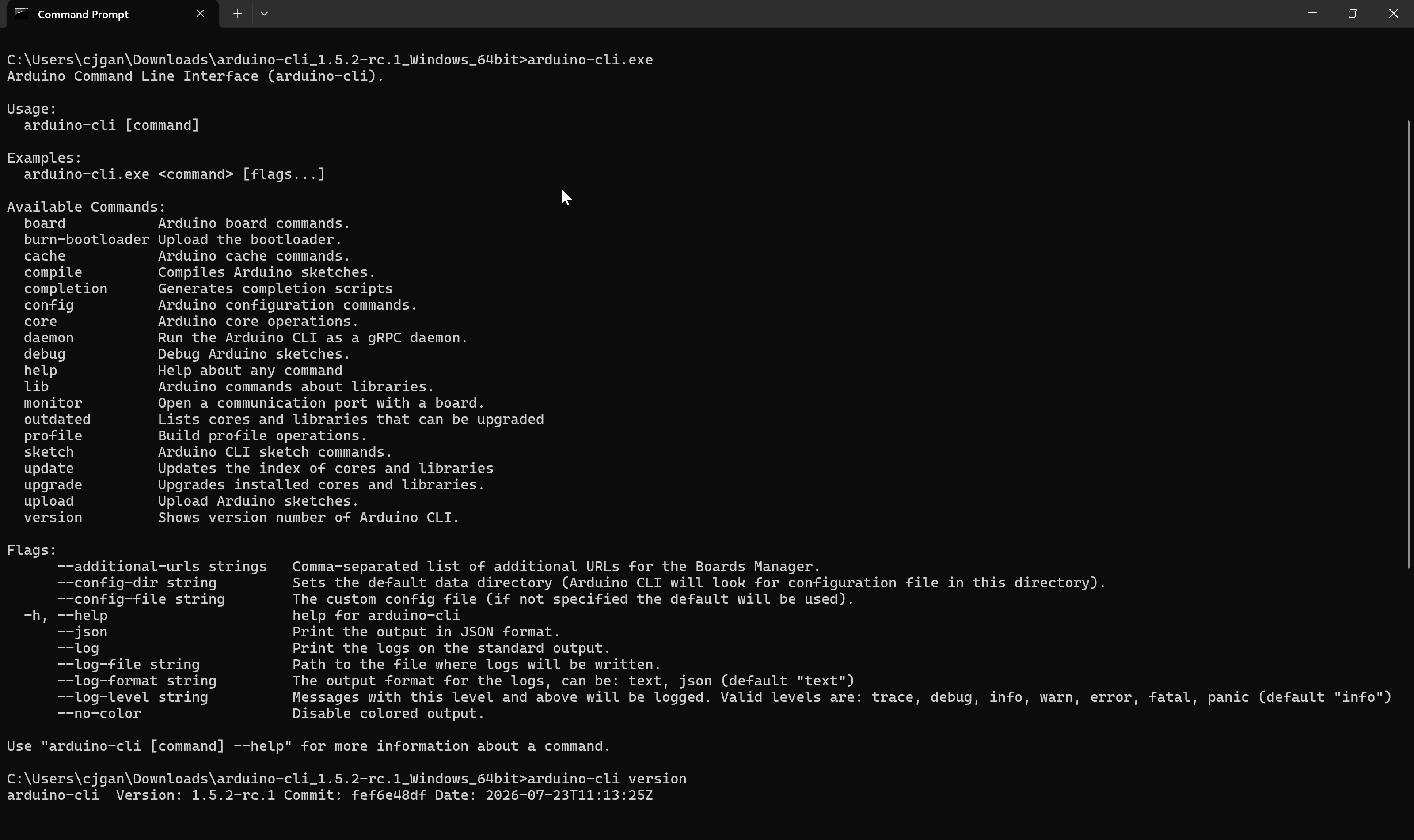
arduino-cli version
If you get "not recognized":
- You edited PATH and reused an old window. Close it. Open a new one.
- You added the wrong folder.
dir C:\tools\arduino-cli\arduino-cli.exeshould list the file. - You added a User PATH but opened an Administrator terminal that does not inherit it, or the reverse. Match the kind of window to where you edited PATH.
arduino-cli help prints the main commands. You do not need to memorize that output. It is the manual.
Create a config file
# Create a config file with default settings (safe to run once)
arduino-cli config init
This writes arduino-cli.yaml (YAML is a plain-text settings format that uses indentation to group settings), usually under %LOCALAPPDATA%\Arduino15\ (C:\Users\<you>\AppData\Local\Arduino15\). That Arduino15 directory is the same neighborhood IDE 2 uses for cores and indexes. If config init says a file already exists, leave it. IDE 2 or an earlier experiment already created one.
# See the paths the CLI will use
arduino-cli config dump
Look at directories.data and directories.user. Data is cores and indexes. User is the sketchbook (often Documents\Arduino). If you already use IDE 2, matching these paths means one Board Manager install serves both tools. If they differ, you will install arduino:avr twice and wonder why.
Fetch the board index and install AVR
A fresh CLI has an empty catalog until you update it.
# Download Arduino's catalog of available cores
arduino-cli core update-index
# Install the AVR core: compiler + upload tools for Uno, classic Nano, Mega
arduino-cli core install arduino:avr
# Confirm it shows up as installed
arduino-cli core list
arduino:avr is the Uno / classic Nano / Mega family. A core is the compiler and upload recipes for that family. Without it, compile --fqbn arduino:avr:uno fails.
Optional: copy any Additional boards manager URLs from IDE 2 Preferences into arduino-cli.yaml under board_manager.additional_urls if you use ESP32. The commands article in this folder covers that.
Your first command-line compile
A successful arduino-cli version proves the program is installed. It does not yet prove the whole chain works, so I always finish with a real compile. The commands below create a starter sketch, build it for an Uno, and find the board's serial port. You do not need a board plugged in for the compile step.
# Creates a folder named MyFirstCli containing MyFirstCli.ino with empty
# setup() and loop() functions. Starting from a generated sketch means any
# failure is about your install, not a typo in code you wrote.
arduino-cli sketch new MyFirstCli

# Compile for an Uno. --fqbn is the "fully qualified board name", the exact
# label the CLI uses to pick the right compiler settings (vendor:family:board).
arduino-cli compile --fqbn arduino:avr:uno .\MyFirstCli

# Lists connected boards and the COM port each one is using.
# Plug the board in first, and use a data cable.
arduino-cli board list
The compile prints a size report: how many bytes of flash storage the program uses out of what the chip offers. If it ends with that report and no red text, your install is healthy. When you are ready to put it on a board, the upload command needs the port from board list:
# Replace COM3 with the port that board list showed you.
arduino-cli upload -p COM3 --fqbn arduino:avr:uno .\MyFirstCli
Find out which copy you are running
People sometimes end up with two copies of the CLI, perhaps one from a ZIP experiment and one from the MSI, and then wonder why a version number never changes after an upgrade. Windows will happily run whichever copy appears first in PATH. Ask it directly:
# Shows the full path of the arduino-cli that PowerShell will actually run.
Get-Command arduino-cli | Select-Object -ExpandProperty Source

# Lists EVERY copy found on PATH, in the order Windows would pick them.
where.exe arduino-cli
If where.exe prints more than one line, delete or un-PATH the older copy. One tool in one place is much easier to keep updated.
Keeping it current
The CLI itself updates by running a newer MSI or replacing the ZIP contents, so there is no background updater to worry about. Cores and libraries are separate, and these commands handle them:
# Refresh the catalog first, otherwise the CLI cannot know anything is newer.
arduino-cli core update-index

# Show which installed cores and libraries have newer versions available.
arduino-cli outdated

# Upgrade the cores (the compilers). Do this on purpose, not right before a deadline.
arduino-cli core upgrade
I treat outdated as a look-but-do-not-touch command. Upgrading a core can change how a project compiles, so I only do it when I have time to test.
Nightly CLI
Arduino publishes nightly CLI builds from master. They are unstable by design. Do not replace your only arduino-cli.exe with a nightly. Same rule as IDE 2 nightlies.
When Windows pushes back
A freshly downloaded program from a small publisher sometimes triggers Windows SmartScreen, the built-in reputation check that shows a blue "Windows protected your PC" box. For Arduino's official installer, choosing More info and then Run anyway is normal, as long as you downloaded it from arduino.cc or the project's GitHub releases page and not from a search-result mirror. Downloading from the source you can name in a bug report is the same habit that makes MSI or ZIP the right choice in the first place.
Corporate and school laptops add one more layer: PowerShell may refuse to run scripts, or your account may be unable to edit system PATH. The user-level PATH edit described above needs no administrator rights, which is why it is the version I recommend first.
Troubleshooting
| Symptom | Likely cause | Fix |
|---|---|---|
| Command not recognized | PATH or old terminal | Add the folder. New PowerShell |
core install cannot find arduino:avr |
Index never fetched | core update-index first |
| IDE 2 has cores, CLI does not | Two Arduino15 folders |
config dump vs IDE data dir. Align them |
| Antivirus quarantined the exe | Fresh download | Restore from Arduino's zip. Add an exclusion if your AV is aggressive |
Wrap-up
Install Arduino CLI from Arduino's MSI or ZIP. Put the folder on PATH. Open a new PowerShell. Run arduino-cli version, then config init, then core update-index and core install arduino:avr. After that, the commands article in this folder is the daily set.
Hack The World and Make Awesome.