Mastering Arduino Part 12: I2C, Addressing a Bus
Part 11 connected two serial devices with one transmit wire and one receive wire. That arrangement is enough for a direct conversation between two devices. It becomes awkward when an Arduino needs to talk to a display, a temperature sensor, and an input expander at the same time. Adding a separate serial port for every part would consume pins quickly.
I2C, short for Inter-Integrated Circuit, solves that problem by putting multiple devices on one shared two-wire bus. A bus is a set of conductors shared by several devices. Each peripheral has an address, so the Arduino can call one device while the others wait.
In this lesson, we’ll build the idea from the wires upward. You’ll see why I2C needs pull-up resistors, how 7-bit addresses work, how to write a scanner by hand, how the Wire library hides the individual clock pulses, and how two devices share the same bus without sharing an address. It also covers where I2C came from and how it compares with UART and SPI, how to calculate pull-up values, the available bus speeds and Wire.setClock(), clock stretching, 10-bit addresses, level shifting, multiplexers, and using an Arduino as an I2C peripheral.
Bill of Materials
| Component | Description | Buy on Amazon | Buy on Temu | Buy on SparkFun | Buy on Seeed Studio | Datasheet |
|---|---|---|---|---|---|---|
| Arduino Uno R3 | The controller board. Any Uno R3 or compatible board works. | Amazon Link | Temu Link | SparkFun Link | Seeed Link | Uno R3 datasheet |
| I2C temperature breakout modules (×2) | TMP102-compatible breakouts with documented Uno-compatible power and logic levels, each with a configurable address. | Amazon Link | N/A | SparkFun Link | N/A | TMP102 datasheet |
| Pull-up resistors, 4.7kΩ | Only needed if the modules do not already include pull-ups. A resistor kit covers it. | Amazon Link | Temu Link | SparkFun Link | Seeed Link | N/A |
| Breadboard & Jumper Wires | Short wires keep the bus easy to debug. | Amazon Link | Temu Link | SparkFun Link | Seeed Link | N/A |
| USB A-to-B cable | The square printer-style plug the Uno uses. It must carry data, not just power. | Amazon Link | Temu Link | SparkFun Link | N/A | N/A |
The products linked above may contain affiliate links. The Makers Workbench earns from qualifying purchases when these links are used.
The code examples in this lesson use a TMP102-compatible temperature-sensor breakout at address 0x48 for one raw register read. A second compatible breakout must be configured to a different documented address, such as 0x49, before both are placed on the same bus. Verify the exact module voltage, address pin behavior, and onboard pull-ups from its datasheet or schematic.
How I2C Actually Works
Where I2C comes from, and how it compares
Philips Semiconductors (now NXP) developed I2C in 1982 to connect the chips inside televisions with as few wires as possible. The name is short for Inter-Integrated Circuit, and it is also written I²C. Version 1.0 of the specification in 1992 added the 400kHz fast mode and 10-bit addressing, and later versions added faster modes. A close relative, the System Management Bus (SMBus), was developed for computer hardware monitoring and adds timeout rules. Many I2C parts also work on SMBus.
Compared with the serial link in Part 11 and the SPI bus in Part 13, I2C trades speed for wiring.
| Feature | UART | SPI | I2C |
|---|---|---|---|
| Signal wires | 2 per link (TX and RX) | 3 shared, plus 1 chip-select per device | 2 shared by every device |
| Devices | One partner per port | Many, each needing its own select pin | Many, chosen by address |
| Clock | None (both sides agree on a baud rate) | Shared clock line | Shared clock line |
| Typical speed | Up to about 115,200 baud on a hobby board | Often 1MHz to 50MHz | 100kHz or 400kHz |
I2C is a good fit for sensors, displays, and real-time clocks, where the data rate is modest and saving pins matters. It is a poor fit for fast data, such as an SD card or a color display, and SPI is normally used for those.
Two shared signal lines
I2C uses SDA, the serial data line, and SCL, the serial clock line. On an Arduino Uno R3, SDA is A4 and SCL is A5. The separate SDA and SCL pins near AREF are duplicates of those same electrical signals, not a second I2C port.
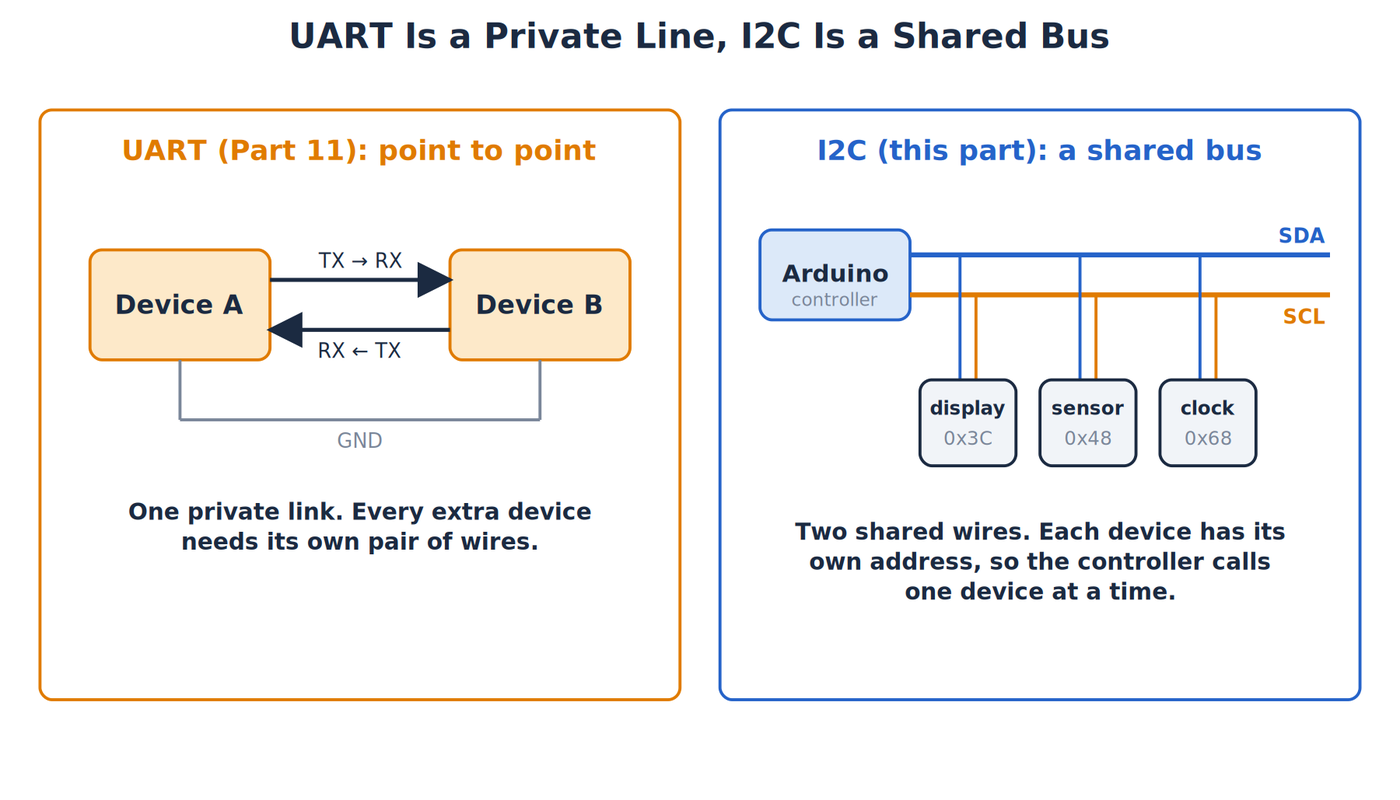
Every device also needs a common reference through GND. Power requirements are separate. A 3.3V sensor is not automatically safe on a 5V bus just because its connector has SDA and SCL labels. Check the device and breakout documentation before wiring.
The controller, our Uno, provides the clock and starts transactions. Older material calls it the “master,” while peripherals are often called “slaves.” Current documentation increasingly uses controller and target or peripheral. The signals and code remain the same.
Open-drain lines and pull-ups
The surprising part of I2C is that devices do not normally drive SDA or SCL high. Each output behaves like a switch that can pull the line low or release it. This is called an open-drain output. When every device releases a line, a pull-up resistor brings it high.
Picture a spring-loaded pull cord. Any person can pull it down, but nobody pushes it up, and a spring returns it when everyone lets go. The resistor is that spring. The analogy stops at speed: a real I2C line has capacitance, and the resistor must charge that capacitance quickly enough for the chosen clock rate.
Without pull-ups, released lines float and communication becomes unreliable or stops. Many breakout boards already include pull-ups. Several boards in parallel place those resistors in parallel too, which lowers the combined resistance. Two 4.7kΩ pull-ups in parallel act like about 2.35kΩ.
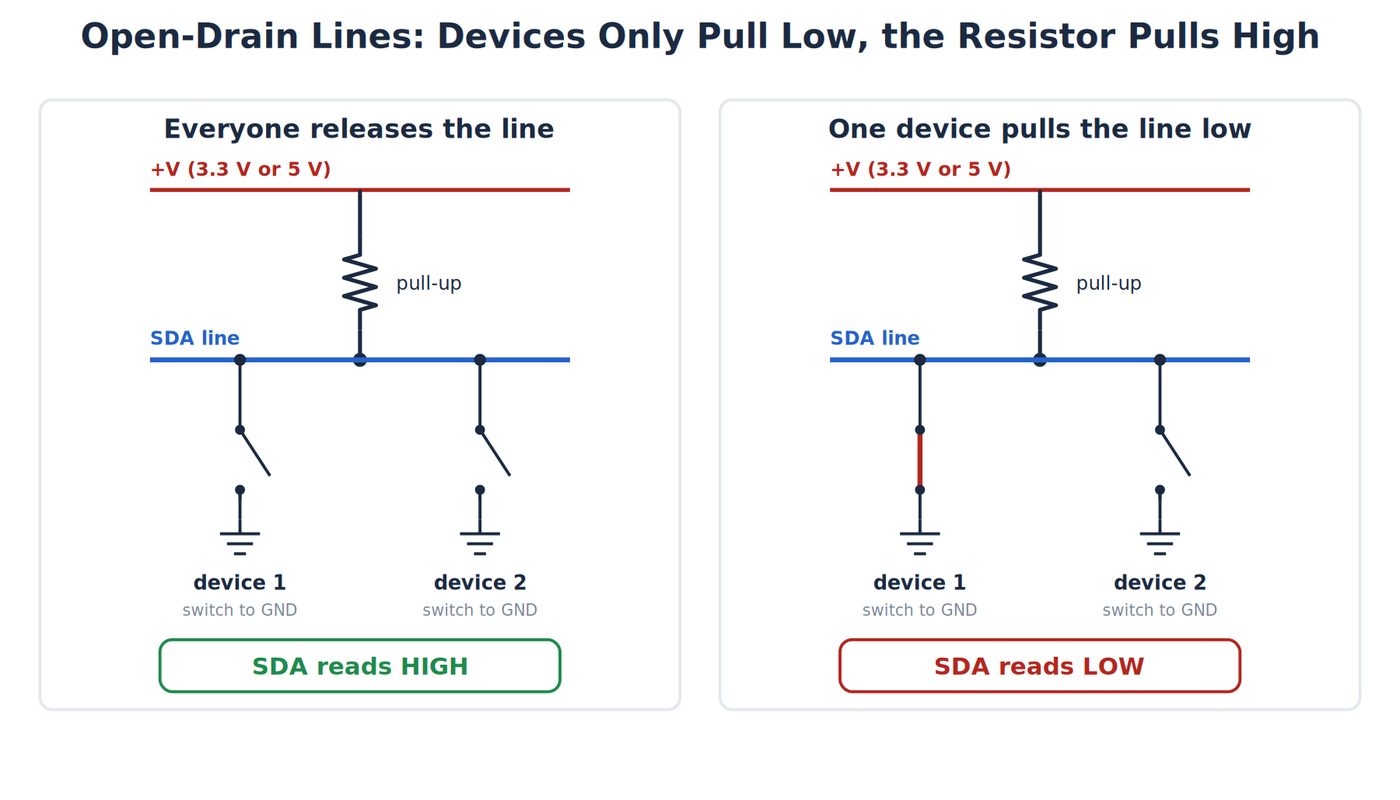
A common beginner starting value is 4.7kΩ on each line for a short, low-capacitance bus, but it is not universal. Supply voltage, bus capacitance, device current limits, and clock speed set the acceptable range. Use the device datasheets for a finished design. Internal microcontroller pull-ups are usually too weak to treat as a dependable external I2C design.
The resistor has to satisfy two competing needs. A lower resistance charges line capacitance faster, creating a sharper rising edge. It also makes a device sink more current whenever it pulls the line low. A higher resistance reduces that current but allows the line to rise more slowly.
At 5V, a 4.7kΩ pull-up asks a device pulling low to sink roughly:
I = V/R = 5V / 4,700Ω ≈ 1.06mA
If two modules each add 4.7kΩ, their effective 2.35kΩ pull-up asks for about 2.13mA. Those values may be acceptable for many parts, but the datasheets make the decision. The calculation also shows why endlessly adding pull-ups is not harmless.
Bus capacitance comes from pins, traces, cables, and breadboard wiring. When the line is released, the pull-up and capacitance form an RC charging path. RC means resistance multiplied by capacitance, which sets how quickly the voltage rises. Long wires and many devices increase capacitance, so a value that works on a compact board may fail on a long breadboard harness.
Standard-mode I2C commonly runs at 100kHz, meaning the controller produces up to 100,000 clock cycles per second. Faster modes allow less time for each rising edge. We will use the Uno Wire library’s normal beginner behavior and short wires rather than tuning speed around a marginal build.
Calculating a pull-up range
The 4.7kΩ starting value works for many short buses, but the I2C specification gives a way to calculate a range. Two limits apply.
The minimum resistance is set by how much current a device must be able to sink when it pulls the line low. The specification requires a device to hold the line at or below 0.4V while sinking 3mA, so:
Rmin = (Vcc − 0.4V) / 3mA
At 5V this is 4.6V / 0.003A ≈ 1,533Ω, and at 3.3V it is 2.9V / 0.003A ≈ 967Ω. A smaller resistor would ask a device to sink more than the specification guarantees.
The maximum resistance is set by how fast the line must rise when it is released. The rise time is the time for the line to climb from 30 percent to 70 percent of the supply voltage, and for a pull-up resistor charging a bus capacitance it is:
tr = 0.8473 × R × Cb
The specification allows a rise time of 1,000ns in standard mode (100kHz) and 300ns in fast mode (400kHz), and it limits the bus capacitance, Cb, to 400pF. Solving for R gives:
Rmax = tr / (0.8473 × Cb)
Suppose the bus capacitance is 100pF, which is an assumed value for a short breadboard bus with a few devices. In standard mode, Rmax = 1,000ns / (0.8473 × 100pF) ≈ 11.8kΩ. In fast mode, Rmax = 300ns / (0.8473 × 100pF) ≈ 3.5kΩ.
At 5V, the allowed range is therefore about 1.5kΩ to 11.8kΩ at 100kHz, and 4.7kΩ falls inside it. At 400kHz the range shrinks to about 1.5kΩ to 3.5kΩ, so 4.7kΩ is too large and a 2.2kΩ or 3.3kΩ pull-up is the better choice. If the bus capacitance rises to the 400pF limit, the standard-mode maximum falls to about 2.95kΩ. This is why long wires and many devices call for smaller pull-up resistors, and why the combined resistance of every onboard pull-up should be checked against the range.
Start, address, data, and stop
An idle I2C bus has SDA and SCL high. A transaction begins with a START condition, where SDA falls while SCL remains high. The controller sends an address and a read/write bit, then one or more data bytes. A byte is eight bits.
After each byte, the receiver uses a ninth clock pulse for an acknowledge, abbreviated ACK. Pulling SDA low means “I received that.” Leaving it high produces a not acknowledge, or NACK.
A STOP condition occurs when SDA rises while SCL is high. A repeated START begins another phase without releasing the bus. Many sensors use a write phase to select a register, followed immediately by a read phase.
The clock gives I2C a rhythm that UART did not have. Data on SDA should remain stable while SCL is high, except when creating START or STOP. Devices change the next data bit while the clock is low, then the receiver samples it while the clock is high.
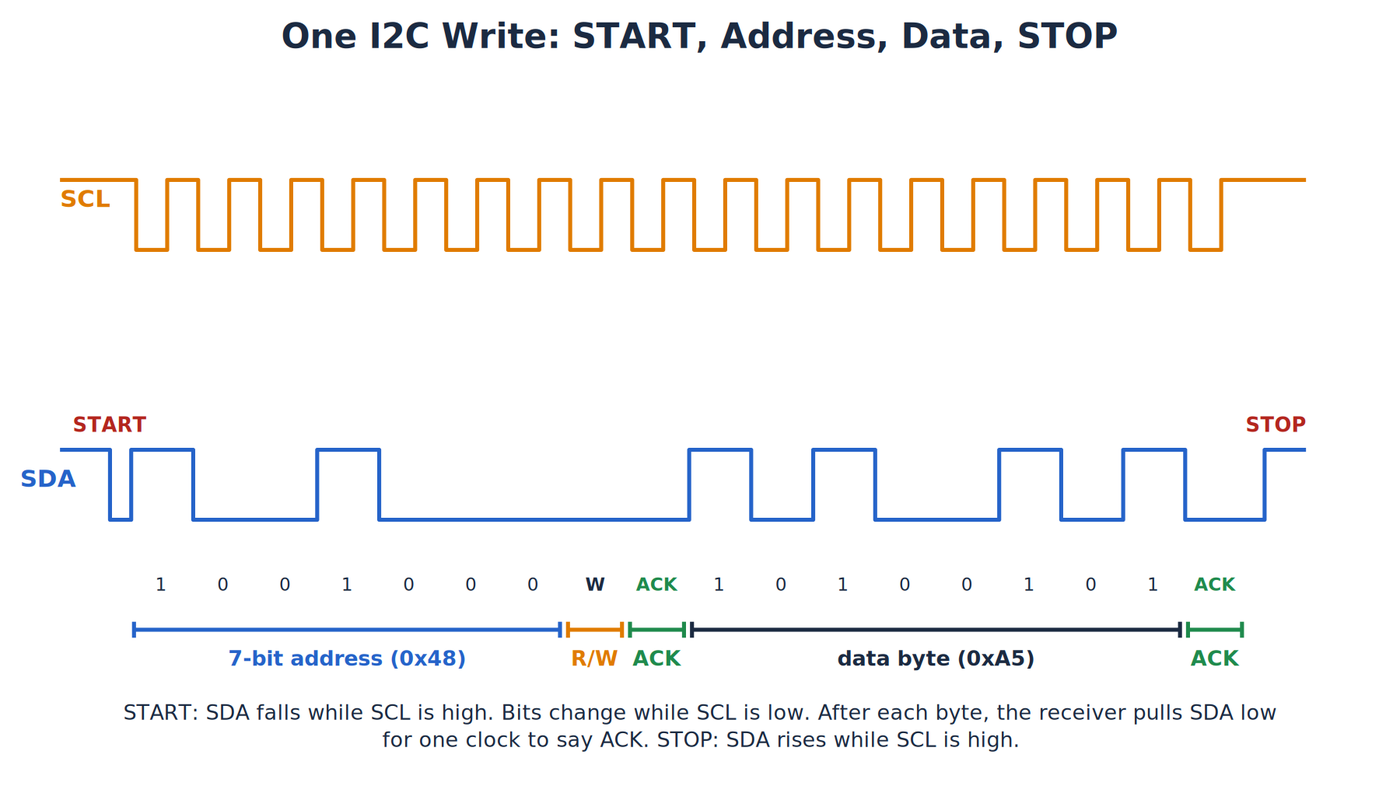
For one address write, the sequence is:
- The controller creates START.
- It sends seven address bits followed by a zero read/write bit for write.
- The addressed peripheral returns ACK.
- The controller sends a data byte.
- The peripheral ACKs that byte.
- The controller creates STOP, or a repeated START if a read follows immediately.
During a read, the peripheral drives the data bits and the controller controls the clock. The controller ACKs received bytes when it wants more. It NACKs the final byte, then creates STOP. That final NACK is not an error. It is the controller saying the read is complete.
Clock stretching
Normally the controller alone controls SCL. Clock stretching is an exception: a peripheral that is not ready, for example because it is still measuring or calculating a result, can hold SCL low after the controller releases it. The controller must notice that SCL has not risen and wait until the peripheral lets go. Nothing is lost, because the transaction simply pauses. The CCS811 air-quality sensor and the BNO055 orientation sensor are known examples of parts that stretch the clock.
The Uno's I2C hardware waits for SCL to rise on its own, so stretching works without extra code. Other boards can limit how long they wait. The ESP8266 core, for example, provides Wire.setClockStretchLimit(), and the I2C hardware on older Raspberry Pi models had a known problem with stretched clocks. A sensor that works on an Uno and fails on another board may be stretching the clock. A clock held low for longer than the controller allows is reported as a timeout, which is the code 5 in the table later in this lesson.
Seven-bit addresses
Most Arduino I2C code uses a 7-bit device address from 0x00 through 0x7F, written in hexadecimal. Hexadecimal is base 16 notation; the 0x prefix tells C++ that 0x48 is hex.
On the wire, the 7-bit address is followed by one read/write bit. Some datasheets print the resulting 8-bit read and write bytes instead of the 7-bit address. If a sheet lists 0x90 for write and 0x91 for read, shifting either value right by one bit gives the 7-bit address 0x48 used by Wire.beginTransmission().
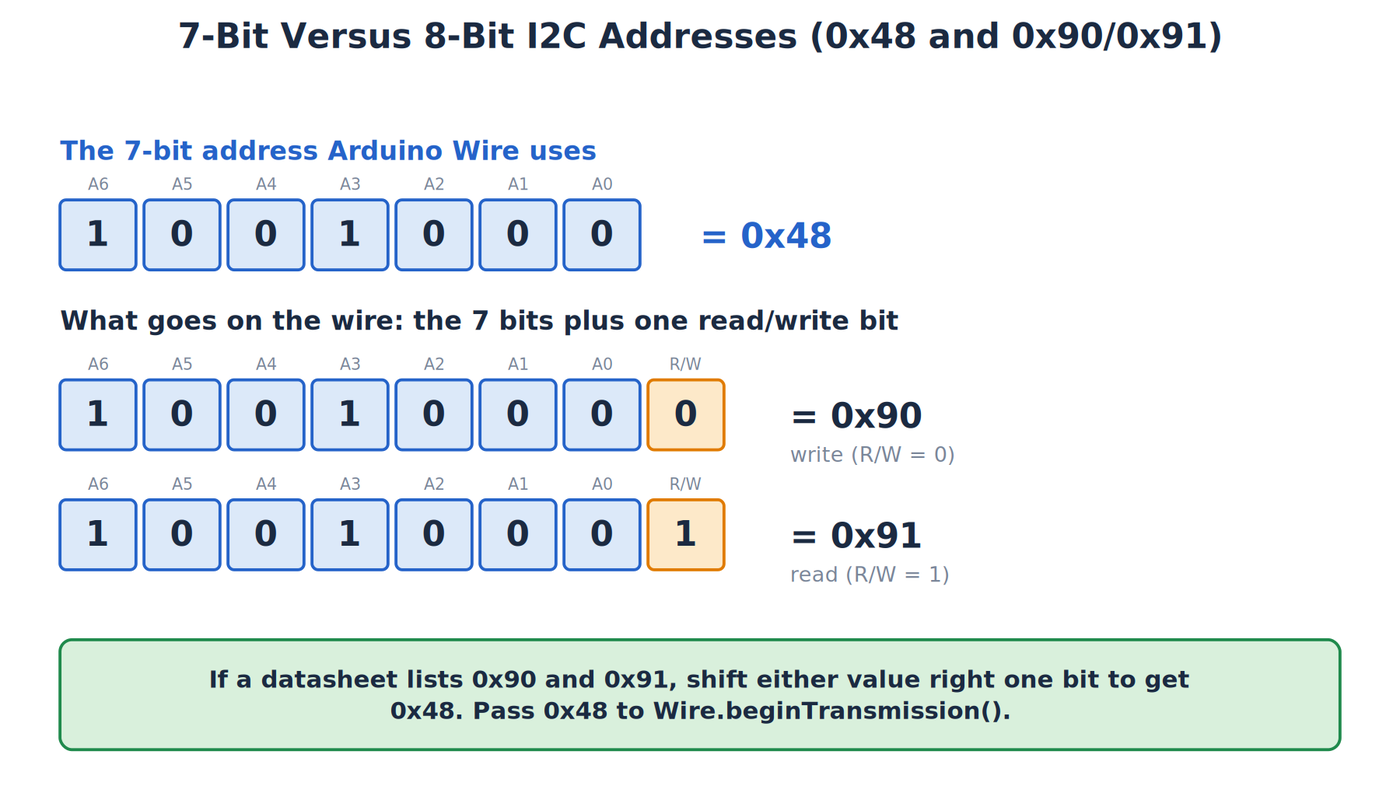
Addresses 0x00 through 0x07 and 0x78 through 0x7F are reserved. A scanner should normally probe 0x08 through 0x77. Two devices with the same fixed address hear the same call and can drive SDA at the same time. Software cannot separate them on one bus. Change an address pin, use a multiplexer, or move one device to another bus.
Hex uses digits 0 through 9 and letters A through F. The sequence goes 0x08, 0x09, 0x0A, 0x0B, and so on. The notation changes how humans write the value, not the bits on the wire.
Address pins often select only a few alternatives. A temperature sensor might use 0x48 when its address pin is low and 0x49 when that pin is high. Other chips use two or three address pins for four or eight options. A solder bridge labeled A0 does not necessarily behave like every other A0 bridge, so use the exact part documentation.
Ten-bit addresses
Seven bits allow 128 addresses, and 16 of them are reserved, which leaves 112 for devices. The 1992 specification added a 10-bit address mode for larger systems. In it, the first byte on the bus starts with the reserved pattern 11110, followed by the top two bits of the address and the read/write bit. A second byte then carries the remaining eight address bits. The pattern is in the reserved range 0x78 to 0x7B, so 7-bit devices ignore it and 10-bit and 7-bit devices can share a bus.
Ten-bit devices are rare in hobby electronics, and the Arduino Wire library on the Uno supports 7-bit addresses only. Nearly every sensor and display you meet uses a 7-bit address. A scanner that probes 0x08 to 0x77 covers all of them.
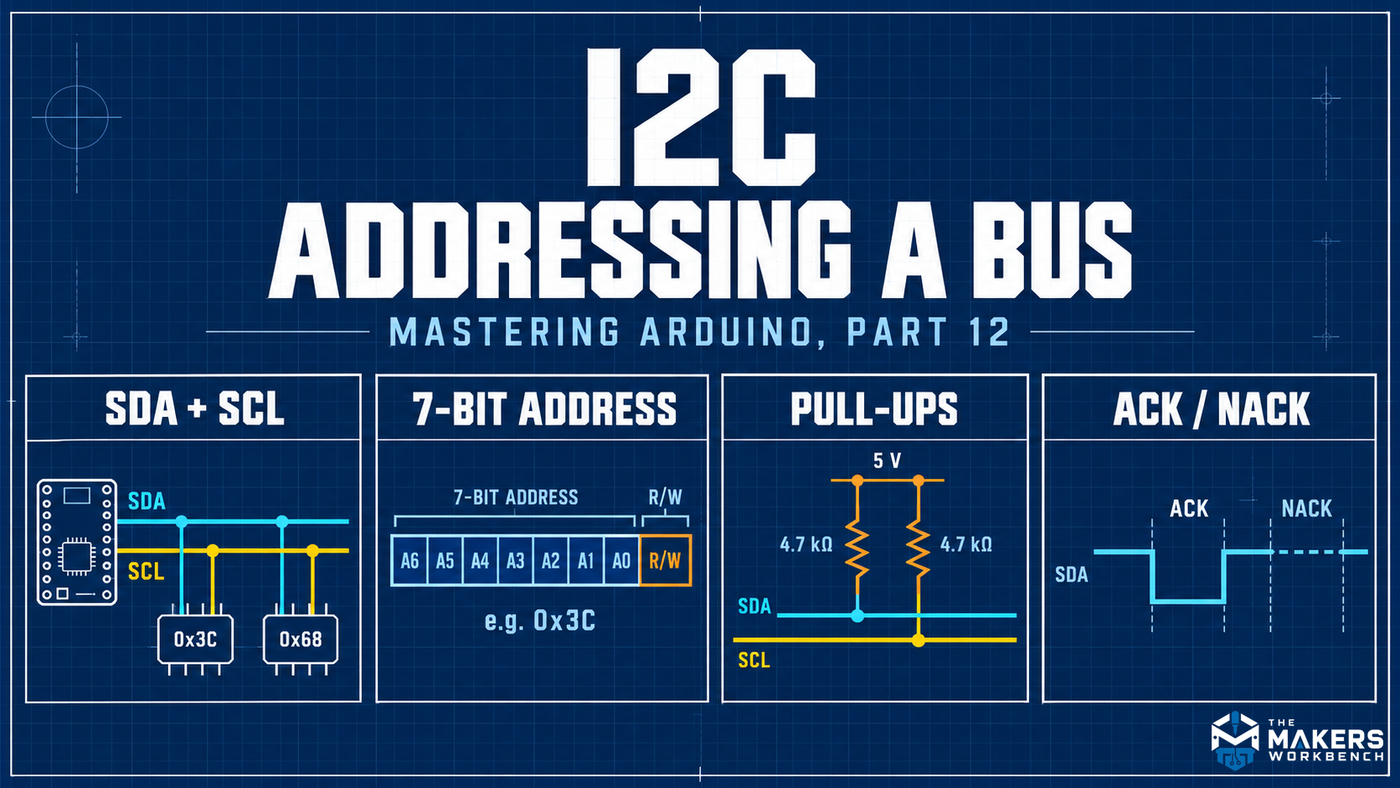
The figure below summarizes the four ideas in this section: the two shared wires, the 7-bit address and its read/write bit, the pull-up resistors, and the ACK and NACK response.
Wire Library Basics
The hard way is to switch SDA and SCL at exactly the right moments, create START and STOP conditions, shift every bit, release SDA for ACK, and recover when a device does not answer. Arduino’s Wire library performs those timing details with the Uno’s I2C hardware.
Wire.begin() initializes the Uno as the controller. Wire.beginTransmission(address) starts collecting bytes for one addressed peripheral. Wire.write() adds data to the transmit buffer. Wire.endTransmission() sends the address and buffered data, then returns a status code.
| Return | Meaning |
|---|---|
| 0 | Success |
| 1 | Data too long for the transmit buffer |
| 2 | NACK after the address |
| 3 | NACK after a data byte |
| 4 | Other transmission error |
| 5 | Timeout in current AVR Wire implementations |
Wire.requestFrom(address, count) asks a peripheral for bytes. Wire.available() says how many received bytes remain, and Wire.read() removes the next one.
Those functions are the easy layer. Underneath, the Uno’s hardware peripheral shifts bits and watches bus conditions. The Wire library groups outgoing bytes in a small memory buffer, controls START and STOP, and reports a compact status. That abstraction keeps a normal sensor read readable.
It also creates limits. A call to Wire.write() does not necessarily put a byte on the physical line at that instant. It adds the byte to a transmit buffer after beginTransmission(). endTransmission() performs the transaction. If you try to queue more than the buffer holds, the operation cannot be represented as one ordinary transfer.
Always save and check the result from endTransmission() while debugging. Ignoring it can turn a missing device into a later “bad sensor value,” because the sketch continues as though the register selection succeeded.
A common register read follows this pattern:
beginTransmission(address)selects the target for an upcoming write.write(registerNumber)queues the register pointer.endTransmission(false)sends the pointer but requests no STOP.requestFrom(address, count)creates the repeated START and read phase.available()andread()retrieve the returned bytes.
The false argument matters for devices that require a combined write-read transaction. It asks Wire to retain control of the bus between phases. Other devices tolerate a STOP and fresh START. Follow the target datasheet instead of assuming every register protocol is identical.
Setting the bus speed with Wire.setClock()
The Wire library starts the bus at 100kHz. The I2C standard defines faster modes, and the table shows them.
| Mode | Maximum clock | Notes |
|---|---|---|
| Standard mode | 100kHz | The Arduino default |
| Fast mode | 400kHz | Supported by most sensors and displays |
| Fast-mode Plus | 1MHz | Needs stronger pull-ups and device support |
| High-speed mode | 3.4MHz | Needs special controller hardware, not available on the Uno |
| Ultra Fast mode | 5MHz | One direction only, for write-only devices |
To change the speed, call Wire.setClock() after Wire.begin(). The Uno supports up to 400kHz:
Wire.begin();            // Start the Uno as the I2C controller.
Wire.setClock(400000);   // Run the bus at 400kHz. The argument is in hertz.
On a 16MHz Uno, the library sets a hardware register called TWBR to produce the requested clock. The clock is 16MHz / (16 + 2 × TWBR), so TWBR is 72 for 100kHz and 12 for 400kHz. You do not need to set this register yourself.
Every device on the bus must support the speed you choose, so the slowest device sets the limit. A faster clock leaves less time for the line to rise, so the pull-up range calculated earlier gets narrower and long wires cause more trouble. If a bus that worked at 100kHz becomes unreliable at 400kHz, return to the default and check the pull-ups and wire length before looking at the code.
The Arduino as an I2C peripheral
An Arduino can also be a peripheral on another controller's bus. Pass an address to Wire.begin() and register functions that the library calls when the controller writes to it or reads from it:
#include <Wire.h>                        // Load Arduino's I2C library.

const byte MY_ADDRESS = 0x42;            // Choose an unused 7-bit address for this Arduino.

void setup() {
  Wire.begin(MY_ADDRESS);                // Join the bus as a peripheral with this address.
  Wire.onRequest(sendReading);           // Call sendReading() when the controller asks for data.
}

void loop() {
  delay(100);                            // The work happens in the handler function, not here.
}

void sendReading() {
  Wire.write(42);                        // Send one byte back to the controller.
}
When the controller writes data to the Arduino, Wire.onReceive(handler) registers a function that runs with the number of bytes received, and Wire.read() retrieves them. Handler functions run inside an interrupt, so they should be short and should not use delay() or print to the Serial Monitor. This arrangement is how two Arduinos exchange data over two wires, and it is how many I2C sensor modules are built.
Planning the First Physical Bus
Before wiring, make a one-page bus inventory. It prevents most beginner conflicts.
| Question | What to record |
|---|---|
| Which controller pins? | Uno R3 A4/SDA and A5/SCL |
| What logic voltage? | Voltage allowed on SDA and SCL for every device |
| Which addresses? | One documented 7-bit address per peripheral |
| Address choices? | Pin, solder bridge, or register used to change each one |
| Existing pull-ups? | Value and destination voltage on every breakout |
| Effective pull-up? | Parallel result for SDA and SCL |
| Wire length and speed? | Short initial wiring at the default clock |
Power each module only from a compatible supply. A breakout with a regulator may accept 5V on VIN while its I2C pins still use 3.3V logic, or it may include level shifting. A bare 3.3V sensor can be damaged by 5V pull-ups. Similar-looking boards are not proof of identical circuitry.
Level shifting between 5V and 3.3V
A 5V Uno and a 3.3V sensor cannot be joined directly if the sensor's pins are not 5V tolerant, and I2C makes the problem harder because SDA is bidirectional. A one-way level translator does not work on SDA. The usual solution is a bidirectional level shifter. A common design uses one small MOSFET (a transistor used as a switch) per line, with a pull-up resistor on each side connected to that side's own supply. When neither side pulls the line low, both sides sit high at their own voltages. When the 5V side pulls low, the MOSFET turns on and pulls the 3.3V side low. When the 3.3V device pulls low, the MOSFET's internal diode and then its channel pull the 5V side low.
Four-channel breakout boards with this circuit are inexpensive, and dedicated chips such as the PCA9306 do the same job for two lines. The shifter board's pull-up resistors count as part of the bus, so include them when you calculate the effective pull-up. Many breakouts already contain a level shifter and a regulator, so check the board's documentation before adding one.
Qwiic and STEMMA QT connectors
Several vendors sell I2C breakouts with a small four-pin connector that carries 3.3V, ground, SDA, and SCL. SparkFun calls its version Qwiic, and Adafruit's STEMMA QT uses the same connector. The cables are keyed so they cannot be reversed, and boards can be chained from one to the next without soldering or a breadboard. The connector carries 3.3V, so a 5V Uno needs a Qwiic-compatible shield or adapter that handles the voltage difference.
Start with one peripheral. Scan it and perform one known read. Add the second peripheral only after the first works. Building the whole bus at once makes it harder to separate an address conflict from a wiring or voltage problem.
Reading an I2C Timing Diagram
A datasheet may show SDA and SCL as two stacked square-wave traces. Read both at the same horizontal position because time moves left to right.
First find START: SDA falls while SCL stays high. The next eight SCL pulses carry the seven address bits and the read/write bit. The ninth pulse carries ACK or NACK. Data bytes follow in the same eight-plus-one pattern. STOP appears when SDA rises while SCL is high.
Most data changes occur while SCL is low. If SDA changes while SCL is high, it normally marks START or STOP. This rule lets a logic analyzer distinguish control conditions from ordinary bits.
A logic analyzer is a test instrument that records digital high and low states over time. It can decode I2C addresses, data, ACKs, and NACKs. It is useful when a scanner finds a device but a register transaction still fails. For a first bus, Serial output and return codes are enough. The analyzer becomes the next tool when you need to see which byte was rejected.
Do not connect an analyzer until you confirm its input voltage rating and ground arrangement. Attach it only to the extra-low-voltage circuit in this lesson.
Common Transaction Shapes
I2C defines the bus signaling, while each peripheral defines the meaning of its bytes. Three patterns appear often.
Write one configuration byte
The controller addresses the peripheral for writing, sends a register number, sends a value, and stops. A library might package that into setMode(), but underneath it performs the register write.
Read bytes without a register pointer
Some simple devices produce data whenever addressed for reading. The controller calls requestFrom() and consumes the returned bytes. The datasheet says how many bytes and what each means.
Select a register, then read
Many sensors first need a write telling them which register to expose. A repeated START changes direction without letting another controller take over. The TMP102-compatible exercise uses this shape.
These patterns explain why a scanner can succeed while application code fails. The scanner tests only the address phase. Application code adds register numbers, configuration values, byte counts, timing, and conversion rules.
Exercises
Exercise 1: Draw the shared bus
Draw one Uno, one sensor, and one display. Connect every SDA pin to the same SDA line and every SCL pin to the same SCL line. Add one effective pull-up from SDA to the bus logic supply and another from SCL to the same supply. Join the grounds. Label each peripheral address.
The diagram should look like a road with several driveways, not separate point-to-point cables.
Exercise 2: Write a scanner by hand
A scanner tests each usable 7-bit address. It begins a transmission, ends it without data, and checks whether a device acknowledged the address.
#include <Wire.h>                         // Load Arduino's I2C library.

void setup() {
  Serial.begin(115200);                  // Start the Serial Monitor connection.
  Wire.begin();                          // Start the Uno as the I2C controller.
  Serial.println("I2C scanner ready");  // Confirm that setup finished.
}

void loop() {
  byte devicesFound = 0;                 // Count devices that acknowledge.
  Serial.println("Scanning 0x08 to 0x77...");

  for (byte address = 0x08; address <= 0x77; address++) {
    Wire.beginTransmission(address);     // Put this 7-bit address on the bus.
    byte result = Wire.endTransmission(); // Send it and save the ACK status.

    if (result == 0) {                   // Return code 0 means a device answered.
      Serial.print("Found device at 0x");
      if (address < 0x10) {              // Keep one-digit values aligned as 0x0A.
        Serial.print('0');
      }
      Serial.println(address, HEX);      // Print the responding address in hex.
      devicesFound++;                    // Add this device to the count.
    } else if (result == 4 || result == 5) {
      Serial.print("Bus error at 0x");  // Report errors separately from silence.
      Serial.println(address, HEX);
    }
  }

  if (devicesFound == 0) {               // Give a clear result when nothing answers.
    Serial.println("No I2C devices found");
  } else {
    Serial.print("Devices found: ");
    Serial.println(devicesFound);
  }

  Serial.println();                      // Add a blank line between scans.
  delay(5000);                           // Wait five seconds before scanning again.
}
This scan proves that something acknowledged an address. It does not prove which exact chip is present or that every register works. One address can belong to many product families.
Look at the scanner as a continuity test for the communication path. A result of 0x48 means the controller generated a valid enough transaction for some device at 0x48 to answer. It does not verify the sensor’s calibration, operating mode, or identity.
If the scanner reports nearly every address, treat that as a fault. SDA may be stuck low, which looks like an ACK on every probe. If it finds changing random addresses, suspect wiring, power, pull-ups, or noise before changing the loop in the code.
For a scanner-focused reference and a deeper troubleshooting flow, keep Finding I2C Device Addresses: The Arduino I2C Scanner Guide beside your workbench.
Exercise 2A: Make a NACK on purpose
With one known device connected, record the address reported by the scanner. Then temporarily set the scanner loop to probe only an unused address and print the return code. A normal unused address should produce code 2, NACK on address, with the AVR Wire implementation used for this lesson.
Restore the original scanner afterward. A NACK is a normal response and not a crash. It tells the controller that no peripheral accepted that address.
If an unused address returns zero, another device is responding or the bus is being held low. If the return code is 4 or 5, investigate the bus condition rather than treating it as an ordinary absent address.
Exercise 3: Read one sensor register
Many sensors expose registers, numbered storage locations used for settings and measurements. The TMP102-compatible example selects temperature register 0x00, sends a repeated START, and requests two bytes.
#include <Wire.h>                           // Load Arduino's I2C library.

const byte SENSOR_ADDRESS = 0x48;           // Use the sensor's 7-bit I2C address.

float readTemperatureC(byte address) {
  Wire.beginTransmission(address);          // Select the sensor to receive a command.
  Wire.write(0x00);                         // Point to temperature register 0x00.
  byte status = Wire.endTransmission(false); // Keep control with a repeated START.

  if (status != 0) {                        // Stop if the sensor did not acknowledge.
    return NAN;                             // NAN means "not a number" on failure.
  }

  byte received = Wire.requestFrom(address, (byte)2); // Request two temperature bytes.
  if (received != 2 || Wire.available() < 2) {        // Verify both bytes arrived.
    return NAN;                             // Report an incomplete read as failure.
  }

  int raw = (Wire.read() << 8) | Wire.read(); // Join the high and low bytes.
  raw >>= 4;                                // Align the TMP102's 12-bit value.
  if (raw & 0x0800) {                       // Check the 12-bit sign bit.
    raw |= 0xF000;                          // Extend a negative value to 16 bits.
  }
  return raw * 0.0625;                      // Convert counts to degrees Celsius.
}

void setup() {
  Serial.begin(115200);                     // Start serial output for the reading.
  Wire.begin();                             // Start the Uno as I2C controller.
}

void loop() {
  float temperatureC = readTemperatureC(SENSOR_ADDRESS); // Read sensor at 0x48.
  if (isnan(temperatureC)) {                // Check whether communication failed.
    Serial.println("Sensor read failed");
  } else {
    Serial.print("Temperature: ");
    Serial.print(temperatureC, 2);           // Print two digits after the decimal.
    Serial.println(" C");
  }
  delay(1000);                              // Read once per second.
}
The conversion applies to a TMP102 in its normal 12-bit mode. Do not reuse it for a different sensor just because that sensor also answers at 0x48.
The sensor returns its result as two bytes because the measurement contains more than eight useful bits. The expression (highByte << 8) | lowByte shifts the high byte into the upper half of an integer and joins the low byte underneath it. Shifting right by four removes the unused low bits in normal 12-bit mode.
Negative values use a signed binary format. Checking bit 11 and filling the upper bits with ones preserves that sign when the 12-bit value becomes a 16-bit Arduino integer. Multiplying by 0.0625 converts each count into degrees Celsius for this sensor mode.
Those details belong to the TMP102 register map, not to I2C itself. The bus moves bytes. The sensor datasheet tells us what those bytes mean. A library often hides both the register transaction and this conversion, which is convenient only after you understand what it is doing for you.
Exercise 4: Put two devices on one bus
Configure the second TMP102-compatible module to address 0x49 using its documented address pin. Wire both modules to the same SDA, SCL, ground, and compatible power rails. Then call the same function twice:
#include <Wire.h>                           // Load Arduino's I2C library.

const byte SENSOR_A = 0x48;                 // First sensor's configured address.
const byte SENSOR_B = 0x49;                 // Second sensor's configured address.

float readTemperatureC(byte address) {
  Wire.beginTransmission(address);          // Select one sensor by address.
  Wire.write(0x00);                         // Select its temperature register.
  byte status = Wire.endTransmission(false); // Send a repeated START for the read.
  if (status != 0) {                        // Catch an address or bus failure.
    return NAN;
  }

  byte received = Wire.requestFrom(address, (byte)2); // Ask that sensor for two bytes.
  if (received != 2 || Wire.available() < 2) {        // Confirm a complete reply.
    return NAN;
  }

  int raw = (Wire.read() << 8) | Wire.read(); // Assemble the sensor value.
  raw >>= 4;                                // Align the normal 12-bit result.
  if (raw & 0x0800) {                       // Preserve negative readings.
    raw |= 0xF000;
  }
  return raw * 0.0625;                      // Convert to degrees Celsius.
}

void setup() {
  Serial.begin(115200);                     // Start the Serial Monitor link.
  Wire.begin();                             // Start the shared I2C bus.
}

void loop() {
  float a = readTemperatureC(SENSOR_A);      // Address 0x48 selects sensor A.
  float b = readTemperatureC(SENSOR_B);      // Address 0x49 selects sensor B.

  Serial.print("A: ");
  Serial.print(a, 2);                       // Print sensor A's result.
  Serial.print(" C, B: ");
  Serial.print(b, 2);                       // Print sensor B's result.
  Serial.println(" C");
  delay(1000);                              // Repeat once per second.
}
The shared wires did not change between reads. Only the address changed.
Run the scanner before this sketch. It should report both 0x48 and 0x49. If it reports only 0x48, do not assume the second read will somehow find another module. Correct the address strap or wiring first.
The two calls are sequential. I2C does not let both peripherals transmit different readings at the same moment. The controller completes the transaction with sensor A, then begins a new transaction with sensor B. Sharing wires saves pins, but all devices share the available bus time.
Exercise 5: Prove the address conflict
Do this only with modules whose address configuration is documented and safe to change while power is off.
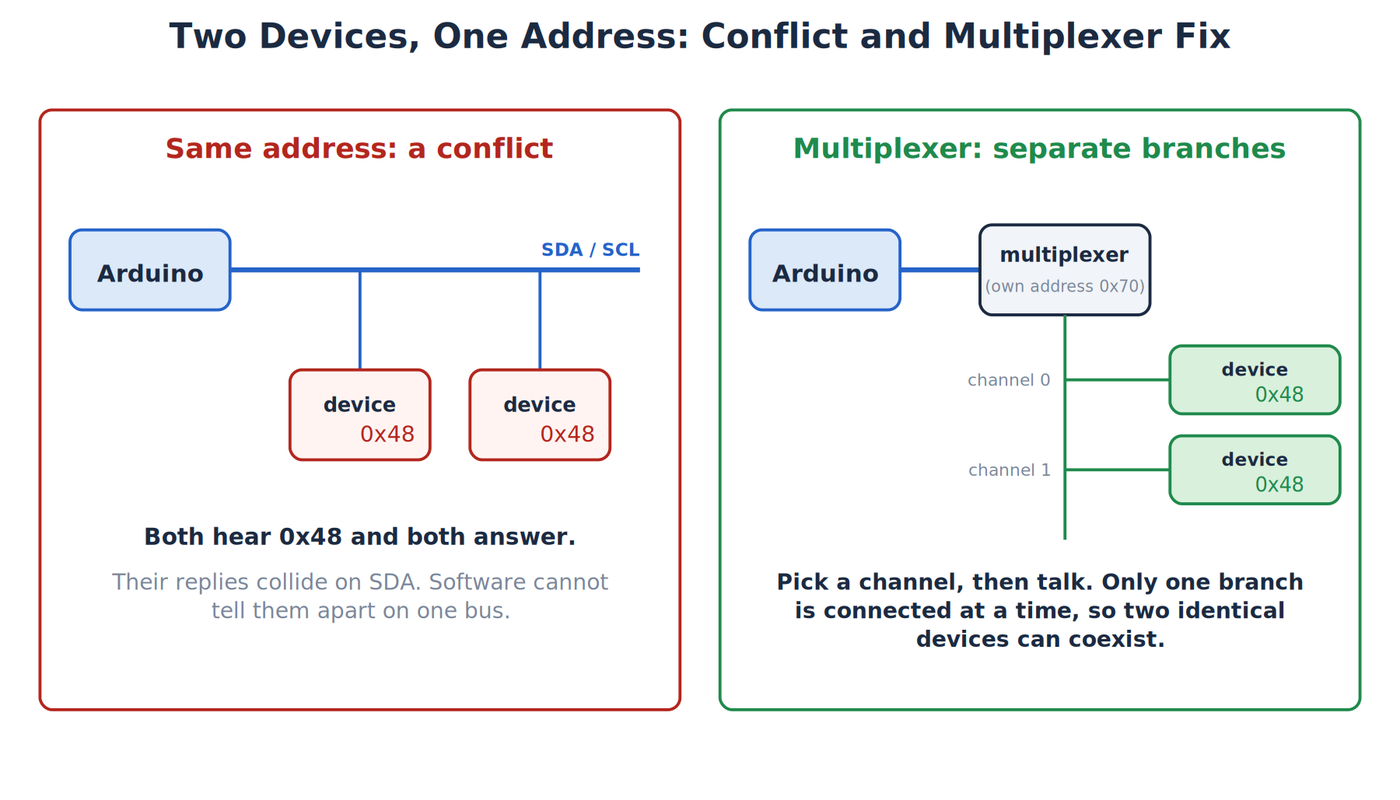
- Scan sensor A by itself at 0x48.
- Scan sensor B by itself at 0x48.
- Power down and connect both at 0x48.
- Scan again.
The scanner will often print one 0x48 entry, not two. A bus address identifies a transaction participant, not a count of physical boards. Both sensors may acknowledge together, and if their returned data differs they can corrupt a read.
Power down, change sensor B to 0x49, and scan again. Now two addresses appear and software can select each module. This exercise shows directly why each device on a bus needs a unique address.
Exercise 5A: Resolve a conflict with a multiplexer
An I2C multiplexer is an addressed device that connects the controller to one of several separate downstream buses, called channels. The popular TCA9548A has eight channels and an address from 0x70 to 0x77 set by three address pins. Two identical sensors at 0x48 can sit on different channels, because only the channel you select is connected to the controller at any moment.
To pick a channel, write one byte to the multiplexer in which each bit enables one channel:
void selectChannel(byte channel) {
  Wire.beginTransmission(0x70);   // Address the TCA9548A at its default address.
  Wire.write(1 << channel);       // Set one bit: bit 0 enables channel 0, bit 1 channel 1, and so on.
  Wire.endTransmission();         // Send the byte. The chosen channel is now connected.
}
After selectChannel(0);, a read of address 0x48 reaches the sensor on channel 0. After selectChannel(1);, the same address reaches the other sensor. The scanner finds the multiplexer at 0x70 and then finds the devices on whichever channel is selected, so scan each channel in turn. Each channel has its own pull-ups in practice, so account for them in the bus calculation. A multiplexer solves an address conflict at the cost of extra hardware and one more address in the sketch.
Exercise 6: Count the pull-ups
With power removed, use the module schematics or board markings to list every SDA and SCL pull-up. Calculate the parallel result. For two equal resistors, the result is half one value. For different values:
1 / Reffective = 1 / R1 + 1 / R2 + ...
Three 10kΩ pull-ups in parallel produce about 3.33kΩ. One 4.7kΩ and one 10kΩ produce about 3.20kΩ. The result must still meet every device’s low-level sink-current limit and the required rise time.
This is a planning calculation, not a command to desolder parts. If the bus works reliably within documented limits, unnecessary rework can create more problems than it solves.
Try the I2C Scanner in the Lab
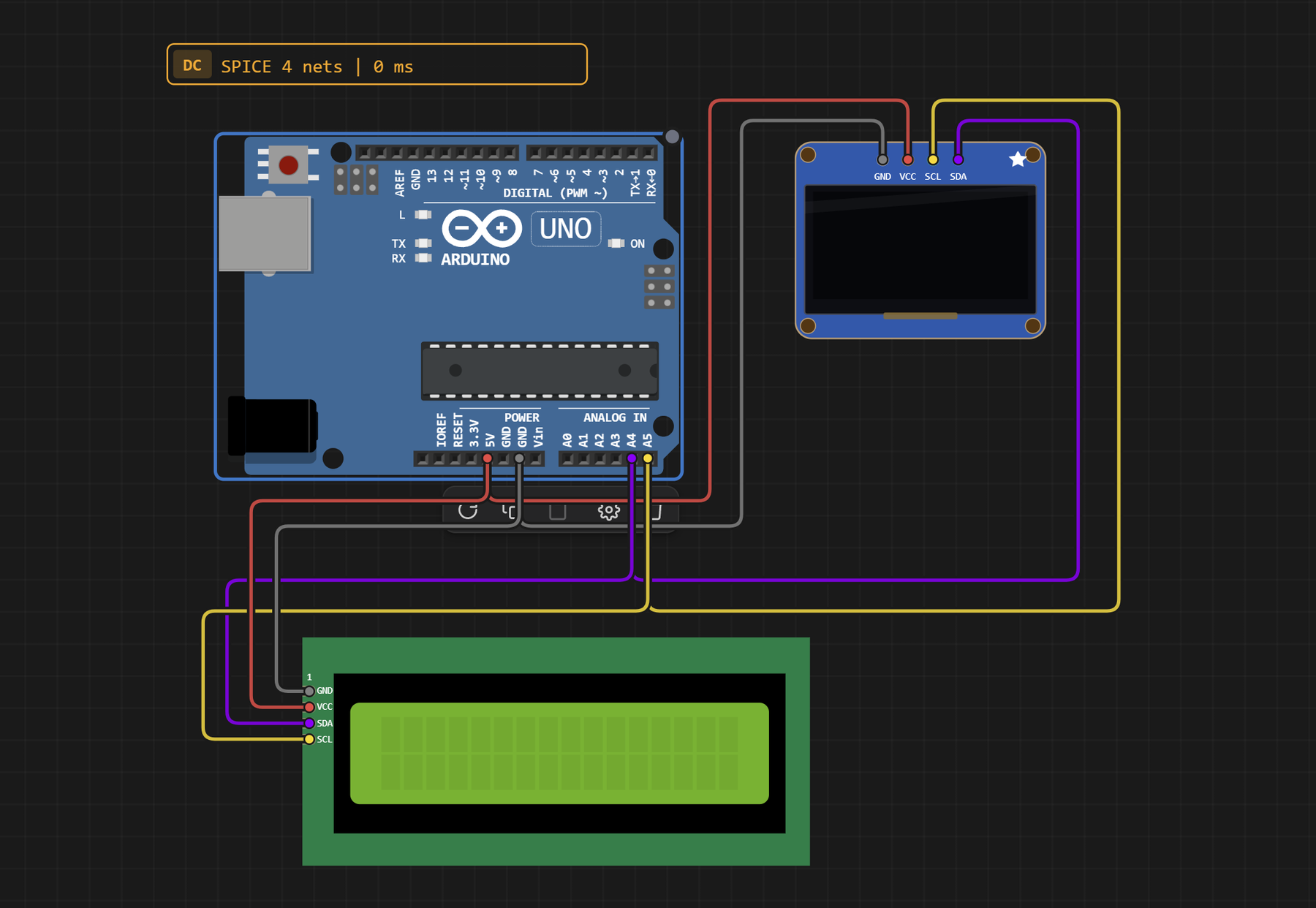
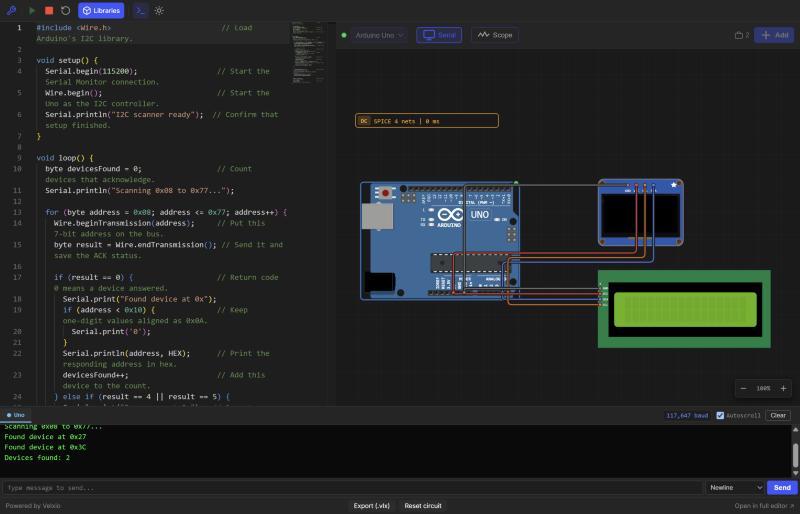
The Makers Workbench Electronics Lab can run the scanner from Exercise 2 on a simulated Uno R3 with two I2C peripherals at different addresses: an SSD1306 OLED display at 0x3C and a 16x2 LCD with an I2C backpack at 0x27. The Lab has no TMP102 model, so the temperature exercises and the project still need real modules. The simulated bus also works without pull-up resistors. A real bus needs them, as covered earlier in this part.
The Lab circuit is wired like this:
| From | To | Why |
|---|---|---|
| OLED SDA | Uno A4 | Shared data line |
| OLED SCL | Uno A5 | Shared clock line |
| OLED VCC | Uno 5V | Power |
| OLED GND | Uno GND | Common reference |
| LCD (I2C backpack) SDA | Uno A4 | Same data line as the OLED |
| LCD (I2C backpack) SCL | Uno A5 | Same clock line as the OLED |
| LCD (I2C backpack) VCC | Uno 5V | Power |
| LCD (I2C backpack) GND | Uno GND | Common reference |
To use the Lab:
- Press the green Run button. The first run compiles the sketch, so give it a few seconds.
- Open the Serial monitor above the circuit. It reads the same 115200 baud the sketch uses.
- Watch for
Found device at 0x27andFound device at 0x3C, followed byDevices found: 2. The scan repeats every five seconds.
Both peripherals share the same two wires, and only the address tells them apart.
Practical Project: Two-Point Temperature Monitor
What you will build
The project reads two separately addressed TMP102-compatible modules on one pair of signal wires. Place them at two points in a low-voltage project enclosure or on opposite sides of a breadboard and compare their readings.
Components needed
- Arduino Uno R3
- Two documented TMP102-compatible breakout boards with configurable, unique addresses
- Pull-ups appropriate to the modules and supply, accounting for any already on the breakouts
- Breadboard and jumper wires
Wiring
Wire both modules the way the Lab section wires its two peripherals: SDA to A4, SCL to A5, and shared power and ground. Configure one module for 0x48 and the other for 0x49 according to its own documentation. Power down before changing address straps. Do not connect a 3.3V-only breakout to 5V power or 5V pull-ups.
The sketch
Use the two-device sketch from Exercise 4. Upload the scanner first and record both detected addresses. Then upload the monitor sketch.
What is happening
Both sensors hear every START condition and address byte. Only the sensor whose 7-bit address matches acknowledges and participates in that transaction. The controller selects register 0x00, performs a repeated START, and requests two bytes. It repeats the same sequence for the second address.
That is the main benefit of an addressed bus: many peripherals share conductors, while software selects the intended participant.
The done test
The project is complete when the scanner reports both unique addresses and the monitor prints two plausible readings. Warm one sensor gently with a fingertip without stressing the board. Its reading should move while the other changes less.
Build and test sequence
- With power disconnected, configure sensor A for 0x48 and sensor B for 0x49 according to their documentation.
- Connect only sensor A. Power the circuit, run the scanner, and confirm 0x48.
- Power down. Remove A and connect only sensor B. Confirm 0x49.
- Power down again. Connect both SDA pins to A4, both SCL pins to A5, and both grounds to GND.
- Account for every onboard pull-up. Calculate the effective parallel resistance.
- Scan the combined bus. Do not proceed until both addresses appear on repeated scans.
- Upload the two-sensor monitor.
- Compare the readings, then warm one module gently and watch only that channel move first.
This staged sequence is slower than connecting everything at once, but each step has one expected result. When a result differs, you know which change introduced the problem.
Reading the output critically
Two plausible temperatures do not prove the sensors are correctly placed or calibrated. They prove that the register reads returned values that decode into a plausible range. Swap the modules physically while leaving their addresses unchanged in software. The A label should continue to follow address 0x48, not a position you assumed from the wiring.
Next, disconnect sensor B while the sketch runs. The monitor will print nan (short for “not a number”) for B, because the function returns NAN when the read fails and the loop prints whatever it gets back. A polished project would test isnan() for each result and print a clear error for that channel.
Keeping errors separate by address matters on a shared bus. One missing peripheral should not make a working sensor’s last value look like a current reading from both channels.
Adding a display later
A common next project puts a small I2C display on the same bus. The wiring rule stays the same, and the display needs its own unique address. The software now spends some bus time sending display-buffer data as well as reading sensors.
Do not add the display until the two-sensor monitor passes its done test. Scan after adding it, check the effective pull-up resistance again, and reduce how often the screen refreshes if sensor updates become sluggish. Large display transfers do not change the address rules, but they do consume shared bus time.
Troubleshooting
| Symptom | Likely cause | Check |
|---|---|---|
| Scanner finds nothing | SDA/SCL swapped, no common ground, no pull-ups, wrong power | Recheck A4/A5, GND, voltage, and effective pull-ups |
| Only one of two modules appears | Same address or one unpowered device | Scan separately, then configure unique addresses |
| Address appears but sensor code fails | Wrong register format or wrong chip assumption | Read the exact datasheet and library documentation |
| Intermittent data | Long wires, weak/strong pull-up combination, poor connection | Shorten wires, inspect connections, calculate effective pull-up |
| Bus stays low | Miswired or failed device, logic-level problem | Power down and disconnect devices one at a time |
| Code reports NACK | Device absent, wrong address, or not ready | Check scanner result and endTransmission() status |
Do not add stronger pull-ups blindly. Lower resistance increases sink current. Verify that every device can pull the line low and that logic-high voltage is safe for every connected part.
Reading Wire status codes
Return code 2 points toward the address phase: nothing acknowledged that address. Return code 3 means an addressed device acknowledged its address but rejected a later data byte. Code 1 points toward the local transmit buffer before a normal transaction can complete. Code 4 is a less specific bus error. Current AVR Wire implementations can also report timeout as 5.
Treat the code as a starting clue. Code 2 can result from a wrong address, an unpowered device, swapped wires, or incompatible voltage. It does not identify which physical cause occurred.
A line that stays low
Both SDA and SCL should idle high when the bus is powered and inactive. If either remains low, power down and inspect for a short or reversed connection. Then disconnect peripherals one at a time. An unpowered module can sometimes clamp a line through its input protection, and a peripheral interrupted mid-transaction can remain in an unexpected state.
For a beginner build, cycling power after correcting wiring is safer than inventing a bus-recovery sequence. Advanced systems may issue clock pulses and reinitialize the controller, but recovery cannot fix excessive voltage, a hard short, or two output circuits fighting each other.
Address present, data wrong
A scanner result does not validate a register conversion. Confirm the exact part number, register address, byte order, resolution mode, and signed-value format. Also check whether the device needs startup time or a configuration command before its first measurement.
If a library example works while raw code does not, compare the library source or datasheet transaction step by step. The library may set a mode, wait for conversion, or combine bytes differently.
Works alone, fails together
This usually points to an address conflict, power limit, pull-up combination, or bus capacitance. Confirm unique addresses with separate scans. Add the module currents and compare them with the supply capability. Calculate parallel pull-ups, shorten the wiring, and return to the default clock speed.
Safe Measurement on the Bus
A digital multimeter can check supply voltage and whether SDA or SCL is stuck near ground, but it is too slow to display individual I2C bits. Measure voltage with the meter in parallel and keep it out of current mode. Placing a meter configured for current from SDA to ground can short the line.
An oscilloscope can show edge shape and voltage levels. A logic analyzer can decode addresses and bytes. Both instruments add capacitance and share a ground connection with the circuit, so confirm their ratings and reference before attaching probes.
For a healthy idle bus, both signal lines sit high. During traffic, SCL pulses and SDA changes state. A slow-rising line looks rounded rather than reaching a clean high level quickly. That observation can support a pull-up or capacitance diagnosis, but the final values still come from the device timing limits.
Design Limits without the Advanced Detour
This lesson uses one controller, short wires, and modest speed. I2C can include clock stretching and more than one controller, but those cases add arbitration and timing details that do not help the first build.
The practical limit on device count is not simply “how many addresses exist.” Reserved addresses, fixed-address conflicts, capacitance, pull-up current, power, connector quality, and available bus time all reduce what is sensible. A dozen tiny breakout boards on long jumpers can fail electrically even though every address is unique.
Treat I2C as a short shared board-level bus. When a project grows, separate buses or a multiplexer can make troubleshooting and capacitance easier to manage.
Where This Fits in the Series
Part 11, UART: Serial Is a Bus, showed direct asynchronous serial links. This part adds a clocked, addressed bus for multiple peripherals. Part 13 moves to SPI, which uses more signal lines and a separate chip-select path for each peripheral.
Wrap-Up and What’s Next
I2C lets several peripherals share SDA and SCL because each transaction begins with an address. Open-drain outputs can pull the bus low, while pull-up resistors return released lines high. The Wire library handles the bit timing, but its return codes still tell you whether a device acknowledged. A scanner is the first diagnostic tool, but it reports addresses and does not identify the device. Once two devices have unique addresses and compatible voltage levels, the Arduino can select each one over the same two signal wires.
Next, we’ll compare this shared addressed bus with SPI and its chip-select lines.
Hack The World and Make Awesome.