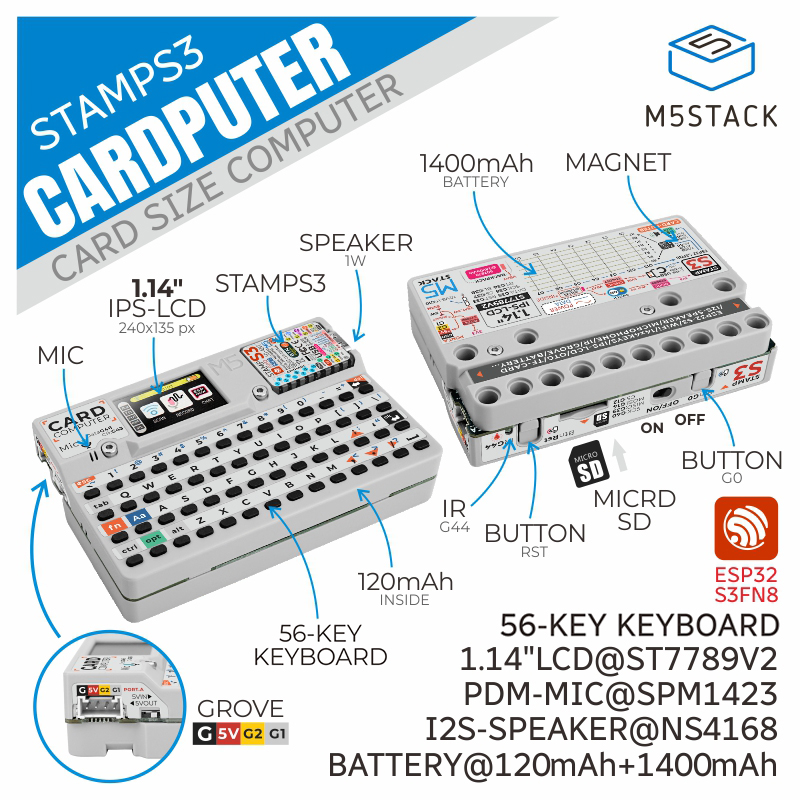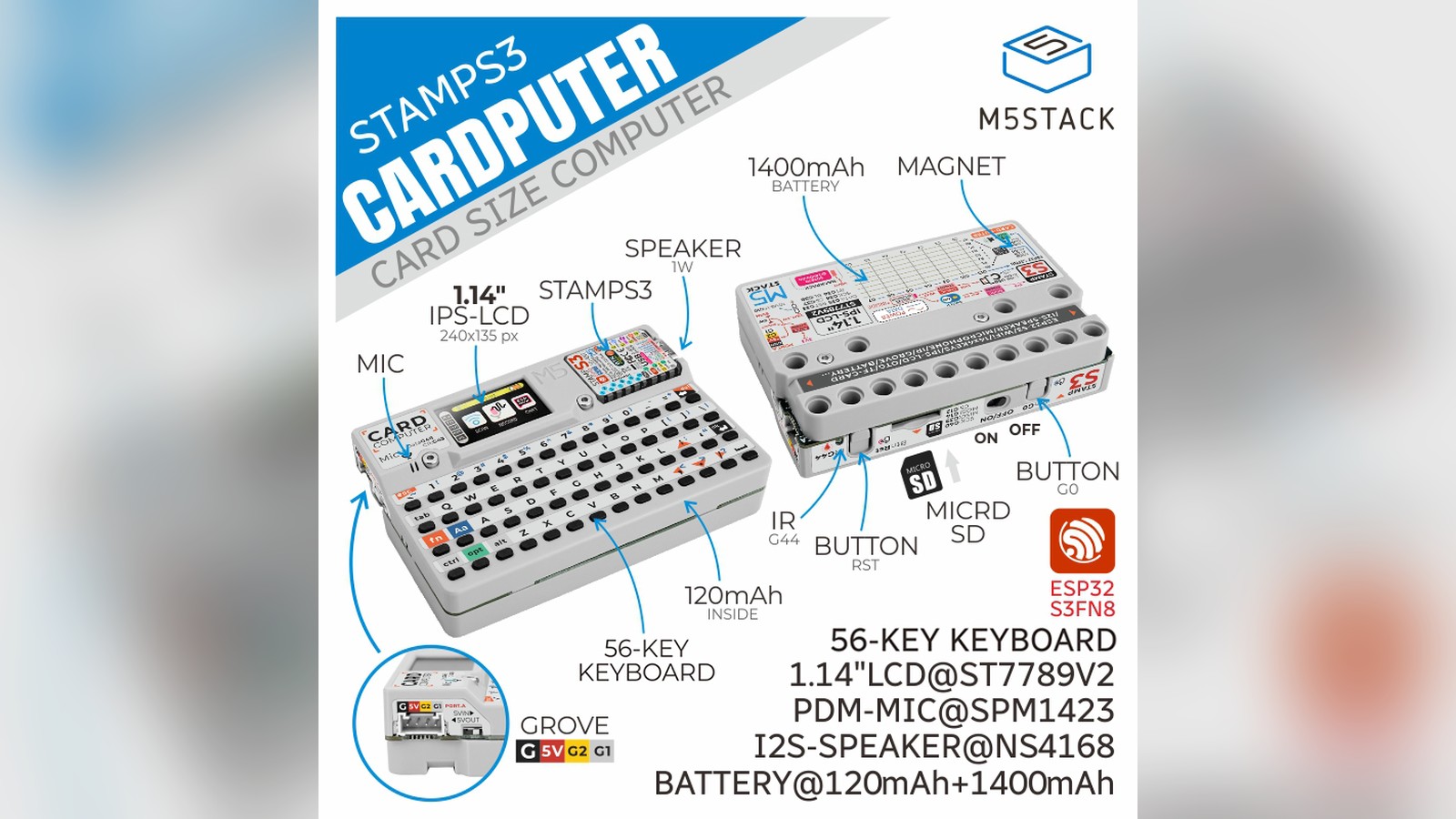
M5Stack's Cardputer turned the ESP32-S3 into a tiny keyboard-equipped computer in 2023. The credit-card-sized device combined a 56-key keyboard, 1.14-inch color display, microphone, speaker, infrared transmitter, microSD slot, Grove expansion, and rechargeable batteries around the company's removable Stamp-S3 controller.
It was neither a laptop replacement nor a conventional development board. Cardputer was a programmable handheld interface that could become a sensor terminal, remote control, portable menu system, text-entry device, network utility, or small game machine according to its firmware.
A keyboard changes the ESP32 experience
Many microcontroller projects can display information but cannot accept more than a few button presses. Adding text entry usually means connecting a computer, phone, or separate keyboard. Cardputer's 4-by-14 key matrix made local input part of the device.
The keyboard is compact, so it is better suited to short commands and messages than long documents. Even so, it changes what can be built. A user can enter Wi-Fi credentials, edit a value, search a list, send a short radio message, or operate a command menu without another screen.
The firmware scans the keyboard as a matrix. Rows and columns let many keys share fewer processor pins, with software determining which intersections are active. Applications should handle debouncing, simultaneous presses, modifier keys, and repeat behavior. A polished keyboard interface needs more than reading one key code at a time.
The small display uses a 240 by 135 pixel ST7789V2 panel. That resolution rewards dense but disciplined interfaces: a status bar, several text rows, and a simple menu can work well. Large desktop-style windows cannot. Clear focus indicators and shortcuts help because there is no touch input.
Stamp-S3 supplies the processor
Cardputer is built around M5Stack's Stamp-S3, using an ESP32-S3 with two Xtensa LX7 cores at up to 240MHz, 8MB of flash, Wi-Fi, Bluetooth Low Energy, and native USB functions. The module sits within the front assembly and can be removed, although M5Stack warns that the display's flexible cable and connector require care during disassembly.
The ESP32-S3 is capable of graphics, networking, audio control, storage access, and peripheral communication, but it remains a constrained microcontroller. Applications should budget RAM carefully, particularly when combining wireless stacks, screen buffers, files, and audio.
Native USB opens useful terminal and human-interface projects. Depending on firmware, the device can communicate with a host computer or present supported USB device classes. Any keyboard-emulation feature should be used only on systems the owner controls and with visible confirmation before sending keystrokes.
Wi-Fi and Bluetooth make Cardputer a portable interface for local devices. Radio performance depends on orientation, the user's hands, nearby electronics, and the enclosure. Test the final use position, especially if the device is expected to communicate from a pocket or against a metal panel.
Audio, infrared, and storage broaden the uses
An SPM1423 digital MEMS (micro-electromechanical system, a tiny sensor etched directly onto a silicon chip) microphone supports recording and wake-word experiments, while a small I2S-driven speaker provides alerts and playback. I2S is a digital connection commonly used to move audio samples between chips.
The tiny acoustic path sets realistic limits. It is appropriate for prompts, tones, compact speech, and sound experiments, not high-fidelity listening. Enclosure resonance and handling noise affect recordings. Voice applications should be tested at the intended distance and in the expected background noise.
The infrared emitter can transmit commands to compatible televisions, appliances, cameras, and other equipment. Infrared usually requires line of sight, and protocols differ between manufacturers. A learning or database-driven remote should clearly identify the selected device to avoid sending unintended commands.
The microSD slot adds room for logs, assets, scripts, and media beyond internal flash. Removable storage makes it easy to exchange files, but firmware should cope with a missing card, unsupported formatting, or power loss during a write.
These components make Cardputer feel more like a pocket tool than a board. One firmware might log a Grove sensor to the card. Another might display serial data. A third could use infrared and a local menu as a custom remote.
Battery design favors portable experiments
M5Stack specified a 120mAh battery in the main unit and a 1,400mAh battery in the base. Charge, boost, and buck circuits manage the different power needs, while a side switch controls operation. The documentation instructs users to leave the switch on while charging.
Runtime depends heavily on screen brightness, radio activity, audio, processor load, and connected sensors. A calculation based only on battery capacity and an ideal sleep current can be misleading. Measure current in every application state, including startup and network reconnection.
Portable projects should expose battery state and save important data before shutdown. Deep sleep can extend standby time, but waking a full interface and reconnecting Wi-Fi may consume more energy than expected. An application used for a few minutes at a time needs a different strategy from an unattended logger.
The magnetic base and LEGO-compatible mounting holes encourage temporary installations. Magnets can affect compasses and some nearby equipment, so placement deserves thought when Cardputer is used with magnetic sensors or sensitive instruments.
Grove keeps the handheld connected to hardware
The four-pin HY2.0 Grove port exposes power and two programmable signals commonly used for I2C devices. A keyed cable provides a tidier link to sensors than loose jumpers, letting Cardputer act as the screen and keyboard for an external measurement.
Possible combinations include temperature monitors, air-quality samplers, RFID (radio-frequency identification, the short-range tag-reading technology used in access badges and inventory tags) interfaces, small radio modules, and machine-status terminals. The port does not make every Grove accessory automatically compatible. Check voltage, protocol, pin assignment, current, and library support.
Because Cardputer is handheld, cable strain is important. Secure an external module or use a flexible lead so the small connector does not carry the weight of the project. For a permanent tool, a purpose-built bracket is better than leaving a sensor dangling.
Several development routes support experimentation
M5Stack documents Arduino IDE, UIFlow2, ESP-IDF, and PlatformIO workflows. Arduino and PlatformIO provide familiar C++ development. ESP-IDF exposes Espressif's lower-level framework. UIFlow2 offers visual blocks and MicroPython-oriented programming for rapid prototypes.
The best starting point is the official keyboard and display example. Confirm every key, screen orientation, speaker, and card before combining them. Pin assignments are specific to Cardputer, and a generic ESP32-S3 sketch may conflict with internal hardware.
Third-party firmware already circulates for many ESP32-class boards, so users should distinguish official tools from third-party images. Review source code and permissions where possible, download from trusted project pages, and use wireless or security-testing functions only on owned or explicitly authorized systems.
Keeping a known-good factory image and recording the flashing procedure makes experimentation less risky. A portable tool is much more enjoyable when recovery is routine.
A practical first terminal project
Build a local sensor notebook. Connect a temperature and humidity unit through Grove, show the current values, and let the keyboard add a short observation such as "window opened" or "fan started." Save each measurement and note to a timestamped CSV file, a plain-text format that stores rows of data as comma-separated values so any spreadsheet program can open it later.
Add a menu for sampling interval, screen brightness, and file selection. Use the speaker for a gentle threshold alert and allow the keyboard to acknowledge it. The project exercises the elements that make Cardputer distinctive without demanding continuous internet service.
Test a full battery cycle, card removal, invalid sensor reading, and sudden power interruption. Keep notes short and sanitize commas or line breaks so the CSV stays readable. Once local operation is reliable, Wi-Fi can upload summaries or set the clock.
Why Cardputer stands out
Cardputer packages familiar ESP32 capabilities into a form that invites software personalities. A board on a bench looks like a component. A pocket device with a keyboard, screen, battery, sound, storage, and infrared looks like something waiting to become a tool.
Its constraints are part of the appeal. The screen and keyboard force focused interfaces, while the microcontroller encourages efficient programs. The expansion port and removable storage keep it from being a closed gadget.
Cardputer establishes the idea: a small, affordable, fully programmable computer can be useful precisely because it is not trying to replace a laptop.
I'd try the sensor-notebook idea from this article. A tiny keyboard and screen turn a bare ESP32 into something you'd actually carry around.
Sources and image credits
- M5Stack Cardputer documentation, M5Stack, 2023.
- Official M5Stack product image of the Cardputer, M5Stack official documentation image.
- Square and vertical crops are edited from the same source image.