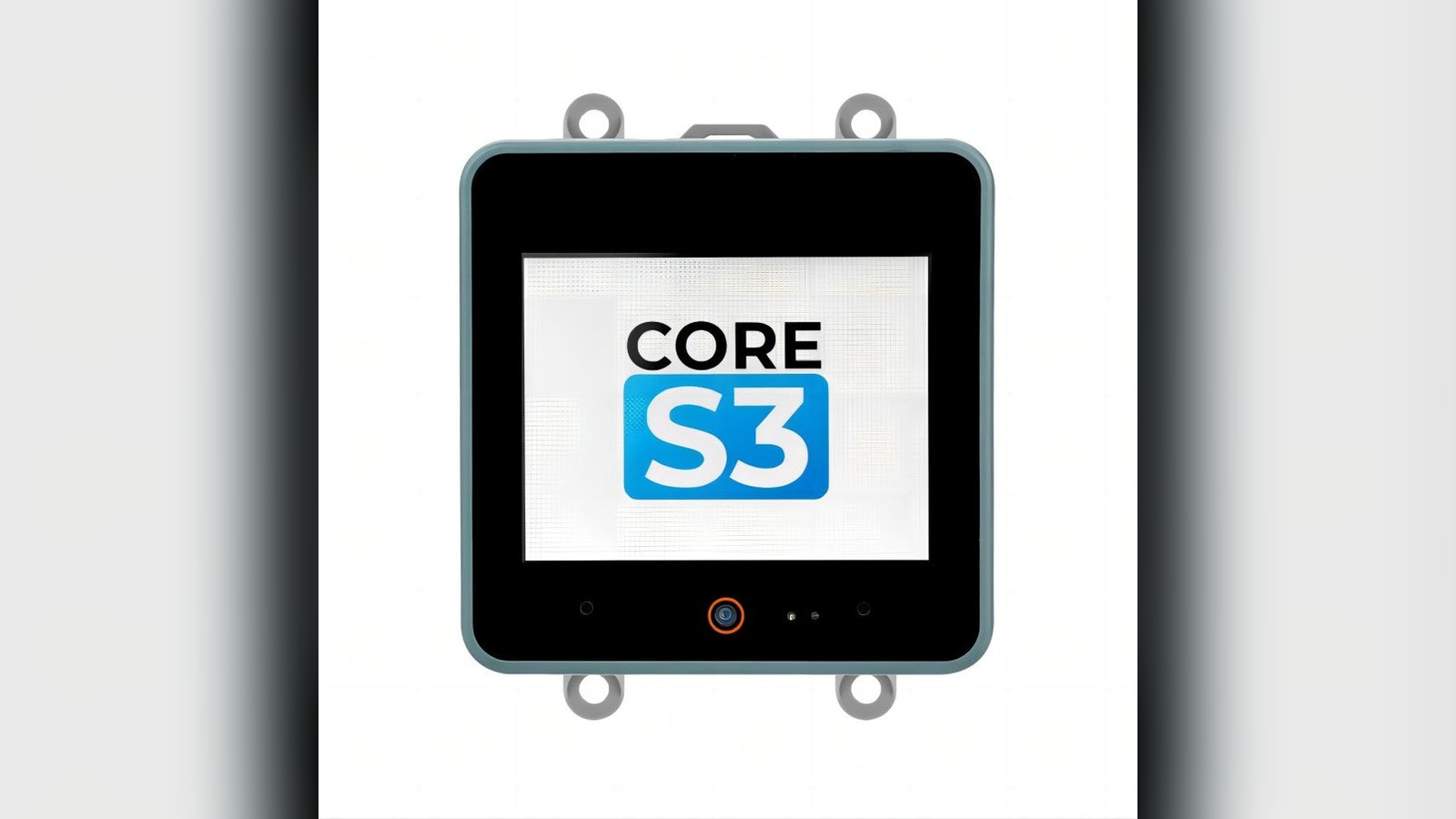
M5Stack launched CoreS3 in May 2023 as the third generation of its flagship Core controller. The familiar five-centimeter-square enclosure now contained an ESP32-S3, a 2-inch capacitive touchscreen, camera, dual microphones, speaker, motion and magnetic sensors, light and proximity sensing, a real-time clock, microSD storage, and USB On-The-Go support.
That list explains the Core idea better than the processor alone. M5Stack was selling a small programmable device that already had the pieces normally collected around a development board. It could move from a desk prototype to a mounted controller without first requiring a custom display board, audio circuit, enclosure, and cable system.
ESP32-S3 provides the new foundation
CoreS3 uses Espressif's ESP32-S3, with two Xtensa LX7 processor cores running at up to 240MHz. It includes 2.4GHz Wi-Fi and Bluetooth Low Energy, along with vector instructions that accelerate repeated arithmetic used in signal processing and small machine-learning workloads.
The S3 does not turn the Core into a desktop computer. It remains a microcontroller, designed for predictable embedded tasks with limited memory and power. Its advantage is integration. A single chip can run a graphical interface, communicate with sensors, control equipment, and connect to a network.
For makers coming from an original ESP32 board, the upgrade is most visible in USB and multimedia projects. Native USB supports device and host-oriented workflows, subject to software and power limits. The vector extensions make compact vision and audio models more practical. The processor also benefits from the large ESP32 software ecosystem.
Wireless projects still need careful design. The final mounting location, nearby metal, stacked modules, and cables can affect antenna performance. Test Wi-Fi and Bluetooth in the actual enclosure and orientation rather than assuming an open-bench result will carry over.
A screen and sensors arrive as one system
The 2-inch 320 by 240 display uses a capacitive touch panel. Capacitive touch detects a finger through changes in an electric field, allowing a glass surface and multi-touch interaction rather than the pressure-sensitive layer found on older resistive screens.
That resolution is enough for status panels, controls, small graphs, and setup screens. It is not generous by phone standards, so layouts should use large targets, short labels, and clear hierarchy. A local display is particularly useful when a device must show network state, sensor values, or an error without requiring a phone.
CoreS3 also includes a GC0308 camera, dual microphones, an audio codec and amplifier, and a one-watt speaker. This creates a complete path for image capture, voice input, alerts, and audio playback. Camera and audio buffers consume memory quickly, so applications should choose resolution, sample rate, and buffer size together.
The BMI270 inertial sensor measures acceleration and rotation, while the BMM150 magnetometer measures magnetic field. A real-time clock maintains time, and the LTR-553 combines ambient-light and proximity sensing. These devices support orientation-aware controls, activity logging, timed operation, and interfaces that respond to nearby users.
Every integrated sensor has placement constraints. The magnetometer can be disturbed by speakers, magnets, and current. The microphone hears the enclosure and mechanical vibration. The light sensor sees the local panel environment. Calibration should happen in the assembled system.
USB OTG broadens the controller role
USB On-The-Go, usually shortened to USB OTG, allows a device to take either the peripheral or host role when the hardware and software configuration supports it. A CoreS3 can appear as a device to a computer for programming and communication, while host applications can interact with selected USB peripherals.
Host mode requires attention to power. A connected peripheral may draw more current than the controller or its supply can safely provide. Developers should confirm the cable, role-selection behavior, current budget, and software driver before treating a USB accessory as part of a dependable product.
The microSD slot provides removable storage for logs, media, configuration, or interface assets. Cards are convenient but not immune to corruption. Avoid sudden power loss during writes, select reputable media, and design recovery behavior for a missing or damaged filesystem.
Together, USB and microSD make CoreS3 useful as a portable data terminal. It can collect sensor information, store it locally, present a summary, and transfer or upload it later.
The stackable format remains the differentiator
CoreS3 preserved M5Stack's M-Bus expansion system. Modules can add communications, positioning, I/O, prototyping, motors, or other specialized functions beneath the controller. Grove ports provide keyed four-wire connections for external units and sensors.
This is different from a bare development board. The enclosure, screen, power system, and expansion mechanics are already coordinated. A builder can explore a concept with relatively little wiring and replace a module when requirements change.
The included DinBase strengthens the industrial and installation angle. DIN rail is the metal mounting system commonly used inside electrical-control cabinets. The base can also mount to a wall or flat surface and provides additional Grove and M-Bus access.
Stacking is not free. Every module adds height, connections, power demand, and possible heat. A mobile assembly needs mechanical support, while a control cabinet needs appropriate spacing and wiring practice. Check module compatibility and current requirements before building a tall stack.
Software offers several entry points
M5Stack supports CoreS3 through Arduino tools and UIFlow. Arduino gives developers C++ libraries and the familiar setup-and-loop model. UIFlow provides visual blocks and MicroPython-oriented workflows that can shorten initial hardware experiments.
Visual programming is not limited to children. It can be an efficient way to verify a sensor, sketch an interface, or demonstrate a process before committing to an application architecture. Text code becomes more attractive as projects need version control, custom libraries, detailed testing, or larger teams.
Whichever tool is used, start by validating one subsystem at a time. Draw a screen, read touch coordinates, capture a short audio sample, inspect sensor values, and test storage separately. A factory demo proves the hardware can operate, but it does not establish that a new program manages every shared bus and resource correctly.
Pay attention to firmware versions and pin assignments. Integrated products often share internal interfaces, and a generic ESP32-S3 example may assume pins that CoreS3 uses for its screen or sensors. M5Stack's board definitions and libraries encode those details.
A practical first CoreS3 project
A room-monitoring controller is a useful starting point. Connect a temperature and humidity unit through Grove, then show the current readings on the touchscreen. Add a settings page for sampling interval and alert limits.
Write timestamped data to microSD and display a clear card or storage error. Use the light sensor to adjust screen brightness and the proximity sensor to wake the interface when someone approaches. Add Wi-Fi only after local recording works reliably.
Next, publish a slower summary to a local dashboard while keeping the complete log on the card. Test network loss, a full card, power interruption, sensor disconnection, and an incorrect clock. Those failure cases turn a pleasant demo into a useful instrument.
If the system will be mounted, finish the test in the DinBase and intended enclosure. Measure temperature, radio range, touch usability, and cable strain. The convenience of integrated hardware should be matched by equally integrated validation.
Why CoreS3 matters
CoreS3 shows how M5Stack's Core concept has matured. The device is still approachable as an ESP32 development platform, but it arrives much closer to a complete product than a conventional board.
Its camera, audio path, sensors, touch display, storage, USB, power management, and modular expansion create many possible applications. The real value is not using all of them at once. It is having a coherent, enclosed platform from which a builder can choose the functions a project needs.
For dashboards, portable instruments, smart-home controls, machine interfaces, and rapid connected prototypes, that can remove weeks of early hardware integration. CoreS3 makes the modern M5Stack ecosystem understandable in a single small box.
I'd use it for a small room-monitor project first and test the failure cases early: a full card, lost Wi-Fi, and a power cut.
Sources and image credits
- M5Stack unveils CoreS3, M5Stack, 2023.
- M5Stack CoreS3 documentation, M5Stack, 2023.
- Official M5Stack launch image of the CoreS3 controller, M5Stack official news image.
- Square and vertical crops are edited from the same source image.