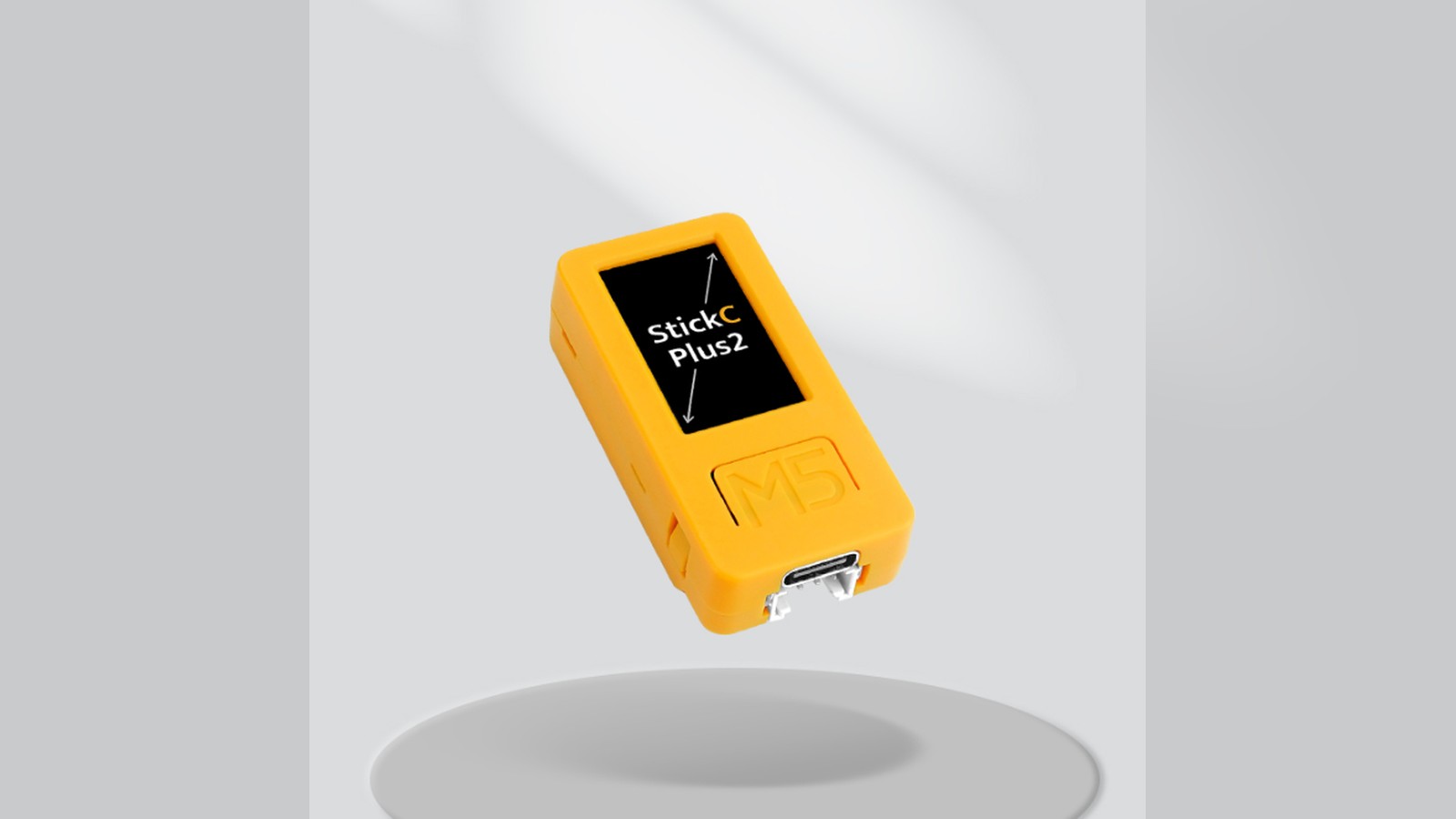
M5Stack refreshed its smallest handheld controller with the M5StickC Plus2 in October 2023. The compact device retained the appeal of the Stick family: an ESP32 computer, color screen, buttons, motion sensor, microphone, infrared transmitter, real-time clock, battery, and expansion connections in a pocket-sized enclosure.
Plus2 focused on practical revisions rather than changing the idea. M5Stack increased battery capacity, updated the USB-to-serial interface, and improved wireless and infrared performance. The result remains a rapid-prototyping device that can serve as a remote, wearable display, sensor interface, timer, or compact control panel.
The finished enclosure is the main feature
A normal ESP32 development board needs a screen, buttons, battery circuit, case, and wiring before it can be carried comfortably. M5StickC Plus2 includes those pieces from the start. That changes the first question from "how do I package this?" to "what should it do?"
The 1.14-inch TFT (thin-film-transistor, the common type of LCD panel found in most small color screens) display is small but useful for numbers, icons, menus, and short graphs. A limited display encourages interfaces with one clear purpose. Status colors, large readings, and button shortcuts work better than shrinking a desktop dashboard.
Physical buttons provide input without a touchscreen. Applications should use short presses, long presses, and combinations consistently, then show visible feedback so users know what happened. A pocket device also needs a way to lock controls or ignore accidental presses.
The case protects the electronics and exposes standard M5Stack expansion points. It is not automatically waterproof, impact-rated, or safe for harsh industrial environments. Makers should add an appropriate outer enclosure when moisture, dust, or mechanical abuse is expected.
ESP32 connectivity supports remotes and interfaces
M5StickC Plus2 uses an ESP32-PICO-V3-02 package, which integrates the original dual-core ESP32 architecture with flash and supporting components in a compact module. It provides 2.4GHz Wi-Fi and Bluetooth, giving the handheld routes to local dashboards, phones, sensors, and network services.
This is important because the device is often an interface rather than the central computer. It can show a Home Assistant value, send a command to another ESP32, configure equipment over a local link, or report a nearby sensor.
Wireless convenience comes with power and reliability costs. Wi-Fi reconnection can draw substantial peak current and take time. Bluetooth behavior depends on the selected mode and phone platform. Applications should show whether they are connected and continue safely when the link disappears.
M5Stack described improved Wi-Fi performance in the Plus2 revision. Radio range still needs testing in the final use case. A hand wrapped around a tiny enclosure and a device mounted against metal can behave differently from a unit on an open desk.
Motion, sound, and infrared are built in
An onboard inertial measurement unit, or IMU, measures acceleration and rotation. It can detect orientation, movement, taps, or gestures. Wearable projects can use it to wake the display, count broad activity, or change screens when the device turns.
Raw IMU data includes vibration, gravity, bias, and noise. A reliable gesture normally needs thresholds, timing, and filtering rather than one measurement. Test with different users and mounting positions, and avoid treating a hobby device as a certified medical or safety instrument.
The microphone enables sound-level displays, event triggers, and simple audio experiments. It records the local acoustic environment, including case vibration and handling noise. Privacy should be considered whenever a device can capture audio, even if the intended program only calculates a level.
An infrared emitter can control compatible appliances and consumer electronics. Infrared communication is directional and protocol-specific. Improved output can increase practical range, but the transmitter still needs to face the receiver. Only send commands to equipment the user owns or is authorized to operate.
These integrated functions let one device test several interaction styles. A button, wrist motion, sound event, wireless message, or timer can all trigger a visible or infrared response.
The larger battery helps, but measurement still matters
The Plus2 increased its internal battery relative to the earlier model. More capacity is welcome in a screen-and-radio device, yet runtime cannot be inferred from capacity alone. Display brightness, processor frequency, Wi-Fi traffic, speaker use, attached sensors, and sleep strategy all contribute.
A practical application should measure current in active, idle, and sleep states. It should also test the transition between them. A device may sleep efficiently but spend too long with the display and radio active after each wake.
Battery voltage should be shown in a useful form, with enough margin to save settings and shut down cleanly. Repeated deep discharge can shorten cell life. Charging behavior, cable quality, and enclosure temperature deserve attention if the unit will remain connected for long periods.
The Plus2 revision changed some power-management behavior compared with its predecessor. Firmware and instructions written for the original StickC Plus should not be assumed to behave identically. Use board-specific libraries and verify power-on, power-off, wake, and charging states.
RTC and expansion support unattended work
A real-time clock, or RTC, keeps calendar time separately from the main processor and can support scheduled wake-ups. That is useful for a portable logger that samples periodically or a controller that must perform a task at set times.
Clock accuracy and backup behavior should be tested. If Wi-Fi is available, network time can correct drift. If it is not, record the expected error over the deployment period. Store timestamps in Coordinated Universal Time when data will cross time zones or daylight-saving changes.
The Grove connector lets the Stick communicate with compatible external sensors and modules through a keyed cable. HAT accessories, small add-on boards that stack directly on top of the device (the name is borrowed from the Raspberry Pi world's "Hardware Attached on Top" boards), can add purpose-built hardware around the small enclosure. Voltage, protocol, current, and mechanical compatibility still need checking.
A portable sensor should secure its cable and module. The connector is convenient, but it should not support a heavy dangling board. A clip, strap, or small bracket makes the project safer and easier to use.
Programming routes fit beginners and experienced makers
M5Stack supports Arduino, UIFlow2, and MicroPython-style development for the platform. UIFlow2 can quickly connect buttons, display elements, sensors, and network actions. Arduino provides C++ libraries and more direct control over application structure.
Start with the official board selection and examples. Confirm screen orientation, buttons, IMU axes, microphone input, RTC, infrared output, and battery reading separately. Generic ESP32 sketches may use pins already assigned to built-in hardware.
Third-party firmware can add interesting capabilities, including wireless-analysis tools. Such software should come from a trusted repository and be used only on owned or explicitly authorized systems. A low-cost handheld does not change the legal or ethical boundary around testing networks and devices.
Keep a recovery path. Save the official flashing tool, a known-good image, and the button sequence for download mode before experimenting. This turns a failed firmware build into a routine reset instead of a dead-end.
A useful first project: a pocket status remote
Connect the M5StickC Plus2 to a local automation server over Wi-Fi. Display one large value, such as workshop temperature, printer status, or whether a door is open. Use the main button to move through pages and another input to send a clearly labeled command.
Use the IMU to wake the screen when the device is lifted, then turn it off after a short idle period. Add an infrared page for one owned appliance. Keep network and infrared actions separate so a button cannot trigger the wrong system.
Show connection state and the time of the last successful update. If the server is unavailable, keep the previous value but mark it as stale. Test weak Wi-Fi, a restart, an empty battery, and repeated button presses.
This small project uses the display, buttons, motion sensing, battery, radio, and infrared without requiring external hardware. It also reveals the interface decisions that matter in a tiny device.
Why the Plus2 refresh matters
M5StickC Plus2 is a focused update to a useful form factor. It does not chase a large screen or maximum processing power. It preserves a tiny programmable object that is already enclosed, powered, interactive, and connected.
That makes it valuable for proving an idea quickly. A maker can carry a sensor display, build a custom remote, attach a Grove unit, or test a wearable interaction before designing dedicated hardware.
The small screen and battery impose limits, but those limits encourage clear, single-purpose tools. For many embedded projects, that is a better starting point than another bare board waiting for a case.
I'd build the pocket status remote described here. It uses almost everything on the board, and it teaches you a lot about tiny-screen design.
Sources and image credits
- All you need to know about StickC Plus2, M5Stack, 2023.
- M5StickC Plus2 product page, M5Stack, 2023.
- Official M5Stack image of the M5StickC Plus2, M5Stack official blog image.
- Square and vertical crops are edited from the same source image.