The processor gets most of the attention when a computer feels fast, but memory often decides how much useful work it can keep open at once. A powerful processor with too little random-access memory spends time unloading data, compressing it, or moving it to much slower storage.
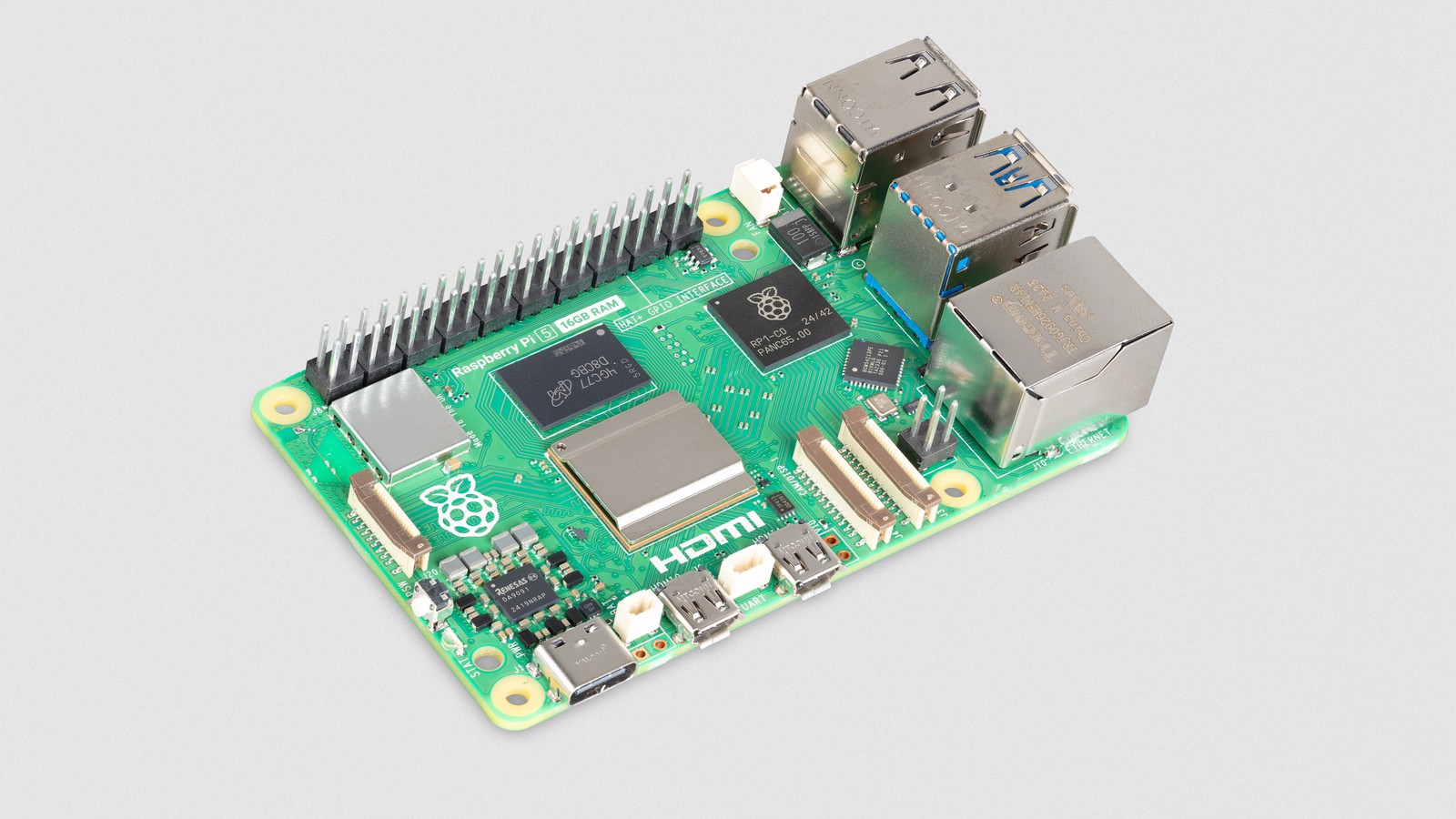
Raspberry Pi addressed that ceiling on January 9, 2025, by launching a 16GB version of Raspberry Pi 5 for $120. It joined the existing 2GB, 4GB, and 8GB models with the same core board architecture and twice the memory of the previous largest version.
The new capacity did not make the processor itself faster. It made larger working sets practical. A working set is the code and data an application needs readily available while it runs. Local artificial intelligence, scientific computing, development tools, databases, virtualized services, and heavy desktop use can all benefit when that working set remains in memory.
How did Raspberry Pi fit 16GB on the board?
Raspberry Pi 5 uses Broadcom's BCM2712 application processor. An application processor is a chip designed to run a full operating system such as Linux, rather than one small embedded program. Its four Arm Cortex-A76 CPU cores provide a substantial performance increase over Raspberry Pi 4.
The optimized D0 revision of BCM2712 supports memory capacities larger than 8GB. Micron supplied a package containing eight 16-gigabit LPDDR4X dies, giving the board 16 gigabytes in one memory package. LPDDR4X is a low-power memory technology commonly used in compact computers and mobile devices.
That single-package arrangement is what lets Raspberry Pi keep its familiar board size. There is no row of desktop memory sockets. The memory is soldered beside the processor and cannot be upgraded later, so the capacity has to be chosen when the board is purchased.
What does more memory improve?
The clearest improvement is running several memory-hungry jobs together. A developer can keep a browser with many tabs open beside a large code editor, compiler, local database, and containers. A container packages an application and its dependencies into an isolated environment. Each service consumes memory even when its processor use is modest.
Servers also benefit. A home automation system, database, file-sharing service, and monitoring stack can share one Pi without competing as aggressively for RAM. More memory can be used as filesystem cache, where Linux keeps recently accessed storage data ready for faster reuse.
Scientific software may need to hold large grids, matrices, or simulation states. Raspberry Pi specifically cited computational fluid dynamics, which numerically models the motion of liquids and gases. A problem that exceeds available RAM may slow dramatically or fail, even if the CPU could otherwise complete it.
Heavy Linux distributions such as Ubuntu can use the extra space for desktop applications and background services. Raspberry Pi OS is designed for a relatively small base footprint, so a light desktop and a few programs will not automatically use 16GB.
Why is 16GB useful for local AI?
A local AI model runs on the Raspberry Pi instead of sending every request to a remote server. The model's parameters, temporary calculations, application code, and input data all need memory.
Parameters are the learned numerical values that determine how a model transforms input into output. More parameters generally require more storage and RAM. Quantization reduces memory use by representing those values with fewer bits. It can make a model smaller and faster, sometimes with a loss of quality.
Sixteen gigabytes does not turn Raspberry Pi 5 into a high-end AI workstation. The board still has limited CPU performance and memory bandwidth compared with a modern desktop graphics card. Memory bandwidth describes how quickly data can move between memory and the processor.
The larger model helps when memory, rather than compute speed, was the immediate blocker. A compact language model may fit comfortably with room for the operating system and application. Image models can use larger inputs or keep several components loaded. Developers can experiment without the system constantly swapping data to storage.
Swap is disk space used as an overflow area when RAM is full. It prevents some crashes, but an SD card or SSD is far slower than main memory. Heavy swapping can make an application feel frozen and can add writes to flash storage.
When does 16GB not help?
A simple kiosk, DNS server, media player, sensor gateway, or small Python project may run perfectly on 2GB or 4GB. Unused memory does not make a program faster. Buying the largest board for every project wastes money and can make replacement planning harder.
Processor-bound work will still be processor-bound. If all four CPU cores are already occupied with calculation, additional memory will not shorten the job unless memory pressure was slowing it. Storage-bound work may need a faster SSD, not more RAM. Network-bound services may be limited by the connection.
AI inference may benefit more from a dedicated accelerator than from another 8GB of system memory. An accelerator is hardware designed to perform the repeated mathematical operations used by neural networks efficiently. Raspberry Pi's AI HAT products provide that kind of processing for supported workloads.
The practical rule is to measure. Linux tools can report used memory, available cache, swap activity, processor load, and input/output waits. If an 8GB system rarely approaches its limit, 16GB will probably not change the experience.
What else does a heavy workload need?
Cooling comes first. Raspberry Pi 5 can reduce its clock speed when the processor becomes too hot, a behavior called thermal throttling. Long compilations, simulations, and AI workloads should use an Active Cooler or a well-designed fan case.
Power needs attention too. A reliable 5-volt supply and a good cable prevent low-voltage events when the board and attached USB devices draw current. Storage should match the workload. An NVMe (Non-Volatile Memory Express) solid-state drive connected through the Pi 5's PCI Express interface is a better choice than a basic microSD card for databases, containers, and frequent builds.
PCI Express, or PCIe, is a high-speed interface used for storage and other peripherals. Raspberry Pi 5 exposes one lane through a small connector, so an adapter board is required for an NVMe drive.
Backups become more important as one board takes on more roles. More memory makes consolidation possible, but a single failure can then interrupt several services. Keep configuration under version control, back up application data, and document how the system can be rebuilt.
Who is the 16GB model for?
The new model makes the most sense for developers, researchers, server builders, and experimenters who can already describe why 8GB is limiting them. It also expands Raspberry Pi's position as a compact desktop and development computer, not only a teaching board.
For first-time buyers, capacity should follow the workload. Four or eight gigabytes remains a strong general-purpose choice. Sixteen gigabytes is valuable when a project uses virtual machines, many containers, a large database, scientific datasets, or local models that would otherwise force the system into swap.
The important change is headroom. Raspberry Pi 5 already has enough processor performance to attempt jobs that earlier models made impractical. The 16GB version removes a second constraint and lets developers keep larger workloads resident. It does not replace a workstation, but it opens up more of the work this small computer can take on without immediately running out of room.
I'd only buy the 16GB board if I could point to the job that was running out of memory on 8GB. For most projects, the cheaper boards still do the work.
Sources and image credits
- Raspberry Pi announcement: 16GB Raspberry Pi 5
- Raspberry Pi 5 product information
- Official product image from Raspberry Pi's launch article, credited to Raspberry Pi Ltd.
- Square and vertical crops are edited from the same source image.