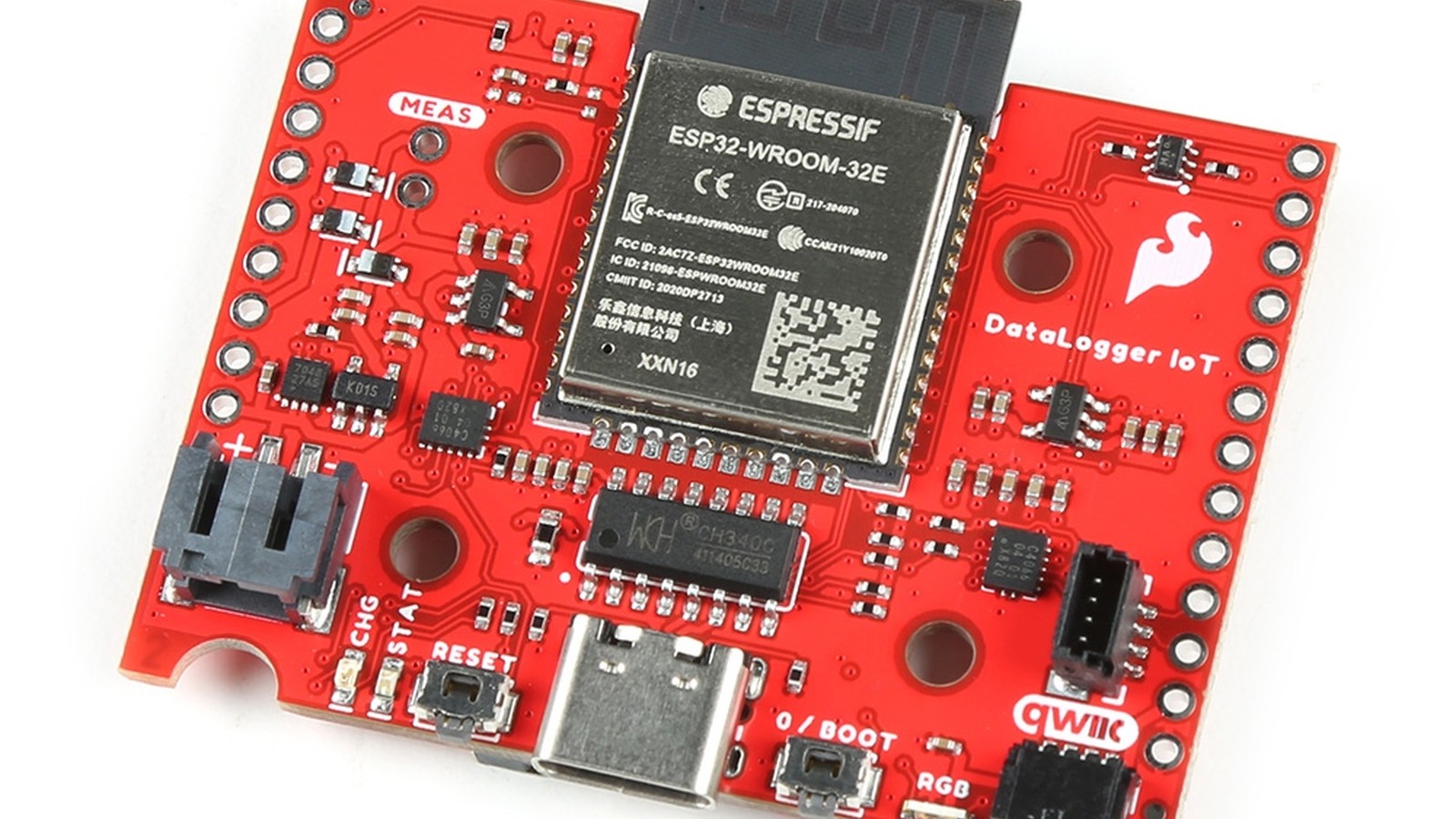
SparkFun followed its DataLogger IoT 9DoF with a less expensive version in September 2023. The revised model removed the built-in accelerometer, gyroscope, and magnetometer, together known as an IMU (an inertial measurement unit, the sensor package that reports motion and orientation), but kept the features that defined the product: automatic detection of supported Qwiic sensors, configuration without custom firmware, microSD recording, timestamps, and Wi-Fi connections to online services.
The change made the product easier to match to stationary projects. A greenhouse, weather station, freezer monitor, aquarium, or workshop logger may need temperature, humidity, pressure, light, or gas measurements without needing to know how the enclosure is moving.
Removing a sensor can improve a product
The original 9DoF version included three-axis acceleration, rotation, and magnetic-field sensing. Those measurements are valuable for moving equipment, orientation studies, vibration tests, and portable instruments. In a fixed installation, however, the motion package may collect little useful information.
Removing it lowers the entry price and makes the product choice clearer. Users who need motion data can choose the 9DoF model or connect a Qwiic motion sensor. Everyone else can spend the difference on the sensor that answers the actual question.
This is a useful lesson in embedded design. A longer feature list is not automatically better. Every component adds cost, power consumption, software support, supply-chain exposure, and potential confusion. The right design includes the measurements a project needs and leaves out the rest.
External motion sensing can also improve placement. A logger may need to remain accessible while an accelerometer must be attached directly to a motor or structure. A cabled sensor can sit at the point of interest without exposing the storage board to heat or vibration.
The no-code workflow remains intact
The lower-cost board continued to recognize supported sensors connected through SparkFun's Qwiic system. Qwiic uses keyed four-wire cables for I2C, a common short-range digital bus. The cable carries power, ground, clock, and data, so supported devices can be connected without soldering or loose jumper wires.
The logger uses its knowledge of supported boards to identify measurements and create records. Users can select settings through the provided interface rather than compiling firmware. That is especially helpful when the goal is a dataset rather than an electronics exercise.
Automatic setup still has boundaries. Two sensors can share an I2C bus only when their addresses are compatible. Long cable chains can become unreliable, and not every possible I2C device is automatically understood. Users should check the supported-device list and test the exact collection of sensors before deployment.
The board's value is in handling common cases consistently. It can remove repetitive work around sensor initialization, column naming, storage files, and networking. That gives a student, technician, scientist, or maker more time to think about sampling and interpretation.
MicroSD provides the primary record
The DataLogger IoT writes readings to a microSD card in formats that can move into spreadsheets or analysis software. Local storage is important because it keeps working when Wi-Fi is unavailable or a cloud service cannot be reached.
A reliable logging plan starts with a storage estimate. Multiply the approximate bytes in one record by the sampling frequency and expected run time, then add margin. A reading every minute creates 1,440 records per day. A reading ten times per second creates 864,000. Adding more columns, long names, or structured JSON increases file size.
Card quality and handling count. Use reputable media, avoid removing power during a write, and inspect sample files before beginning a long experiment. If the deployment is important, rotate cards or copy data on a schedule instead of trusting a single device indefinitely.
File format should match the next step. CSV is compact and opens almost everywhere, while JSON keeps labels and structure that software systems may prefer. Whichever format is chosen, record units and configuration alongside the data. A column named temperature is ambiguous without Celsius or Fahrenheit.
Timestamps need deliberate setup
Measurements become much more useful when their time is trustworthy. DataLogger IoT can obtain time from sources such as network time, a connected GNSS receiver, or a real-time clock, depending on the configuration.
Network Time Protocol uses an internet connection to set the clock. GNSS receives time from navigation satellites and can work away from local networks with a suitable antenna view. A real-time clock maintains time locally and may use backup power. Each approach has different startup and outage behavior.
For most datasets, recording Coordinated Universal Time is safer than storing changing local time. Daylight-saving transitions can repeat or skip an hour. Convert to local time later when presenting results.
Test what happens after a power interruption. Does the first new row have a valid timestamp, or does the clock require a network connection? If several loggers must be compared, measure how closely their clocks agree. A few seconds may be irrelevant for room temperature and unacceptable for vibration or event sequencing.
Wi-Fi is useful, but local-first is what you can count on
The IoT portion of the product can send readings to supported online destinations for dashboards, alerts, and remote monitoring. A user can check a distant sensor without collecting the card, and a team can view results while an experiment continues.
Remote access should complement rather than replace the local record. Networks fail, credentials change, and services enforce limits. A sensible arrangement stores complete readings on the card and sends periodic summaries or important events online.
Security belongs in the project plan. Avoid publishing Wi-Fi passwords in screenshots or shared configuration files. Document who controls the cloud account, where data is retained, and how the device will be updated. A temporary prototype can become long-lived equipment surprisingly quickly.
Include a health signal as well as measurements. The last successful contact, supply voltage, card status, or record count can reveal that a logger has stopped. Otherwise, an unchanged dashboard may look like a stable environment when the device is actually offline.
Designing a useful stationary logger
Begin with the question, not the sensor catalog. If the goal is to detect greenhouse overheating, define the temperature range, acceptable error, sampling interval, and alert threshold. Then select a sensor and placement that can answer it.
Sensor location can dominate accuracy. A temperature board near a regulator measures board heat. A humidity sensor against a wet wall may not represent the room. A light sensor under the enclosure lid reports darkness perfectly but uselessly. Use cables and mounting hardware to place each sensing element in representative conditions.
Connect one sensor first and verify its units and timestamps. Add devices gradually, labeling each cable and channel. Run a short test through the expected environmental range and look for missing rows, impossible values, and discontinuities.
Power also deserves a full-duration test. Wi-Fi transmissions can cause brief current peaks, while heaters inside some gas sensors create a larger continuous load. A battery estimate based only on the logger board can be badly wrong. Measure the assembled system under real reporting conditions.
Finally, create a data-retrieval routine. A logger that quietly fills a card is not a monitoring system until someone reviews, backs up, and acts on its output.
A focused alternative to the 9DoF model
SparkFun's second DataLogger IoT was not a stripped product in the usual sense. It retained the automation, storage, timing, and connectivity features that reduce the work of building a sensor recorder. It simply stopped charging every user for motion sensing.
For fixed installations, that is often the better balance. Projects that later need an IMU can add one through Qwiic and place it where it belongs. Projects that do not can keep the hardware simpler and put their budget toward better sensing, power, or enclosures.
The result reinforces the product family's strongest idea: useful data collection should not require rebuilding the same firmware foundation for every experiment.
For a fixed installation, I'd take this cheaper version and add a motion sensor through Qwiic later, only if the project truly needs one.
Sources and image credits
- SparkFun DataLogger IoT, SparkFun Electronics.
- SparkFun DataLogger documentation, SparkFun documentation.
- Official product image from SparkFun Electronics.
- Square and vertical crops are edited from the same source image.