People ask this as if one language won. It did not. Arduino C++ and MicroPython are two ways to run code on a microcontroller. They install as different firmware. They feel different when you change a line. They fail in different ways. You pick based on the board you have and the job in front of you, not based on a trend.
Arduino C++ is the language of setup() and loop(), sketches, the Library Manager, and Arduino IDE 2. A sketch is Arduino's word for a program. The code is compiled (translated ahead of time into machine code) and uploaded as firmware. Part 3 of the Mastery Series is the place that workflow is taught in depth.
MicroPython is Python written to run on a microcontroller. An interpreter on the chip reads your .py files and executes them. Arduino's door into that world is Arduino Lab for MicroPython, after you put MicroPython firmware on a supported board. A classic Uno is not on Arduino's installer list. Nano ESP32, GIGA, several Nano 33 BLE boards, Portenta, Opta, and others are.
This article compares the two as runtimes and as daily tools. It is not "which download button." It is compiled vs interpreted, speed, memory, how fast you iterate, the REPL, libraries, debugging, talking to hardware, and what is easier for a first-time reader.
A third Python exists on Arduino's software page and I am going to name it so it does not contaminate this comparison: Arduino App Lab runs ordinary Python on Linux, on UNO Q and VENTUNO Q, next to a C++ sketch on a second chip. That is not MicroPython. If your question is App Lab vs IDE 2, that is a different article in this cluster.
Compiled vs interpreted
Arduino C++ is compiled. You click Verify or Upload in IDE 2 (or you run arduino-cli compile). A compiler turns your text into a binary the microcontroller can execute. If the code is illegal, you find out before it runs, as a compile error. The chip then runs machine code. There is no Python sitting in the middle.
MicroPython is interpreted. The MicroPython firmware is already on the chip. Your script is text (or bytecode, a compact pre-digested form of the script that the interpreter can read faster). When you Run, or when main.py starts at boot, the interpreter reads the program and executes it. If the code is illegal, you often find out while it is running, as a traceback in the REPL (a traceback is Python's error report: the error message plus the list of lines it passed through to get there). REPL, again, is Read-Eval-Print Loop: type a line, see the result.
Neither sentence is a moral judgment. Compile errors feel fussy until they save you from uploading a typo that would have sat on the chip looking like a hardware failure. Runtime errors feel friendly until a script dies twenty minutes into a data log because you misspelled a variable that the compiler would have caught.
A small side-by-side of the same idea:
Arduino C++:
void setup() {                      // Runs once at power-up
  pinMode(LED_BUILTIN, OUTPUT);     // Onboard LED pin becomes an output
}

void loop() {                       // Arduino calls this forever for you
  digitalWrite(LED_BUILTIN, HIGH);  // LED on
  delay(400);                       // 400 milliseconds
  digitalWrite(LED_BUILTIN, LOW);   // LED off
  delay(400);
}
MicroPython:
from machine import Pin     # Pin controls one GPIO
import time                 # For time.sleep()

led = Pin(48, Pin.OUT)      # Nano ESP32 onboard LED is GPIO 48; check your board's pinout
while True:                 # You write the forever-loop yourself
    led.value(1)            # LED on
    time.sleep(0.4)         # 0.4 SECONDS, not milliseconds
    led.value(0)            # LED off
    time.sleep(0.4)
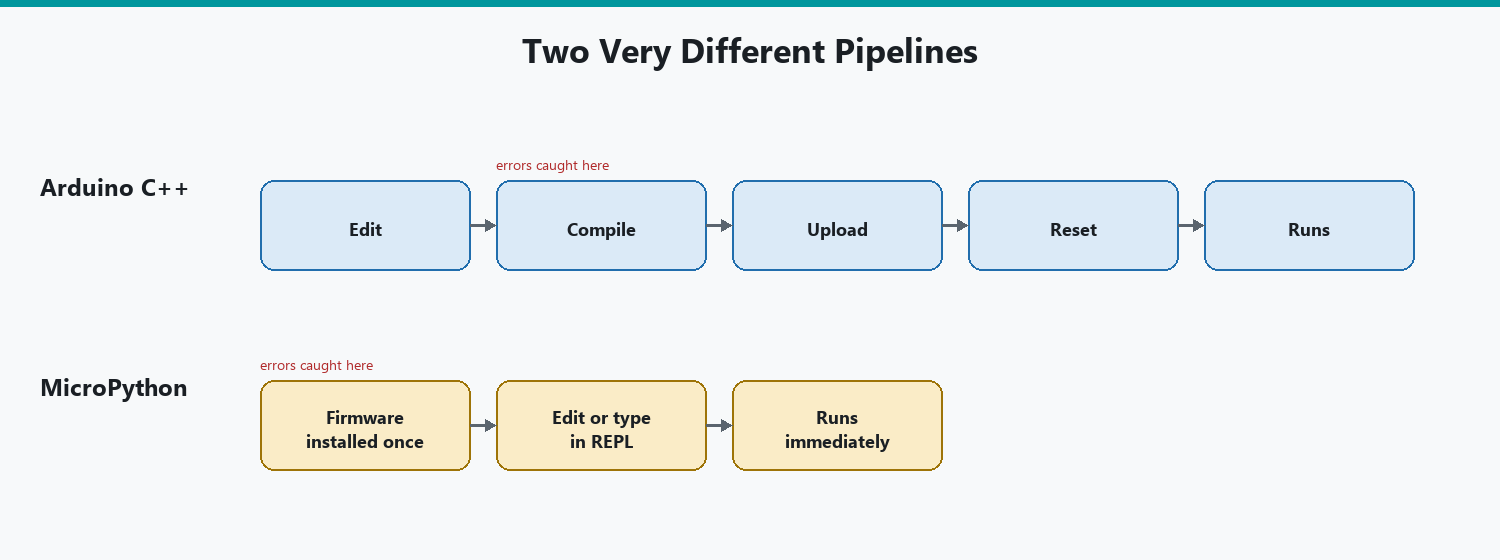
The C++ version does not run until you compile and upload. The MicroPython version can run from the Lab immediately, and you can also type led.value(1) by hand in the REPL to test the pin without the loop.
Performance
Compiled C++ on the same chip is almost always faster and more predictable for tight loops, bit-banging (toggling a pin in software at high speed), audio, and anything that has to happen on a deadline of microseconds.
MicroPython is slower because the interpreter is doing work at run time. For blinking an LED, reading a DHT22 once a second, or driving a simple Wi-Fi request, you will not care. For generating a clean 1-bit audio stream in a while True loop, you will care. For bit-banging a protocol that a hardware peripheral already exists for, use the peripheral (or C++) instead of hoping Python is "fast enough." A peripheral is a dedicated circuit built into the chip for one job, such as a serial port or a PWM generator, that keeps working on its own while your code does something else.
I do not quote cycle counts here because they depend on the board, the firmware build, and whether you used a tight loop or a library that drops into C under the hood. MicroPython can call into C modules. A lot of machine.Pin and I2C work (I2C is a common two-wire bus for talking to sensors and displays) is not pure Python. The honest rule: if the project is "did the pin change in time for this motor or this protocol," start with C++ or use hardware peripherals. If the project is "read a sensor, make a decision, print a line," MicroPython is usually fine on a Nano ESP32-class board.
delay() in Arduino is milliseconds. time.sleep() in MicroPython is seconds. That is not a performance issue. It is a units issue that makes a script look hung. Flag it before you benchmark anything.
Memory
An Uno has 2 KB of SRAM. Arduino C++ on that chip is already a tight fit once you add strings and a couple of libraries. MicroPython does not target that chip in Arduino's installer, which is a kindness. Interpreters want RAM for the runtime, for objects, and for the file system.
On a Nano ESP32 or a GIGA, you have enough RAM that MicroPython is comfortable for typical scripts, and still not unlimited. Large lists, big JSON blobs, and image buffers will still run you out of memory. The error is a runtime exception, not a compile-time "sketch too big" line. Watch the Lab's traceback. gc.collect() exists in MicroPython (garbage collection: reclaiming unused objects). It is not a substitute for smaller data.
Arduino C++ on the same larger boards still wins if you need to know, at compile time, exactly how much flash and SRAM the program uses. IDE 2 prints those percentages after a successful compile. MicroPython will not give you that report for your script in the same way. You find out by running it.
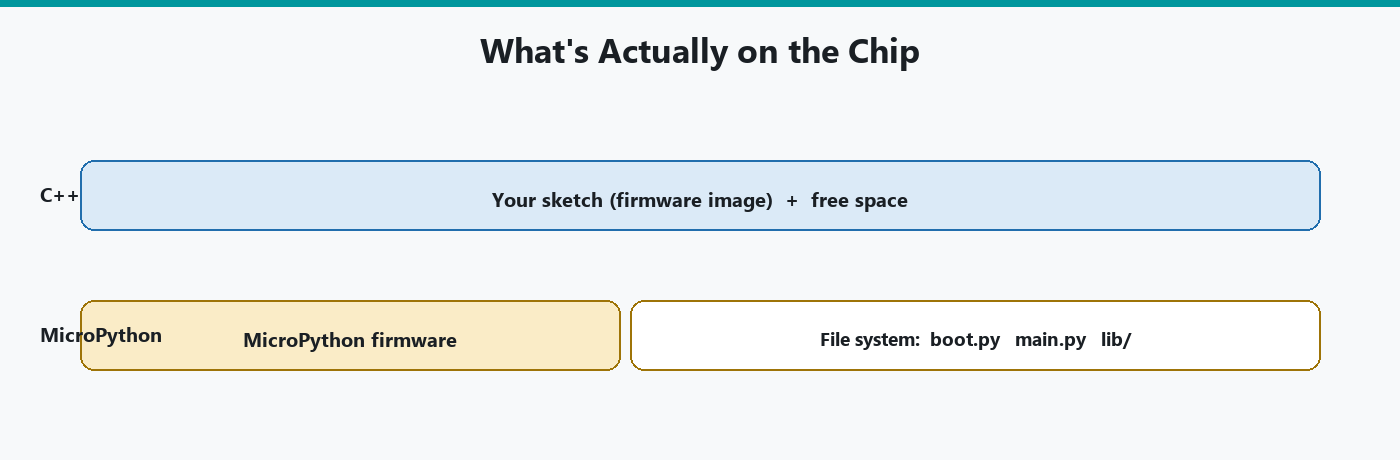
Flash layout is different too. A C++ sketch is one firmware image. MicroPython is a firmware image plus a file system for main.py, boot.py, and lib/. Filling the file system is a different failure from filling sketch flash.
Iteration speed
This is MicroPython's strongest practical argument.
In Arduino C++, a change means: edit, compile, upload, wait for the bootloader, maybe reopen Serial Monitor. On a slow core or a first compile after a restart, that wait is real. On an ESP32 it can be many seconds. You learn to batch changes because each experiment costs a compile.
In MicroPython, a change can mean: type one line in the REPL and see the pin move. Or: edit main.py, Run, watch. No compiler. The cost of "what if I invert this pin" is one Enter key.
That speed is why people use MicroPython to learn a sensor. You can print sensor.read() ten times with ten different settings without ten uploads. When the hardware is understood, some of those people still rewrite the long-running product in C++. Some do not. Both are reasonable.
That speed has a price, though. A syntax error that would have been a compile failure in C++ becomes a crash at minute 15 because that branch of the script never ran during your REPL tests. Test the paths you care about. Do not confuse "I poked it in the REPL" with "the boot script is solid."
REPL
Arduino C++ has Serial Monitor. You print. You do not evaluate an arbitrary function call unless you built that into the sketch.
MicroPython has a REPL. You call functions, inspect objects, import modules, and change pin state live. Arduino's MicroPython docs treat this as a first-class debugging and learning tool, not a hidden terminal.
Use the REPL to answer "is this pin high?" and "what did that I2C device return?" Use main.py for the program you want after reset. Do not leave your only copy of a working procedure as a scrollback buffer in the Lab.
Arduino C++ can approximate a tiny command parser over Serial. That is extra code. It is not a REPL.
Library ecosystem
Arduino C++ has twenty-plus years of sketches and the Library Manager. If a sensor exists, someone probably wrote a library. The DHT22 article on this site is that world: install a library, #include it, call readTemperature(). Some libraries are excellent. Some are abandoned. You still have a lot of them, including board-specific cores for ESP32 and friends.
MicroPython's library world is smaller and split:
-
Built-in
machine,time,network, and board-specific modules. -
Packages installed with
mip(MicroPython's small package installer) ormpremote(its command-line tool), and files you drop intolib/on the board. -
Arduino-specific extras (for example the packages for Modulino, Arduino's line of small plug-together sensor boards) installed onto the board's file system, with the Lab disconnected so it does not hold the port.
You will not find a one-click Library Manager with the same depth as IDE 2. What you will find is that a lot of hardware talks I2C and SPI (two standard ways chips exchange data over a few wires), and MicroPython can speak those buses directly. That means you can talk to a chip straight from its datasheet without anyone's library. It takes longer to write that way. The upside is that you end up understanding exactly what the chip is doing, because you wrote every step.
A C++ library that uses AVR registers will not compile for an ESP32. A MicroPython script that uses machine.Pin will need pin names adjusted per board, but it will not drag in an AVR-only header. Different failure modes.
If the project depends on a specific Arduino library that has no MicroPython equivalent, that is a real reason to stay on C++. Do not assume "Python can import it." It cannot import a .h file.
A concrete example from this site: the DHT22 humidity sensor. In Arduino C++ you install a library from Library Manager and include it, which is the path in the DHT22 tutorial. In MicroPython you might use a dht module that already ships on some ESP32 builds, or you copy a .py driver into lib/ on the board. Same sensor, two packaging systems. Both routes still use a library of some kind. You just cannot take the C++ one and drop it into MicroPython, or the other way around.
Debugging
Arduino C++ debugging in daily maker work is still mostly Serial prints plus a method, which is what Part 7 of the Mastery Series teaches. IDE 2 also has a live debugger on boards that support a debug probe. A classic Uno generally does not. Compile errors catch a large class of mistakes before the chip is involved.
MicroPython debugging is the REPL, print(), and tracebacks. There is no Verify pane. There is no AVR-style "was not declared in this scope" until that line runs. Live debugging with breakpoints like IDE 2's debugger is not what the Lab is. You stop the script, you inspect in the REPL, you Run again.
When a MicroPython board "does nothing," print a banner at the top of main.py so you know the file started. That is the same trick as a C++ Serial.println in setup(). The channel is the Lab terminal, not IDE 2's Monitor. Two tools cannot own the serial port at once.
Hardware access
Both languages can flip pins, read analog inputs (on boards that have them), and talk I2C, SPI, and UART (plain two-wire serial, the same kind Serial Monitor uses).
Arduino C++ hardware access is pinMode, digitalWrite, analogRead, Wire, SPI, Serial, plus libraries that wrap those. On AVR Unos you are close to the metal. On ESP32, the core maps Arduino APIs onto Espressif's stack. Interrupts, millis(), and timers work the way the Mastery Series describes, with board-specific footnotes.
MicroPython hardware access is mostly the machine module: Pin, ADC, I2C, SPI, UART, PWM, Timer. Names differ. Pin numbering differs. Some Arduino-friendly pin labels (D2) exist on some ports and not on others. Always read the MicroPython pinout for that board, not an Uno diagram.
Interrupts exist in MicroPython (Pin.irq). They have the same class of rules as C++ ISRs (interrupt service routines, the functions that run the instant an interrupt fires): keep them short, be careful what you call. I would not choose MicroPython because I wanted a hard real-time control loop. I would choose it to get a sensor talking on Tuesday.
PWM (switching a pin on and off very fast to fake an in-between voltage, which is how you dim an LED) is available in both worlds, including the ESP32's dedicated LEDC hardware channels, but it is configured differently. Copy-pasting analogWrite(9, 128) into Python will not work. Use the MicroPython PWM class for that board.
Beginner accessibility
"Easier" depends on what you already know and what board you own.
If you already write Python, MicroPython feels like home, and Arduino C++'s void setup() looks like ceremony. The REPL is a gift. The firmware install is an extra step. The board list is shorter. time.sleep units will still bite you.
If you are new to both languages, Arduino C++ in IDE 2 is still the path most tutorials, including this site's series, assume. Error messages at compile time, Board Manager, Library Manager, Serial Plotter, and a classic Uno you can buy anywhere. You will learn pinMode before you learn objects. That is slower to type and clearer when a sketch will not compile.
If you are new and you only have an Uno, the comparison is over. Use Arduino C++. MicroPython, as Arduino ships it, is not for that board.
If you are new and you have a Nano ESP32, you can start in MicroPython. Arduino's MicroPython 101 course does. You can also start in C++ on that same board in IDE 2. Starting in C++ keeps you in the larger tutorial ocean. Starting in MicroPython keeps you iterating faster. I would still teach C++ first on this site because the rest of the catalog is written in it. I would not tell a Python teacher they are wrong to start the other way on a Nano ESP32.
Power consumption and sleep
Battery-powered projects care about this in a way a USB-tethered bench sketch never does, so it deserves its own look rather than a line inside the performance section above.
Arduino C++ gives you direct access to a chip's sleep modes: deep sleep, light sleep, whatever the specific microcontroller's datasheet calls them, each with its own current draw and its own wake-up path (a timer, a pin change, a specific peripheral). Libraries exist for the common cases, but the mechanism underneath is a handful of register writes the compiler turns into exact instructions. Nothing is running between "go to sleep" and "wake up." Current draw during sleep is close to what the datasheet promises, because there is no interpreter idling in the background waiting for the next line to execute.
MicroPython can also reach a chip's sleep modes, through machine.deepsleep() and similar calls, and on boards like the ESP32 the underlying hardware behavior is the same hardware behavior C++ would trigger, since it is the same silicon obeying the same low-power circuitry either way. The difference shows up around the sleep, not during it: waking from deep sleep on MicroPython means the interpreter has to start back up and re-run main.py from the top before your code resumes, which takes measurably longer than a C++ sketch resuming execution where the compiled binary left off (or, on a full deep-sleep wake, restarting a much smaller and faster boot path). For a sensor node waking once an hour to take a reading and go back to sleep, that difference is negligible. For a project waking every few seconds trying to stretch a coin-cell battery for months, the interpreter's startup cost on every single wake adds up, and C++ is the safer choice.
Where to get unstuck
The two ecosystems point you toward different places when a board does something you cannot explain, and knowing that in advance saves a frustrating search.
Arduino C++ problems are usually answered in the Arduino forum, the board-specific subforum for whatever you own, GitHub issues on the specific library involved, or this site's own troubleshooting tables, because two decades of sketches means almost any compile error or wiring mistake has already been asked about somewhere with an Arduino board in the title. Search the exact error text from IDE 2's output pane first, quotes and all.
MicroPython problems split between two communities that do not always overlap: the general MicroPython project (forum, GitHub, docs at micropython.org) for interpreter-level questions and the machine module's behavior, and Arduino's own Help Center and forum for the parts specific to Arduino's installer, Arduino Lab, and Arduino-branded boards. A traceback mentioning a module name from the standard MicroPython docs is a MicroPython-project question. A board that the installer will not detect, or a Lab connection issue, is an Arduino question. Searching the wrong community first is a common way to lose twenty minutes on a MicroPython question that turns out to be Arduino-specific, or the other way around.
Which one should you use?
Use Arduino C++ when:
-
The board is an Uno, classic Nano, Mega, or anything not on Arduino's MicroPython list.
-
You need a library that only exists in Library Manager.
-
You care about compile-time checks, flash/SRAM reports, or tight timing.
-
You want to follow the Mastery Series and most of the rest of this site without translating every example.
Use MicroPython when:
-
The board is supported (Nano ESP32 is the easy example).
-
You want to try hardware live in a REPL.
-
You already think in Python.
-
The project is a script (sensor, Wi-Fi call, small UI of prints), not a microsecond control loop.
You can switch. Upload a sketch to leave MicroPython. Run the MicroPython installer to come back. Do not expect to run both firmwares at once.
Wrap-up
Arduino C++ is compiled firmware, a huge library ecosystem, and the default for classic boards and this site's series. MicroPython is an interpreter on the chip, a REPL, faster experiments, and a smaller official board list. Speed and memory favor C++ when those are the constraint. Iteration speed and live inspection favor MicroPython when those are the constraint. Beginner-friendly depends on the board in the box and the language you already have.
Neither one makes the other obsolete. Put MicroPython on a supported board if you want to feel the REPL. Stay on C++ if you want the sketch universe you already started.
Hack The World and Make Awesome.