How UART Communication Works
Picture two friends on opposite sides of a dark field, sending messages with flashlights. They don't share a watch, and they can't see each other's hands. All they have is a deal they made before they split up: "When I want to send something, I'll switch my light off for one beat to get your attention. Then I'll send eight flashes, one beat each, light on for a 1 and off for a 0. Then I'll leave the light on for at least one beat so you know I'm done." As long as they both count beats at the same speed, every message gets through.
That is UART, almost exactly. Every time an Arduino prints text to your Serial Monitor, a GPS module reports its position, or a Bluetooth module passes along a message from your phone, there's a good chance this same simple agreement is carrying the data, one bit at a time, down a single wire.
In this article I'm going to walk through how that agreement actually works: what the letters stand for, what a single byte looks like on the wire, what "baud rate" really means, how the receiver keeps its place without a shared clock, how to wire two devices together, and the handful of mistakes that turn perfectly good data into a screen full of garbage characters. You don't need to know anything about serial communication to follow along. If you've ever used Serial.print() on an Arduino, you've already used UART, and by the end you'll know exactly what that line of code was doing behind your back.
What UART stands for
UART stands for Universal Asynchronous Receiver-Transmitter. Each word is doing real work, so let's take them one at a time.
- Universal means the format isn't tied to one company's chip. A UART in an Arduino can talk to a UART in a GPS module, a Raspberry Pi, or a 40-year-old computer terminal, as long as both are set up the same way.
- Asynchronous means there is no shared clock signal. In electronics, a clock is a steady on-off pulse that tells a circuit when to do the next thing, like a metronome. Some communication methods send a clock on its own wire so both sides tick together. UART doesn't. Each side keeps time on its own, the same way the two friends in the field each counted beats in their own heads.
- Receiver-Transmitter means the same piece of hardware both sends (transmits) and receives. On a microcontroller, the UART is a small dedicated block of circuitry built into the chip, often called a peripheral, a helper circuit that handles one job so the main processor doesn't have to.
You'll also hear "serial port," "serial communication," or just "serial." Serial means sending bits one after another down one wire, as opposed to parallel, which sends several bits at once over several wires. UART is one kind of serial communication. I²C and SPI, which you'll meet in their own reference articles, are two other kinds.
A short history: from telegraph keys to a single chip
UART is old, and knowing where it came from explains a lot of its quirks.
The idea of "start, send a fixed number of pulses, stop" goes back to teleprinters, the electromechanical typewriters that sent text over telegraph lines in the early 1900s. The unit we still use for speed, the baud, is named after Émile Baudot, a French telegraph engineer whose 1870s code sent characters as fixed-length groups of on/off pulses.
When computers arrived, engineers needed a way to connect them to those same teleprinters, which were the screens and keyboards of their day. Gordon Bell at Digital Equipment Corporation designed a circuit board to do it for the PDP-1 computer, and that board did the job of a UART using dozens of separate components. Around 1971, Western Digital released the WD1402A, generally described as the first widely available single-chip UART. Once the whole thing fit on one chip, it showed up everywhere. Today a UART is such a basic building block that a $3 microcontroller usually has two or three of them built in.
What a byte looks like on the wire
This is the heart of UART, so I'll go slowly.
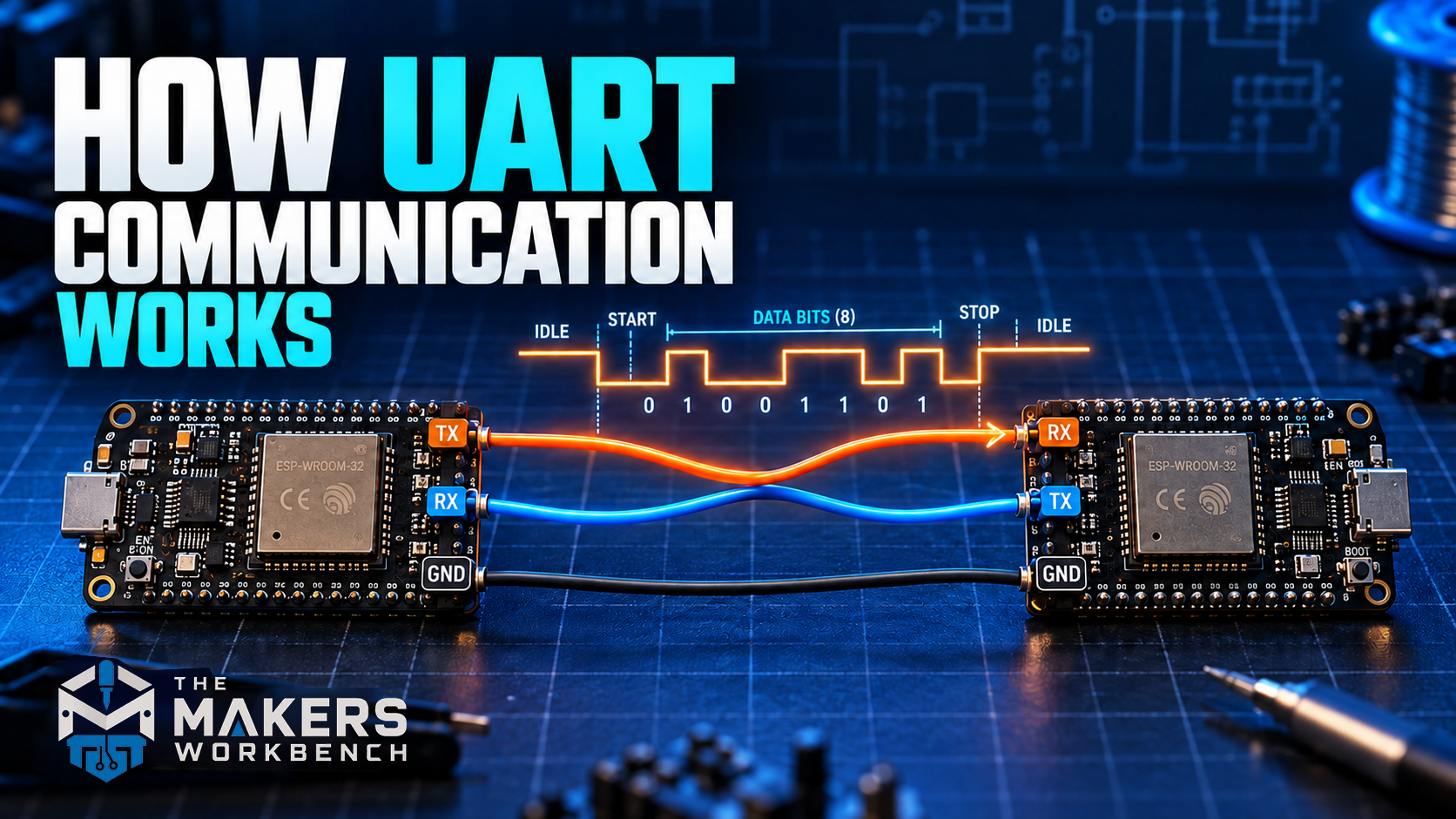
When nothing is being sent, the transmit line sits HIGH, meaning at the device's logic voltage (5 V on a classic Arduino Uno, 3.3 V on an ESP32). This resting state is called idle. Because the quiet state is always HIGH, the receiver knows that the first drop to LOW must be the start of something.
When the transmitter wants to send one byte (a byte is a group of eight bits, enough to hold one text character like the letter A), it sends a little package called a frame:
- Start bit. The line drops LOW for exactly one bit-time. This is the "switch the flashlight off to get your attention" moment. The falling edge from idle-high to low is what tells the receiver a frame is beginning.
- Data bits. Usually eight of them, each held for one bit-time: HIGH for a 1, LOW for a 0. They go out least significant bit first, meaning the rightmost bit of the binary number is sent first. That surprises nearly everyone the first time they see it on a scope.
- Parity bit (optional). An extra bit used as a simple error check. More on this below. Most hobby setups leave it out.
- Stop bit. The line goes HIGH for at least one bit-time. This guarantees there's a clean high-to-low edge when the next start bit arrives, and it gives the receiver a moment to store the byte it just caught.
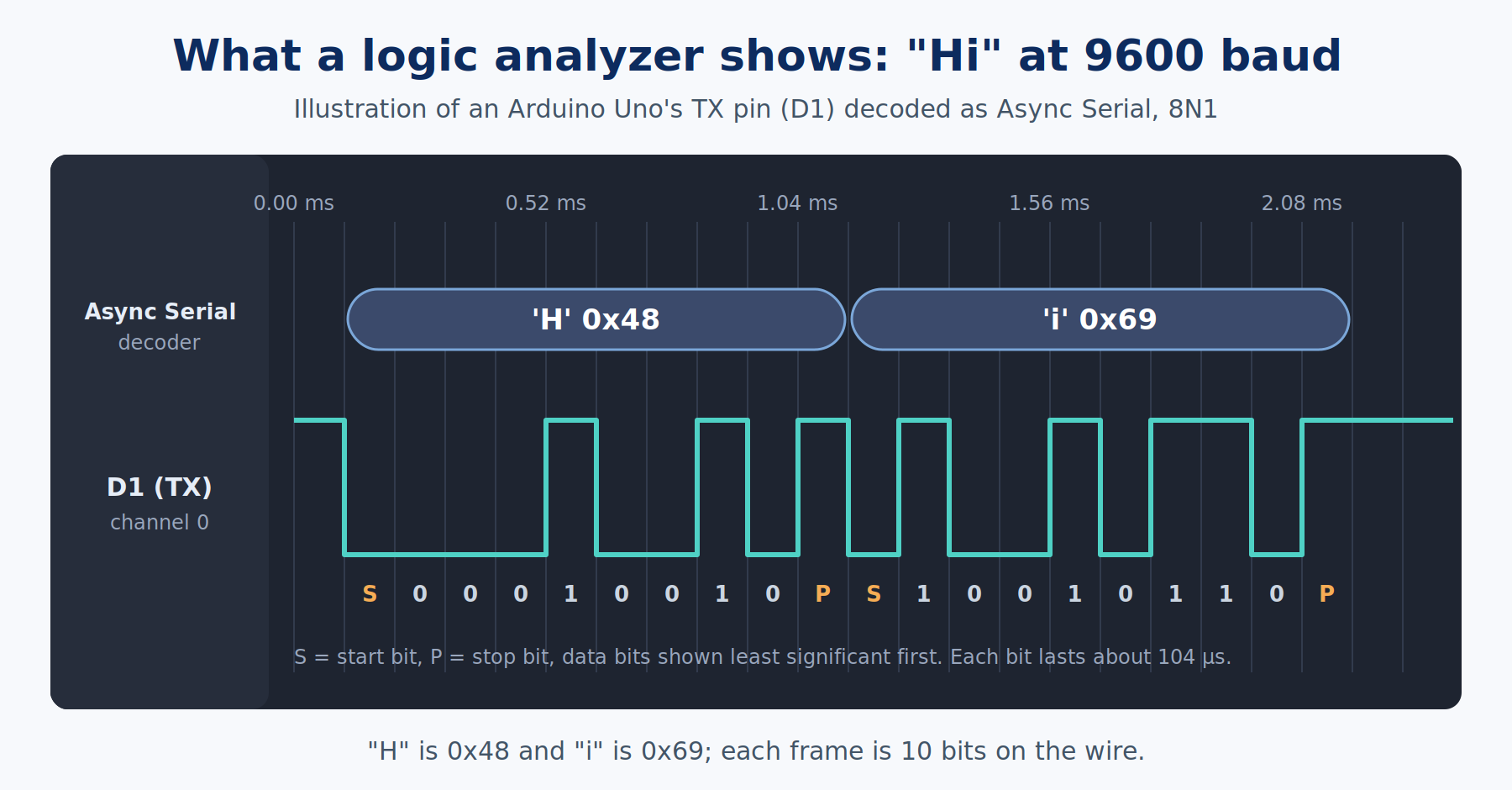
Let's send the capital letter A. In ASCII, the standard table that assigns a number to each text character, A is 65. In binary, 65 is 01000001. Sent least significant bit first, the eight data bits leave in this order: 1, 0, 0, 0, 0, 0, 1, 0. Add the start bit in front and the stop bit at the end, and the whole frame on the wire is:
idle (1) | start 0 | 1 0 0 0 0 0 1 0 | stop 1 | idle (1)
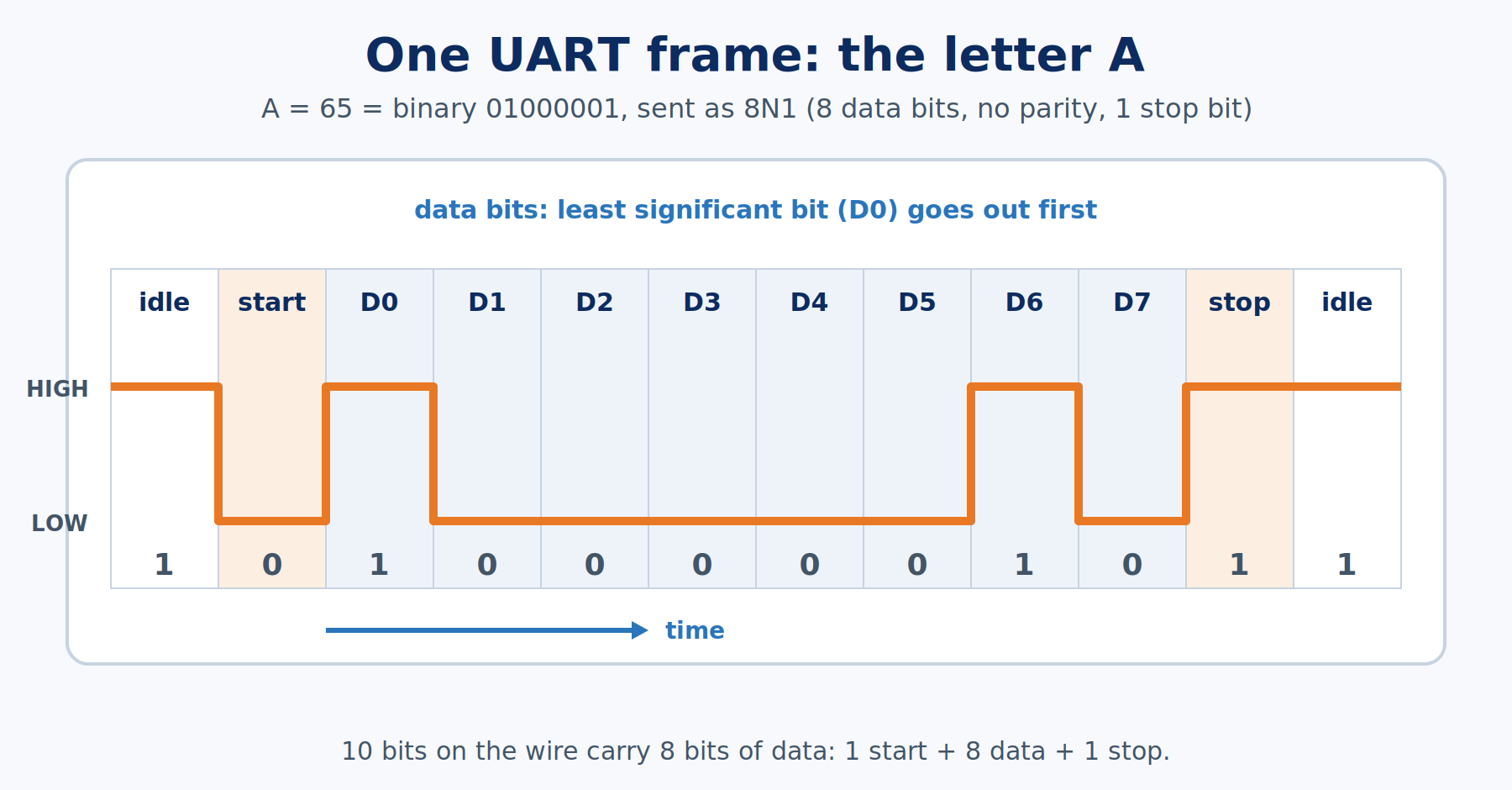
Count the bits: one start, eight data, one stop. That's 10 bits on the wire to deliver 8 bits of data. Hold on to that number, because it matters when we work out how fast UART really is.
Frame settings and the "8N1" shorthand
Because both sides have to agree on the frame's shape ahead of time, the settings get written in a compact shorthand. 8N1 means 8 data bits, No parity, 1 stop bit. It's the default almost everywhere, including the Arduino's Serial.begin(). You'll occasionally see others: 7E1 (7 data bits, even parity, 1 stop bit) on old equipment, or 8N2 for a device that needs a little extra breathing room between bytes.
Parity is a single extra bit that makes the count of 1s in the frame either always even (even parity) or always odd (odd parity). If a burst of electrical noise flips one bit, the count comes out wrong and the receiver knows the byte is damaged. It can't tell which bit flipped, and if two bits flip, parity misses it completely. That's why most modern projects skip parity and do their error checking in software instead.
Baud rate: the beat both sides count
The baud rate is how many signal changes per second the line can make. For UART, each signal slot carries exactly one bit, so baud rate and bits per second are the same number. 9600 baud means 9,600 bits per second.
That sounds abstract, so let's turn it into time. At 9600 baud, one bit lasts 1 ÷ 9600 seconds, which is about 104 microseconds. That's 104 millionths of a second. A full 10-bit frame takes about 1.04 milliseconds, roughly one thousandth of a second per character. So 9600 baud moves about 960 characters per second, not 1,200, because of those start and stop bits.
| Baud rate | Time per bit | Time per 8N1 character | Characters per second |
|---|---|---|---|
| 9600 | about 104 µs | about 1.04 ms | about 960 |
| 19200 | about 52 µs | about 0.52 ms | about 1,920 |
| 57600 | about 17.4 µs | about 0.17 ms | about 5,760 |
| 115200 | about 8.7 µs | about 0.087 ms | about 11,520 |
These particular numbers aren't random. Many of them double from one step to the next (2400, 4800, 9600, 19200, 38400), a pattern left over from early modems and terminals. 9600 is the classic safe default that almost every module supports. 115200 is the common "fast" setting for talking to a computer, and it's what the TMWB Arduino series uses for the Serial Monitor.
Here's the gotcha that catches everyone at least once: the baud rate is not detected automatically. If one side sends at 115200 and the other listens at 9600, the receiver still catches something. It slices the bits at the wrong moments and assembles nonsense, which shows up as a stream of random symbols, question marks, and boxes. If your serial output ever looks like a cat walked across the keyboard, check the baud rate before anything else.
How the receiver keeps its place without a clock
If there's no shared clock, how does the receiver know exactly when to read each bit? This is the clever part.
The receiver watches the idle line. The instant it sees the falling edge of a start bit, it starts its own internal stopwatch, set to the agreed baud rate. Most UART receivers sample the line many times per bit, commonly 16 times, a technique called oversampling. After waiting half a bit-time, it checks that the line is still LOW (a real start bit, not a tiny noise spike). From there it waits one full bit-time between reads, so every read lands in the middle of a bit, as far as possible from the edges where the signal is changing.
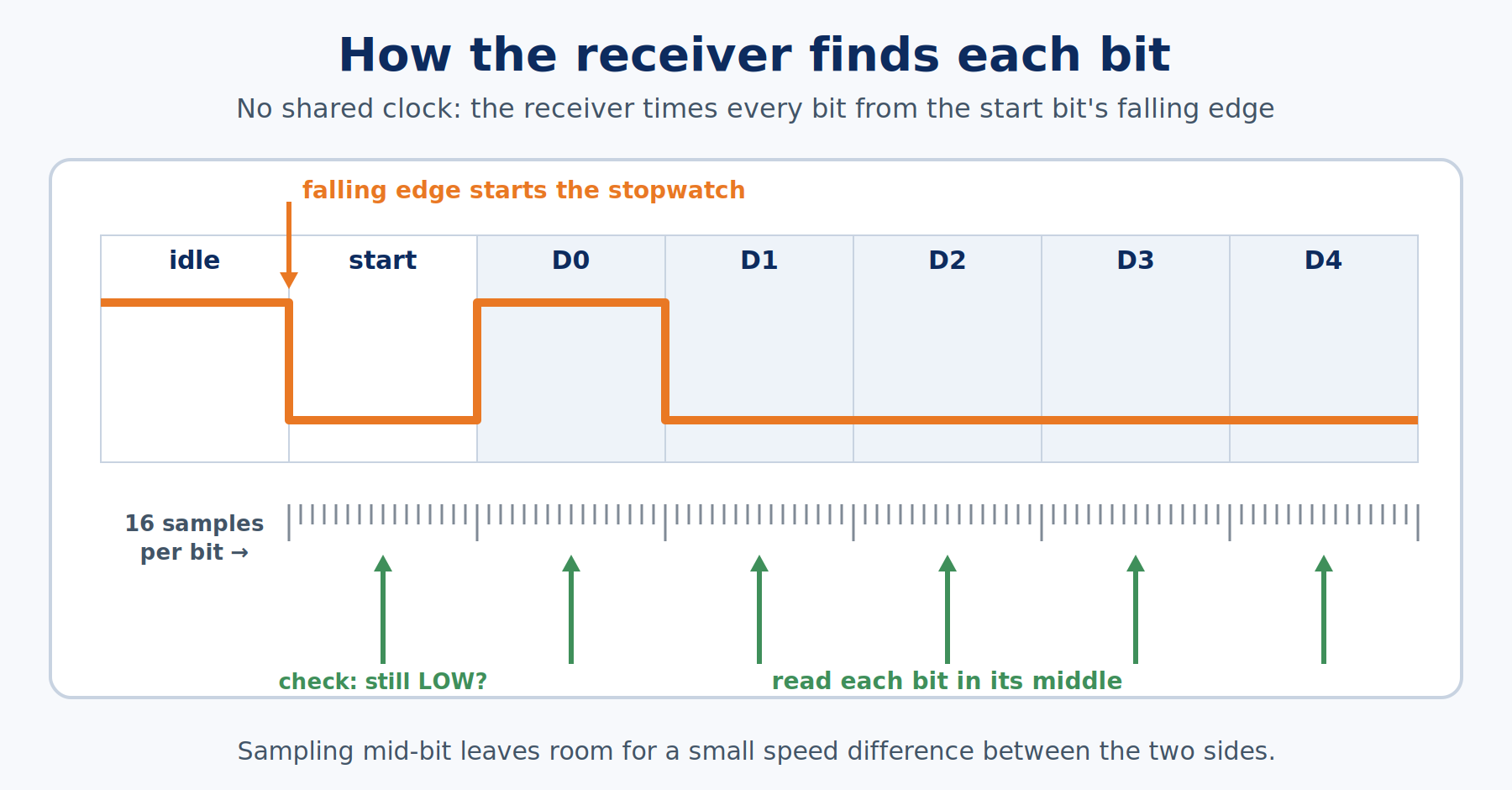
Because the stopwatch restarts on every start bit, small timing errors don't pile up across a whole message. They only have to stay small for the ten bits of a single frame. That's why UART tolerates a little mismatch between the two sides. Designers generally aim to keep the combined error under about 2 percent. By the end of a 10-bit frame, a 2 percent error has shifted the sampling point by a fifth of a bit, still safely inside the bit.
This explains a real-world oddity. A classic Arduino Uno runs from a 16 MHz crystal, and it can't divide 16 MHz evenly down to 115200 baud. The closest it gets is about 117,647 baud, roughly 2.1 percent fast. Talking to a computer, which hits 115200 almost exactly, that's right at the edge, and it usually works. Talking to another device that's off by a percent the other way, it can fail. If an Uno link at 115200 is mostly fine but drops occasional characters, dropping to 57600 or 38400 often clears it up.
Wiring two UART devices together
A UART connection needs three wires:
| From device A | To device B | Why |
|---|---|---|
| TX (transmit) | RX (receive) | What A says, B hears |
| RX (receive) | TX (transmit) | What B says, A hears |
| GND | GND | A shared reference so "HIGH" and "LOW" mean the same thing on both sides |
The TX-to-RX crossover is the single most common UART wiring mistake. It feels natural to connect TX to TX, the same way you'd connect GND to GND, but two transmitters wired together are both talking into the same wire and nobody's listening. Think of a phone handset: your mouthpiece has to connect to the other person's earpiece.
The ground wire matters just as much, and it's easy to forget when two boards are powered by two different USB ports. Voltage is always measured between two points. Without a common ground, the receiver has no reliable reference for deciding whether the incoming line is high or low.
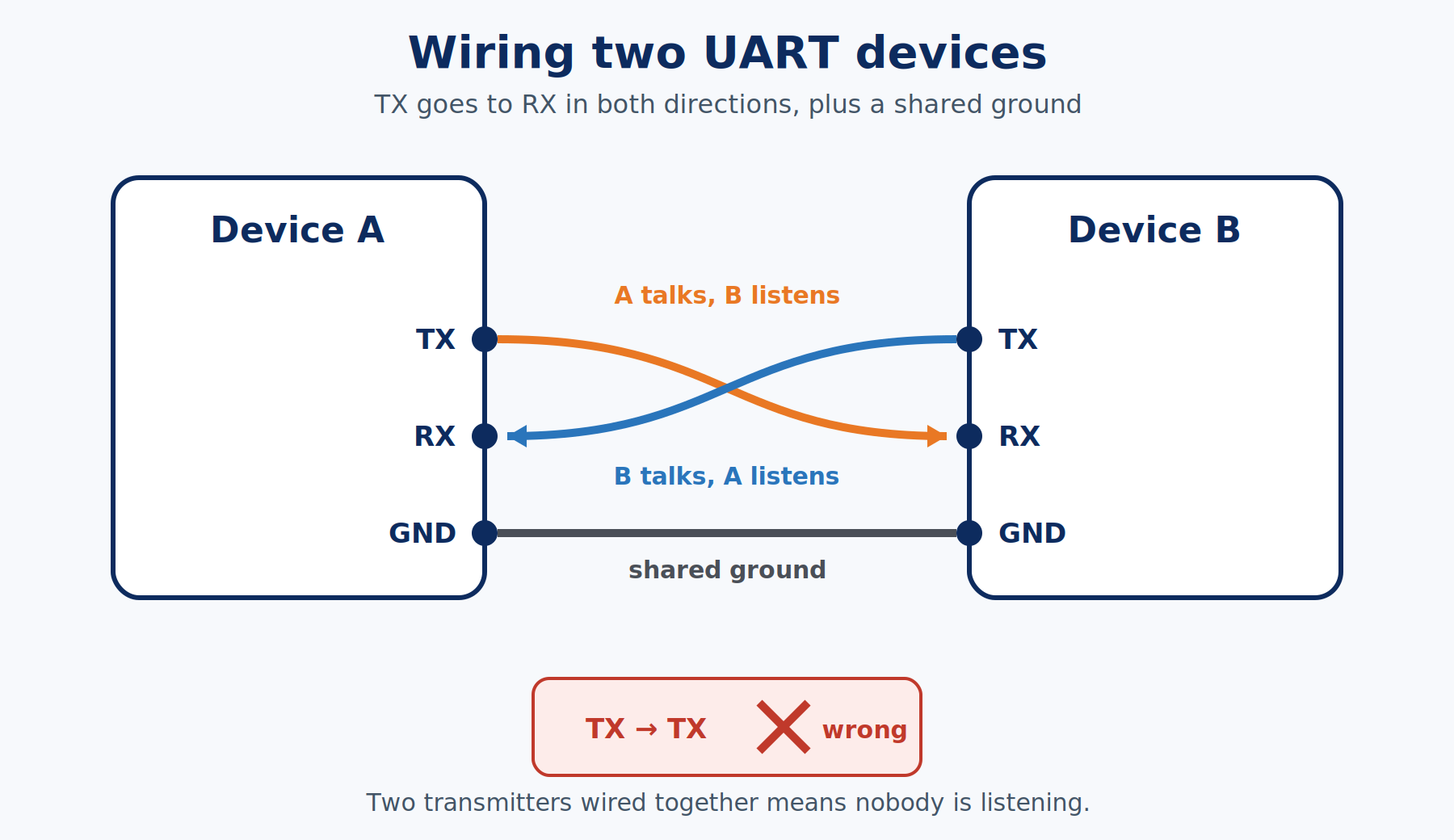
Because each direction has its own wire, both sides can send at the same time. That's called full duplex, like a phone call where both people can talk at once, as opposed to half duplex, a walkie-talkie where you take turns.
UART is also point-to-point: one transmitter drives each wire, and it's meant to connect exactly two devices. Two transmitters on one wire fight each other. If you need many devices sharing the same wires, that's where I²C or SPI come in, or RS-485 for long industrial cable runs.
Voltage levels: the part that can damage hardware
UART defines the timing and the frame, but not the voltage. That depends on the chips involved, and mixing them carelessly is how parts get damaged.
- 5 V logic. Classic Arduino Uno, Nano, and Mega boards idle at 5 V.
- 3.3 V logic. ESP32 boards, Raspberry Pi GPIO, and most modern sensors idle at 3.3 V.
- RS-232. The old "serial port" on the back of vintage PCs uses the same frame but very different voltages, swinging roughly between +3 and +15 V for one state and -3 to -15 V for the other, with the logic flipped upside down compared with a microcontroller's UART.
CHECK YOUR VOLTAGES BEFORE YOU CONNECT. A 5 V TX pin wired straight into the RX pin of a 3.3 V board like an ESP32 or a Raspberry Pi pushes that pin past its rated maximum and can damage it. Use a logic level shifter, or at least a resistor voltage divider on the 5 V-to-3.3 V line. Going the other way, a 3.3 V TX into a 5 V RX usually works, because 3.3 V is high enough to count as HIGH on most 5 V chips, though it isn't guaranteed for every part. And never connect an RS-232 port directly to a microcontroller pin. Those negative voltages need a converter chip such as the MAX3232 in between.
Buffers and flow control
A UART receiver usually holds incoming bytes in a small storage area called a buffer until your program gets around to reading them. On an Arduino Uno, the receive buffer is 64 bytes. If data keeps arriving and your program doesn't read it, the 65th byte has nowhere to go and is simply lost. UART itself won't warn you.
For links where that's a real risk, there's flow control: a way for the receiver to say "hold on, I'm full." Hardware flow control adds two extra wires, RTS (Request To Send) and CTS (Clear To Send), that act like a traffic light. Software flow control sends two special characters, called XON and XOFF, down the data line itself to pause and resume. Most hobby projects skip both and read data promptly, but you'll see RTS and CTS pins on many USB-to-serial adapters and modules, and now you know what they're for.
Where you'll meet UART
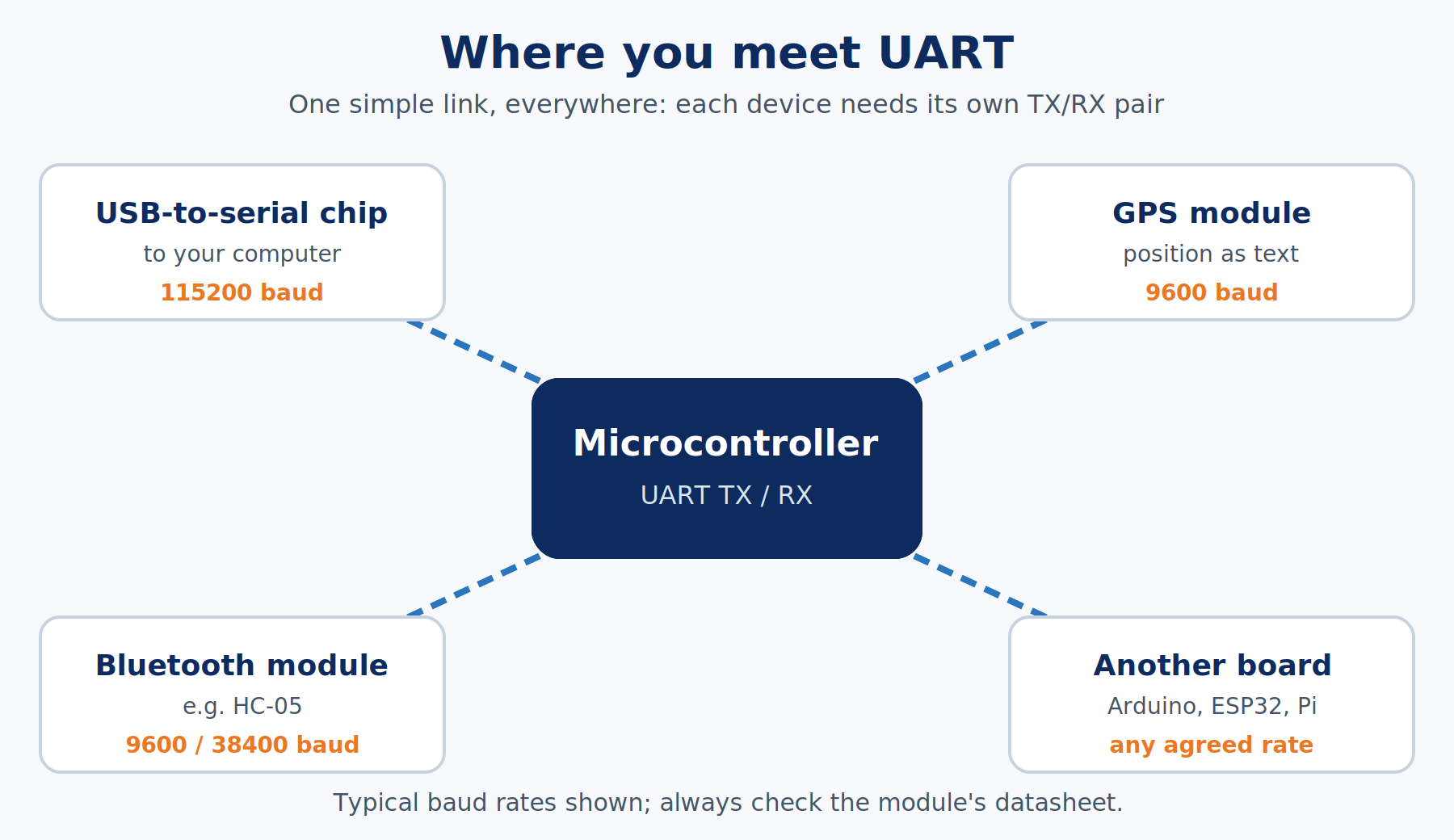
Once you know what to look for, UART turns up everywhere:
- Your Arduino's USB connection. The Uno's main chip speaks UART to a second small chip on the board that translates it to USB. Stand-alone USB-to-serial adapters, built around chips like the FTDI FT232, CP2102, or CH340, do the same job for boards that don't have it built in.
- Uploading code. Most Arduino and ESP32 boards receive new programs over UART through a small startup program called a bootloader.
- GPS modules. Nearly all hobby GPS receivers stream position data as lines of text over UART, often at 9600 baud.
- Bluetooth and cellular modules. Classic modules like the HC-05 act as a "wireless UART cable," and many cellular modules take text commands over UART.
- Debug consoles. Routers, single-board computers, and plenty of consumer gadgets have a few unlabeled pads inside that turn out to be a UART console, which is how a lot of hardware hackers get their first look at a device's internals.
UART compared with I²C and SPI
You'll meet these two in their own articles. For now, here's how they line up:
| UART | I²C | SPI | |
|---|---|---|---|
| Wires (plus ground) | 2 (TX, RX) | 2 (data, clock) | 4 (data out, data in, clock, chip select) |
| Shared clock | No, each side times itself | Yes | Yes |
| Devices per connection | 2 (point-to-point) | Many, picked by address | Many, picked by chip-select wire |
| Typical speed | 9,600 to about 1,000,000 bits/s | 100,000 to 400,000 bits/s (faster modes exist) | Several million bits/s |
| Best at | Simple links, long-ish wires, modules that talk in text | Lots of sensors on two wires | Fast data, like displays and SD cards |
Seeing UART for yourself
You can learn a lot from reading about frames, but seeing one is better. An inexpensive USB logic analyzer, a tool that records digital signals over time and draws them on your computer screen, can capture an Arduino's TX pin while it prints a single letter. Most logic analyzer software includes a UART decoder that labels each frame with the character it carries, start and stop bits included.
Common UART mistakes
Most UART problems come down to one of these:
- Mismatched baud rates. The symptom is garbage characters. Both sides must be set to the same number.
- TX wired to TX. The symptom is silence. Cross the lines: TX to RX, RX to TX.
- No common ground. The symptom is garbage or silence that comes and goes. Connect GND between the devices.
- Mixing 5 V and 3.3 V logic. The symptom can be "works, then a pin stops working forever." Level-shift the 5 V-to-3.3 V direction.
- Mismatched frame settings. Garbage on only some characters often means one side expects parity or a different data length. Use 8N1 on both unless a datasheet says otherwise.
- Reading too slowly. Missing chunks of a long message usually means the receive buffer overflowed. Read data as soon as it arrives.
- Using the Arduino Uno's pins 0 and 1 for a second device. On an Uno R3, those pins are already wired to the USB connection, so anything attached to them can collide with the computer's data and block uploads.
Related articles
- Mastering Arduino Part 11: UART: Serial Is a Bus puts all of this to work on real hardware, from
Serial.print()internals to linking two Arduinos together. - How I²C Communication Works (Reference Article #141) covers the two-wire bus that lets many devices share the same pair of wires.
- How SPI Communication Works (Reference Article #142) covers the fast, clocked bus behind displays and SD cards.
- How RS-485 Communication Works (Reference Article #147) covers how the same UART frame travels hundreds of feet in factories and buildings.
- How Microcontrollers Work (Reference Article #161) explains the chip that's doing all this sending and receiving.
Wrapping up
UART sends one byte at a time down a single wire, wrapped in a frame: a LOW start bit to say "here it comes," eight data bits sent least significant bit first, and a HIGH stop bit to say "done." There's no shared clock. Both sides simply agree on a baud rate ahead of time, and the receiver restarts its stopwatch on every start bit and reads each bit in the middle. Wire TX to RX in both directions, share a ground, match the voltages, and match the settings, and UART is one of the most forgiving and useful ways to get two pieces of hardware talking.
Hack The World and Make Awesome.