A classic Uno has one brain. You upload one sketch. loop() is the whole show.
That single-brain model is easy to reason about precisely because there is only one thing that could be running at any moment: your sketch, executing one line after the next, forever, until you upload something else. Every mental habit built around an Uno assumes that. The UNO Q breaks that assumption on purpose, and most of the confusion people hit with it traces back to unconsciously still thinking in one-brain terms about a board that genuinely has two.
A UNO Q has two processors on purpose. Arduino documents a Qualcomm Dragonwing QRB2210 microprocessor (MPU) running Debian Linux, and an STMicroelectronics STM32U585 microcontroller (MCU) for pins and timing. They run at the same time because they are two chips, not because Linux "emulates" Arduino.
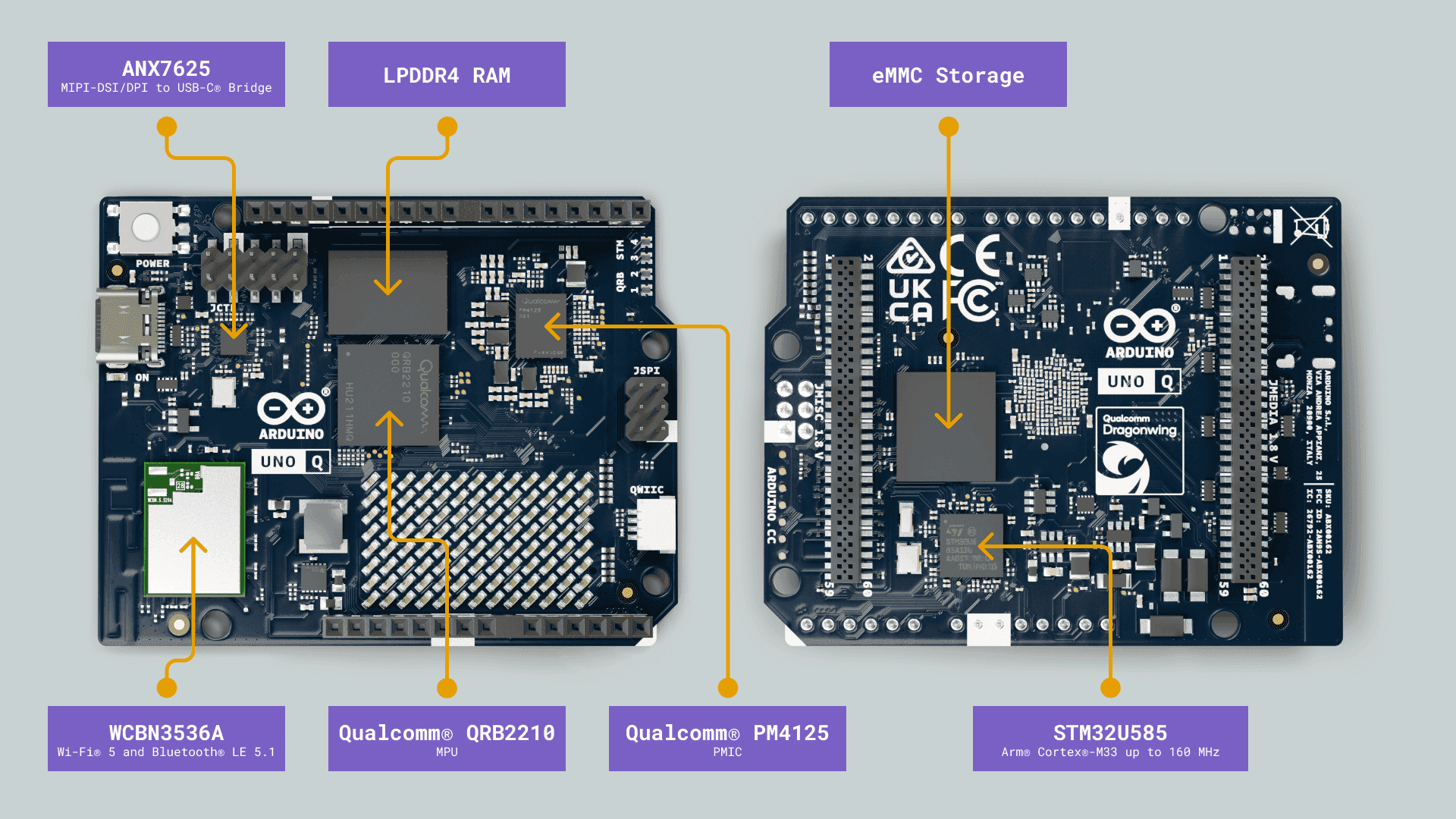
Image: Arduino
Part 2 of the Mastery Series is why you would buy this instead of an Uno. Part 3 is the MCU sketch shape. This article is the split.
VENTUNO Q is the same idea with a different application processor and a different Linux image procedure. The split below is the UNO Q story. Do not flash a UNO Q image onto a VENTUNO Q.
Two computers, one USB-C footprint
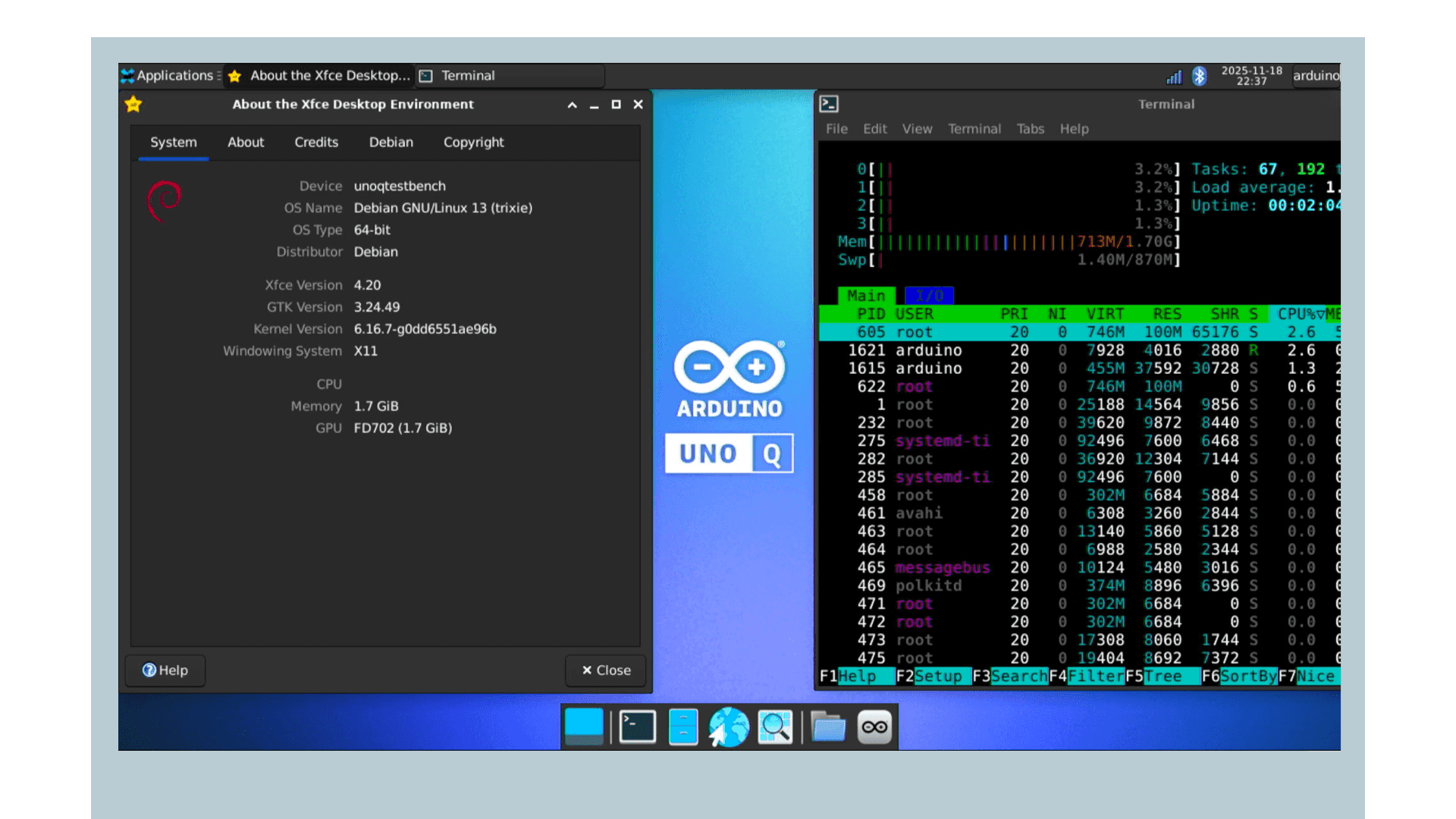
MPU / Linux side. A four-core application processor built on Arm's Cortex-A53 design (the same class of processor core found in budget smartphones), plus a GPU (graphics processor), camera-related hardware, Wi-Fi and Bluetooth on the module Arduino documents, RAM (2 GB or 4 GB SKUs), eMMC storage (soldered flash). Debian boots here. Python, App Lab, apt, SSH, ADB, Docker-based Bricks: all of that is this chip. Arduino can treat the board as a single-board computer if you attach a display and a USB-C dongle with power delivery. They recommend 4 GB RAM for that.
MCU / Arduino side. STM32U585, Cortex-M33, flash and SRAM measured in megabytes and kilobytes, the Uno-shaped headers for GPIO. This is where setup() and loop() run, often on a Zephyr-based Arduino core in current UNO Q docs (Zephyr is a small real-time operating system that sits underneath your sketch and handles low-level housekeeping). Real-time pin toggling belongs here. A 200 ms Python sleep on Linux will not make this chip miss a step unless you put that sleep in the sketch.
They do not share RAM as one pool. They talk over an on-board link that App Lab exposes as the Bridge (RPC). The Bridge article in this folder is that protocol. This page only needs: Linux can ask the MCU to run a named function, and the other way around.
Two separate RAM pools is worth sitting with for a second, because it rules out a shortcut people instinctively reach for. On a single-chip board, two parts of your program can share data just by both reading the same variable in memory. The Qualcomm side and the STM32 side of a UNO Q cannot do that: they are physically different silicon with physically different memory, connected only by that one communication link. Anything one side needs to know about the other's state has to be explicitly sent across the Bridge as a message. There is no such thing as a global variable that both chips happen to see.
What "at the same time" does not mean
It does not mean two loop() functions merged into one. It does not mean MicroPython replacing C++ on the STM32 (that would be a different firmware, a different product). It does not mean IDE 2 is programming Linux.
Arduino IDE 2 on a UNO Q programs the microcontroller. Linux keeps doing whatever the image is doing. Your IDE 2 session is not starting Python Apps.
Arduino App Lab deploys an App: Python (and Bricks) on Linux plus an optional sketch on the MCU, started together with Run.
If you only needed digitalWrite, a classic Uno was enough. The UNO Q is for when Linux work (camera, model, web, packages) must sit next to pin work. Buying the two-chip board for a project that only ever needed the one chip just adds a Linux boot, a second storage area, and a Bridge protocol to keep track of, none of which pays for itself if nothing on the Linux side was ever going to be used.
Storage is split too
Linux lives on eMMC as an operating system image. Flashing that image is not Upload. The STM32 has its own firmware. App Lab Run updates the MCU program as part of the App. apt upgrade updates Linux packages without replacing the whole OS. Mixing those three actions is how people wipe /home/arduino when they meant to blink an LED.
Who boots first, who waits
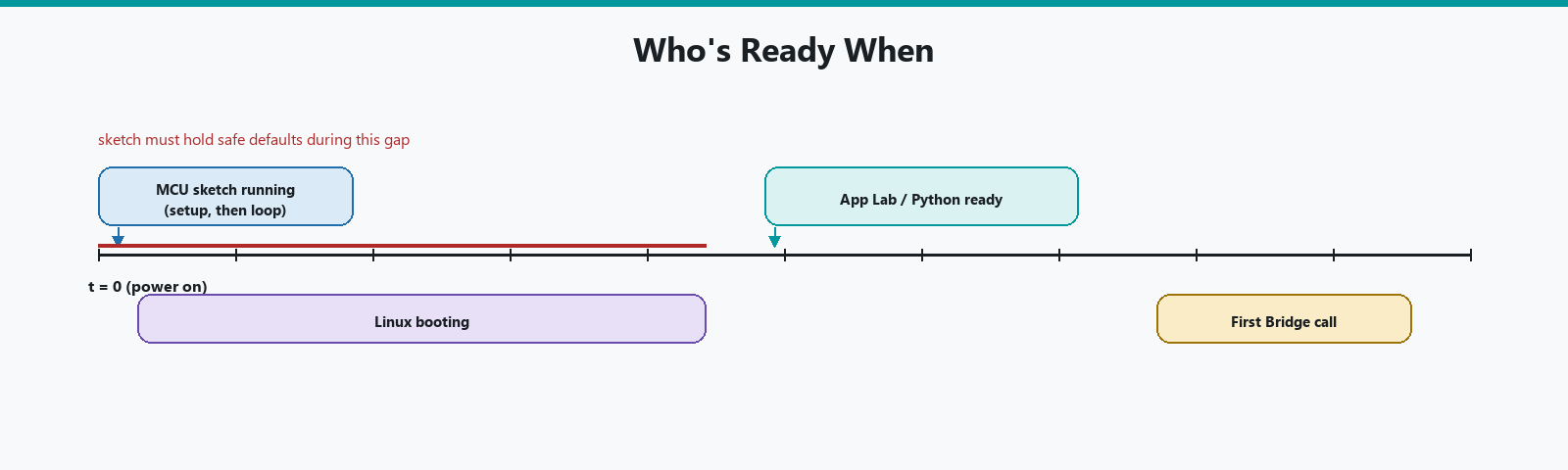
On power-up, Linux takes longer to become useful than the MCU. Pins can be live before Python has imported anything. If an App must not spin a motor until Linux is ready, the sketch should default outputs safe, then wait for a Bridge call, or Linux should call into the MCU when it is up. Do not assume both sides are "ready" at the same millisecond.
The gap between them is not small. A microcontroller running setup() is doing almost nothing before it starts: initialize a few peripherals, set pin modes, jump into loop(), all done in milliseconds. Debian booting on the Qualcomm side is going through the same kind of sequence a laptop goes through, kernel, filesystem, services, before Python ever gets a chance to run your main.py, and that easily takes several seconds. A motor pin that defaults to "on" the instant power arrives will have already been spinning for that whole gap before any Python code exists to tell it otherwise, which is exactly the scenario safe defaults in the sketch are there to prevent.
Arduino documents App Lab starting on boot in single-board-computer use, and a way to mark an App as the default at startup. That is Linux policy, not setup().
What you can use without App Lab
You can SSH into Linux and run commands while the MCU still runs whatever sketch was last deployed. You can also upload a sketch from IDE 2 while Linux is idle at a login prompt. "At the same time" is always true of the silicon. App Lab is only the supported way to ship a matched pair as one App.
If you SSH and apt install a random desktop, you can fill eMMC and make the next App Lab update miserable. Prefer Arduino's documented packages and arduino-app-cli until you know why you need more.
Heat and power: two processors plus a camera draw more than an Uno. Use the supply Arduino documents. Brown-outs (brief voltage dips when the supply cannot keep up with a sudden demand) look like "Linux crashed" and "the sketch reset" at once.
A single-chip Uno pulling a modest, steady current off USB is a very different power story from a UNO Q running Wi-Fi, a camera, and a full Linux boot at once, all of which spike current draw in short bursts rather than drawing a flat line. A USB port or a cheap charger that was perfectly fine for years of Blink sketches can be exactly the kind of supply that cannot keep up with one of those bursts on a UNO Q, browning out for a fraction of a second in a way an oscilloscope would catch and a human eye would only read as "it just restarted for no reason."
Troubleshooting
| Symptom | Likely cause | Fix |
|---|---|---|
| Pin does something before Python is ready | Normal boot gap, sketch has no safe default | Set safe output state in setup(), wait for a Bridge call before doing anything else |
| SSH works, App Lab does not see the board | Different discovery path (network vs USB) | Confirm same-network discovery separately from SSH access |
apt install-heavy Linux side, App Lab acting up |
eMMC filling up from extra packages | Check free space, prefer arduino-app-cli for anything App-related |
| Board resets under load (camera + motor together) | Brown-out from an underrated power supply | Use the supply and PD dongle Arduino documents, not whatever cable was closest |
| IDE 2 upload seems to have "no effect" on the App | Uploaded to the MCU, but App Lab's Run overwrote it again later | Whichever tool wrote to the STM32 most recently is what is running; re-upload after Running the App if you need the IDE 2 version back |
Mental model
Write this on a sticky note if it helps:
- Slow, heavy, networked, AI: Linux / Python / Bricks.
- Fast, pins, motors, sensors with deadlines: MCU / sketch.
- Small messages between them: Bridge, not a JPEG.
Wrap-up
UNO Q runs Linux and Arduino C++ at the same time because it has two processors. Debian on the Qualcomm chip. Sketch on the STM32. App Lab is how you ship work to both. IDE 2 is how you poke the STM32 alone. Recovery and images are a different article. The Bridge is how they talk.
Hack The World and Make Awesome.