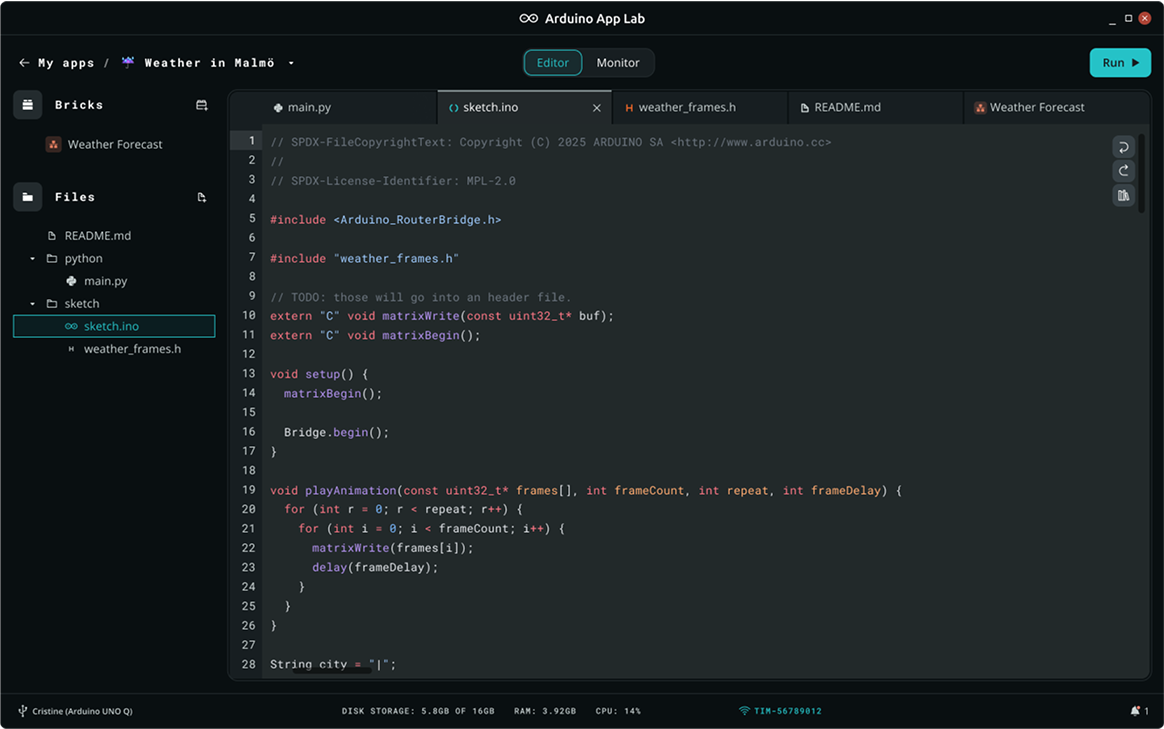
App Lab's whole trick is one App with two languages. Python runs on Debian, on the UNO Q's application processor. Arduino C++ runs on the STM32 microcontroller. You press Run. Both deploy.
This is not MicroPython. MicroPython replaces C++ on a single microcontroller. App Lab Python is ordinary CPython next to a C++ sketch. Mixing those sentences is how people download the wrong editor.
CPython is the standard, full Python interpreter, the same one running on most desktops and servers, with the full standard library and whatever packages apt can install available to it. That is a very different animal from MicroPython, which is a from-scratch reimplementation trimmed to fit inside a microcontroller's few hundred kilobytes of RAM, missing large parts of the standard library by necessity. App Lab's Python has that much room to work with precisely because it is running on the Linux side's gigabytes of RAM, not squeezed onto the same chip that is toggling pins. That difference in scale is the real reason App Lab Python can import requests and hit an API where a MicroPython script on a bare microcontroller generally cannot.
You need App Lab, a UNO Q or VENTUNO Q, and a Blink example that already Runs. If you have never seen main.py next to sketch.ino, do the getting-started and first-App articles in this folder first.
Part 3 of the Mastery Series is the C++ sketch. This article is where each line of a dual-language App belongs.
Folder layout
Arduino documents a strict layout:
main.py: Linux entry. Required.sketch/sketch.ino: MCU sketch, in that subfolder. Optional, but you want it as soon as GPIO matters.app.yaml: name, Bricks, launch metadata.
A loose .ino in the App root is easy for App Lab to miss. Put it in sketch/. If you add extra .cpp files, keep them with the sketch the way Arduino sketches always work: same folder, matching names. Python files besides main.py only help if the example's layout already imports them.
The sticky-note rule
Ask, for each piece of work:
- Does it need a pin on a deadline? Sketch.
- Does it need the network, a file, a model, a web page, or a 200 ms think? Python (or a Brick).
- Does it need to cross the gap? Bridge
provide/call, small values only (Arduino documents a 256-byte message cap).
Examples:
- Debounce a button (ignore the few milliseconds of electrical chatter when its contacts first touch), PWM a motor: sketch.
- Parse JSON (the text format most web APIs reply in) from an API, run object detection: Python / Brick.
- "If the model says person, close the relay": Python calls
set_relayon the MCU.
Do not put time.sleep(1) in loop() on the STM32 because Python examples sleep. Linux is allowed to be slow. The MCU sketch is not, if you care about pins.
A minimal pair
MCU provides set_led_state. Python toggles it once a second. That pair is in the Bridge article in this folder. Copy it into a duplicated Blink example rather than a blank App.
When you add a sensor on the MCU, provide a function that returns its reading. Python calls it on a timer and decides whether to log, send a notification, or call set_relay. The sketch should not wait on Wi-Fi. Here is the shape of it, using a raw analog reading so no sensor library is involved:
// sketch/sketch.ino (MCU side)
#include "Arduino_RouterBridge.h"

int read_raw_adc() {           // Linux will call this by name
  return analogRead(A0);       // Return the current reading on A0
}

void setup() {
  Bridge.begin();                                // Open the link to Linux
  Bridge.provide("read_raw_adc", read_raw_adc);  // Publish it
}

void loop() {
  // Nothing time-critical in this example
}
# main.py (Linux side)
from arduino.app_utils import *
import time

def loop():
    value = Bridge.call("read_raw_adc")  # Ask the MCU, get the number back
    print("A0 =", value)                 # Shows in App Lab's console
    time.sleep(2)                        # Every two seconds is plenty

App.run(user_loop=loop)
Check this against the current App Lab examples before you build on it. Return-value handling is the part of the Bridge API most likely to shift between App Lab versions.
When the MCU needs a Linux decision, Python provides should_run and the sketch calls it. If Linux is down, the sketch must have a safe default (motor off).
Keep a copy of main.py and sketch.ino on the PC, not only on the board. A Linux reimage will erase the board copy. The getting-started and recovery articles in this folder are easier if Git already has the App.
Includes and libraries on each side
Python packages are Linux packages (apt / whatever Arduino documents for the image). MCU libraries are sketch libraries in App Lab's sketch library manager, or the Router Bridge that current cores already bundle. A C++ header will not import in Python. A Python module will not #include on the STM32.
If you need the same number on both sides (a threshold), send it over the Bridge at startup. Do not hope two hardcoded 0.5 constants stay in sync forever. Six months from now, someone (possibly you) will change the Python one while tuning behavior and never think to look inside the .ino file for a second copy of the same number.
A worked split: a plant-watering App
Walking through one slightly bigger example end to end makes the sticky-note rule concrete instead of abstract. Say the goal is an App that watches a soil-moisture sensor, waters a plant when it gets dry, and shows a small log on a web page.
Sort each piece by the same three questions as before:
- Reading the soil sensor and running the pump relay need a real pin, on a schedule the code controls precisely, whether or not Linux happens to be busy that millisecond. That is the sketch:
provide("read_moisture", ...)andprovide("set_pump", ...). - Deciding "dry enough, water now" could live on either side technically, but it is a plain comparison against a threshold with no hard timing requirement, so it belongs in Python where it is easier to change without a recompile and upload.
- The web page showing the log is squarely a Linux job: serving HTTP, formatting a page, is not something the sketch should ever be doing. A web-UI Brick from the catalog, or a small Flask-style script if you want to write it yourself, is the App Lab example folder's usual answer here.
Nothing about this project needed inventing a new mechanism. It is the same three-way split (sketch for pins, Python for decisions, a Brick for the heavier service) the single-LED examples earlier in this article already showed, just with more provide/call pairs and one more moving part.
Restarting cleanly
Pressing Run again, or a board power cycle, restarts both sides from scratch. Any variable Python was holding in RAM (a running average, a count of how many times the pump has fired today) is gone the moment main.py starts over, the same as any script that is not explicitly saving its own state. If that count needs to survive a restart, Python has to write it somewhere durable, a small file on the board's storage, before it can be read back next time main.py starts.
The sketch has the same amnesia. A provide()'d function runs from whatever state the variables around it were in at the top of the file, not wherever they were left when the App was last stopped. If the pump relay should default to off on every fresh start rather than remembering its last state, that has to be written into setup() explicitly, not assumed.
This matters most on the boundary case: a power blip mid-watering. If the pump was on when power dropped, and setup() does not explicitly force the relay pin low first thing, the pin can come back up in whatever state the hardware defaults to rather than the safe one. A sketch that always sets outputs to a known safe value at the top of setup(), before anything else runs, is not being paranoid: it is treating "I do not know what state the world was in a second ago" as the normal starting assumption, because on a board that restarts this easily, it usually is.
What breaks
- Python runs, pins dead: no sketch in the App, or Bridge names differ, or IDE 2 uploaded a different MCU image after Run.
- Sketch fine in IDE 2, Python never starts: you used IDE 2 only. Open App Lab, Run the App.
- Types: start with
boolandint. Read Arduino's Bridge type map before you pass custom structs. Serial.printlnto USB while you watch App Lab's console: wrong window.
Debugging both sides
Print from Python with print(). Print from the MCU with Monitor.print in App Lab examples, or USB Serial if you opened that on purpose. Do not assume one console shows both.
If you must use IDE 2 to prove a pin, do it, then Run the App again so Python and the sketch match.
Troubleshooting
| Symptom | Likely cause | Fix |
|---|---|---|
| Only Python or only sketch runs | Wrong tool last | App Lab Run for both. IDE 2 is MCU only |
| Thresholds disagree | Hardcoded on both sides | Send the number over Bridge at start |
| Import error in Python | Linux package missing | Install on Debian, not Library Manager |
Wrap-up
Python and Arduino C++ run together in App Lab because they run on two processors. Put deadlines in the sketch, put heavy work in Python, cross with Bridge strings that match. Duplicate Blink, then add one provide/call, then a sensor or a Brick.
Hack The World and Make Awesome.