The UNO Q's Linux chip and its microcontroller do not share variables by magic. They send messages. Arduino's supported way to do that from App Lab is the Bridge: a library and service for RPC, remote procedure call. RPC means code on one processor asks the other to run a function by name, and can get a small result back, as if the function were local.
Part 3 of the Mastery Series is still the sketch. This article is the extra API that sketch uses to talk to Python.
VENTUNO Q uses the same Bridge idea. Pin and SoC (system-on-chip, the main processor package) names differ. Read that board's Bridge notes when you leave UNO Q.
What sits on the wire
Arduino documents:
- Linux device:
/dev/ttyHS1 - MCU port:
Serial1 - Baud: 115200
- Maximum message size: 256 bytes
Underneath, a Linux service Arduino Router (arduino-router) moves the messages, packed in MessagePack (a compact binary format, like a smaller, faster cousin of JSON). You do not hand-build that packet for a first App. You call Bridge.provide and Bridge.call.
Seeing that stack laid out, a serial device, a baud rate, a byte limit, a router service, a binary encoding, is useful even though you will never touch most of it directly. It confirms that RPC on the UNO Q is not some exotic hardware feature unique to this board; it is ordinary serial communication, the same kind of link a USB-to-serial adapter uses to talk to any microcontroller, with a router process and a naming convention layered on top to make "call a function by name" feel effortless from either side. Nothing about it needs a special chip feature to exist. It needs a wire, a protocol, and a piece of software willing to speak it consistently on both ends.
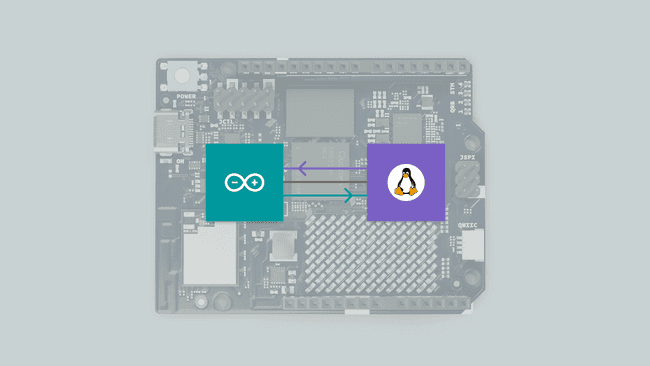
Image: Arduino
256 bytes is the gotcha people skip. A bool, an int, a short string: fine. A JPEG, a WAV, a Python list of a thousand floats: not this path. Camera frames stay on Linux. The MCU gets "person=true" or a box coordinate, not the pixels.
Provide and call
The MCU provides a function (registers it under a name). Python calls that name.
Sketch (pattern from Arduino's UNO Q examples):
#include "Arduino_RouterBridge.h"  // The Bridge library

// The function Python is allowed to call. "state" arrives from Linux.
void set_led_state(bool state) {
  digitalWrite(LED_BUILTIN, state ? LOW : HIGH);  // many onboard LEDs are active-low
}

void setup() {
  pinMode(LED_BUILTIN, OUTPUT);                    // LED pin as output
  Bridge.begin();                                  // Open the link to Linux
  Bridge.provide("set_led_state", set_led_state);  // Publish the function under this exact name
}

void loop() {
  // Serve RPC. Put real-time work here, not long delays.
}
Python:
from arduino.app_utils import *   # Arduino's App helpers (App, Bridge)
import time

led_state = False                 # What we want the LED to be

def loop():                       # App.run() calls this over and over
    global led_state              # Allow this function to change the variable above
    time.sleep(1)                 # One second. Fine here; Linux is allowed to be slow.
    led_state = not led_state     # Flip on/off
    Bridge.call("set_led_state", led_state)  # Same name as the sketch's provide()

App.run(user_loop=loop)           # Start the App and keep calling loop()
The string "set_led_state" must match on both sides. A typo looks like "Python runs, LED dead."
Call from Python only after App.run has started the stack the example uses. Calling before the MCU has run Bridge.begin() is a race on boot. A short delay in Python's first loop is acceptable. A delay(5000) in the MCU loop() is not how you wait for Linux.
That last distinction matters because of who is waiting for whom. A short pause in Python's very first loop is Linux, which is already slow to boot anyway, giving the much-faster microcontroller a moment to finish its own quick startup before the first call goes out; the cost is a second of extra patience on the side that was going to be waiting regardless. A delay(5000) sitting inside the MCU's loop() blocks the one processor that is supposed to be fast and responsive, unable to serve any RPC call, read any pin, or react to anything at all for that entire five seconds, for no benefit, since the sketch has no way of knowing whether Linux was ready after one second or needed six.
Python can provide and the sketch can call the other way: the MCU asks Linux for a model result or a Cloud value. Keep MCU calls brief and rare. If Linux is slow, the sketch should not sit forever in loop() waiting unless you designed for that.
On current UNO Q cores (Arduino documents this around Zephyr core 0.55.0), Router Bridge can be included by default. Older tutorials say to add Arduino_RouterBridge via a sketch library manager. If a fresh App compiles Bridge.begin() without that step, you are on the newer core. If it does not compile, add the library. Do not follow both instructions at once.
Monitor vs Serial
Official examples often use Monitor.print to send text to the App Lab console. That is not always the same stream as USB Serial in IDE 2. If the console you are watching is empty, you printed to the other serial. App Lab's log is the first place to look when an App is running.
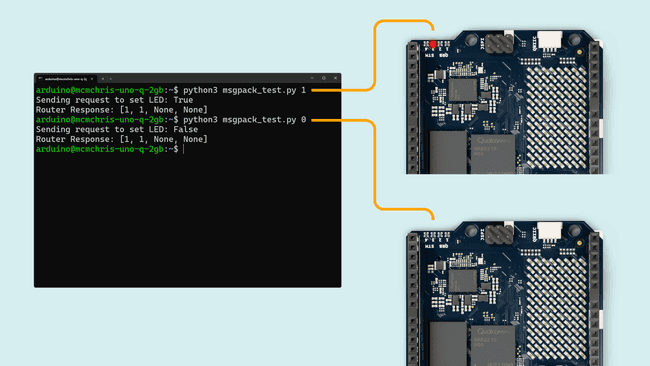
Image: Arduino
Names are an API
Treat "set_led_state" like a public function name. If you rename it on one side and not the other, you shipped a broken App. When you add a second function, keep names boring: set_relay, read_raw_adc. Do not reuse the same name for different types.
Document the direction in a comment at the provide:
// Linux -> MCU: bool on (true = LED on)
Bridge.provide("set_led_state", set_led_state);
That comment is for you in six months, not for the compiler.
Passing more than one value
A single call is not limited to one argument. Bridge.provide can register a function that takes several parameters, and Python passes them the same way it would to any local function:
Bridge.call("set_pixel", 10, 200, 0) # x, brightness, mode, however you defined it
void set_pixel(int x, int brightness, int mode) {
  // three plain ints, matched by position, not by name
}
Arguments match by position, not by name, the same as an ordinary function call in either language. If the sketch expects (int x, int brightness, int mode) and Python sends them in a different order, you get a silently wrong pixel, not an error. Keep the parameter order written down next to the provide() call, the same comment habit as documenting call direction.
Return values follow the same shape in reverse: a provided function can return a value, and Bridge.call on the Python side gets it back as its result. That return trip still counts against the 256-byte ceiling, combined with whatever was sent going in, so a function that takes a small argument and returns a small result is fine, but a function you are hoping will hand back a whole sensor history in one call is not.
How fast you can actually call it
Bridge is not built for the same kind of tight timing loop digitalWrite gives you directly on the MCU. Every call crosses a real serial link at 115200 baud, gets packed and unpacked as MessagePack, and passes through the arduino-router service on the Linux side. That adds real latency, on the order of milliseconds per call rather than the near-instant cost of a plain function call within one chip. For a light sensor you read once a second, or an LED you toggle a few times a second, that overhead is invisible. For something you want called thousands of times a second, treating every value as its own RPC call will bottleneck on the link itself before it bottlenecks on either chip's actual processing.
The practical fix is the same one applies to slow I/O anywhere: batch what you can. If Python needs five related sensor readings, provide one function that returns all five packed into a single small payload rather than five separate calls, each paying the round-trip cost on its own. Arduino's own examples lean this way already, one call per meaningful event (a button press, a detection result) rather than one call per loop iteration.
When RPC fails
- Name mismatch.
- App Lab did not deploy the sketch, only Python (or IDE 2 overwrote the sketch).
- Payload too big.
arduino-routernot up because the App did not start cleanly. Run the App again.- Types that do not map (see Arduino's Bridge API type table when you pass structs). Start with bool and int.
Bridge.call from Python can block (sit and wait) until the MCU returns. Do not call it from a context that cannot wait, and do not deadlock. A deadlock is when each side is waiting for the other to answer first, so neither ever does, and everything freezes.
A concrete way to build one by accident: have the MCU's loop() call into Python and wait for that call to return, while the Python function it is calling itself waits on a call back to the MCU before it can finish. Neither side can move on to answer the other, because each is paused, waiting on a response that depends on the other side unpausing first. The fix is architectural, not a timeout: keep the direction of "who calls whom" simple, usually Python driving and the MCU responding, rather than letting both sides wait on each other in the same round trip.
Troubleshooting
| Symptom | Likely cause | Fix |
|---|---|---|
| Python runs, no pin change | Name mismatch, sketch not deployed | Match strings. Run App, not only IDE 2 |
| Call hangs | MCU not serving loop(), or deadlock |
Keep loop() free of long delay. One side waits, not both |
| Truncated data | Payload over 256 bytes | Send a summary, not a buffer |
Wrap-up
Bridge/RPC is how UNO Q Python and the STM32 sketch invoke named functions on each other over a small serial link. Provide on one side, call on the other, keep messages tiny, match the strings. Camera pixels stay on Linux. Pins stay on the MCU.
Hack The World and Make Awesome.