Arduino still publishes two desktop IDEs. Arduino IDE 2 (currently 2.3.10) is the one Arduino develops and recommends. Legacy IDE 1.8.19 is the last of the old Java editor. Arduino's support article is direct: 1.8.19 only gets high-severity security fixes. New features go to IDE 2.
This is not "which is better" as a personality test. It is what changed: window, engine, speed, autocomplete, debugger, Serial, boards, libraries, and why you might still open 1.8.19. Part 3 of the Mastery Series assumes a modern sketch workflow. That workflow fits IDE 2. Old screenshots in a 2016 blog may still show 1.8. That is the other reason 1.8 stays in the room.
Here is the thing worth settling before the feature list: your sketch does not know or care which IDE compiled it. setup(), loop(), digitalWrite, every library you have ever installed, all of that is Arduino C++, and Arduino C++ has not changed shape because a new editor exists around it. What changed between 1.8 and 2 is entirely the tooling wrapped around that same language: how you write it, how fast you find out it is wrong, and how much the editor tells you about what a function actually does before you run it. A ten-year-old tutorial's code is exactly as valid today as it was then. Its screenshots are the part that aged.
Interface
1.8.19 is a small Java window: tabs, a Verify check, Upload, a serial monitor that often floated as a second window.
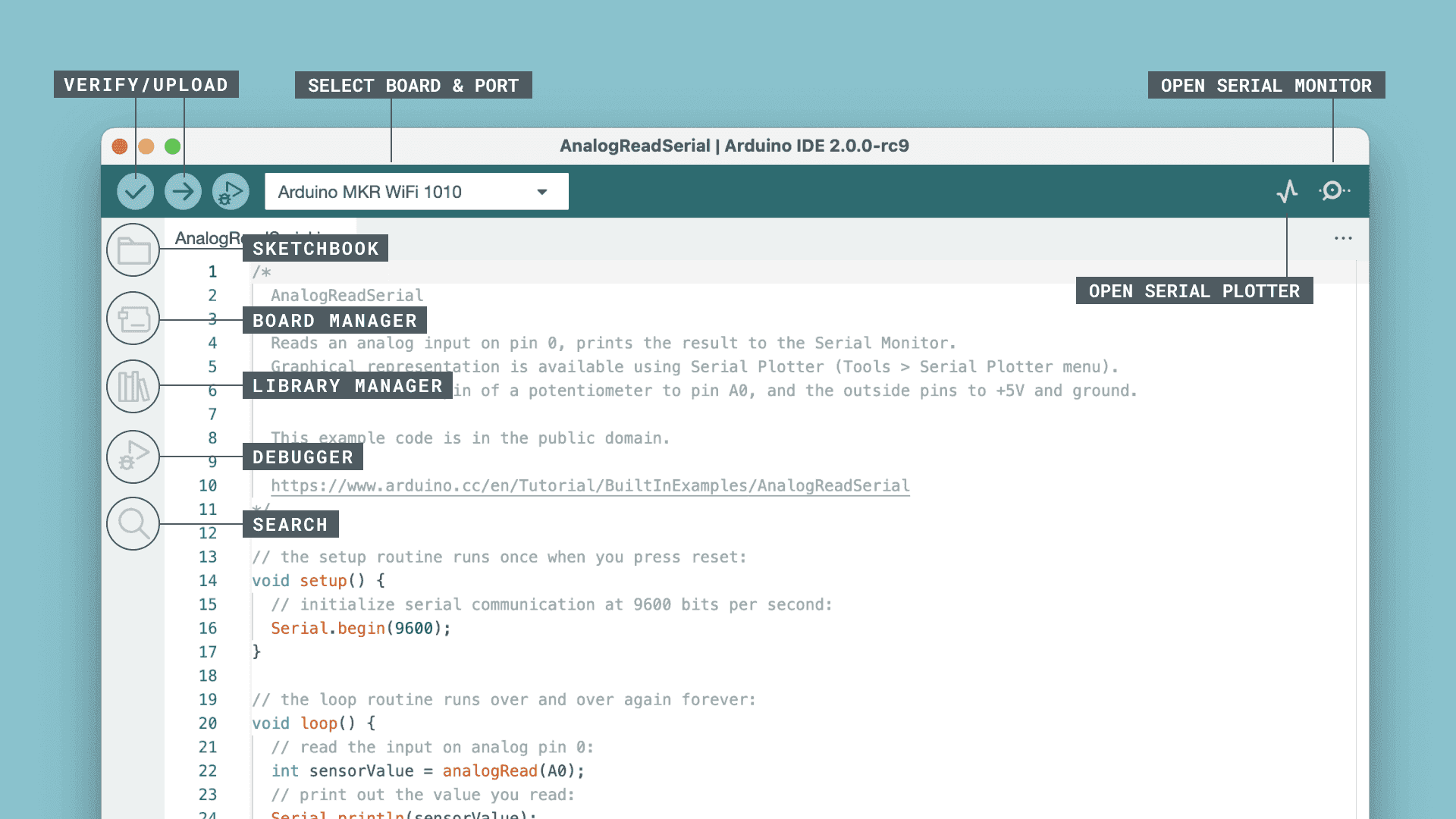
IDE 2 is a larger Electron app (Electron builds desktop programs out of the same web technologies a browser uses). Left sidebar for Board Manager, Library Manager, debug. Serial Monitor and Plotter dock in the same window. Dark theme is a first-class option. The board and port sit on the toolbar, not only under Tools.
If a tutorial says "click the box in the top right for Serial Monitor" it might mean 1.8. In IDE 2, look at the toolbar and the bottom pane. Every button still does the same job it did in 1.8. Most of them just live somewhere new.
IDE 2 needs more RAM and a 64-bit OS. On a very old laptop, 1.8.19 can feel snappier to launch. It is still the editor Arduino is not building on, which matters more over a multi-year timeline than it does on any single afternoon.
Architecture
IDE 2 is a graphical shell around Arduino CLI, the command-line engine. Verify and Upload call that engine. The same cores and libraries can serve CLI and IDE 2 when they share Arduino15.
1.8.19 has its own Java-era compile path. It can share a sketchbook with IDE 2. It does not share the same "the CLI is the compiler" story.
That is why a sketch that builds in IDE 2 usually builds with arduino-cli compile for the same FQBN (Fully Qualified Board Name, the CLI's way of writing a board, like arduino:avr:uno). 1.8 is the odd one out, not IDE 2.
This architecture split explains a lot of the smaller differences later in this article without needing a separate explanation for each one. Autocomplete, jump-to-definition, and the debugger all exist because IDE 2 has a real, structured understanding of your project: which core, which board, which included libraries, the same information Arduino CLI needs to compile. 1.8.19's Java editor was never built with that structured model in mind; it opened text files and ran a compile command, which is enough to build a sketch but not enough to answer "what does this function actually take as arguments" before you have tried compiling and failed. IDE 2's extra features are not bolted on. They fall out naturally from being built on top of a tool that already understands your code as a whole project, not just a file to hand to a compiler.
Speed
First compile of a core is slow in both. Later compiles in IDE 2 use caching. IDE 2.3.10 added a clean compile (Shift-click Verify) when the cache is stale. 1.8 users used to "change a comment and verify" to force rebuilds.
Launch time: 1.8 often wins on old hardware. Compile of a medium sketch: IDE 2 is competitive and often faster after cache is warm. I would not pick 1.8 for speed in 2026 except on a machine that cannot run IDE 2.
The caching that makes IDE 2 fast after the first build is compiling each source file once and reusing the result on subsequent builds as long as that file has not changed, the same general idea most modern compiled languages use to avoid redoing work nobody asked it to redo. That is also why the trick veteran 1.8 users developed, changing a comment just to force a rebuild, existed at all: it was a workaround for a compile path that did not always notice a change on its own, tricking it into thinking a real edit had happened. IDE 2's Shift-click clean compile is the same idea offered as an actual button instead of a folk remedy: it deliberately discards the cache and rebuilds everything from nothing, useful on the rare occasion a stale cached object file is genuinely lying to you about what your code does.
Launch time is the one category where an honest comparison still favors 1.8, and it is worth saying why rather than just noting the fact. Electron, the framework IDE 2 is built on, starts a small embedded browser engine every time you open the app, which is real overhead a Java Swing window from 2018 never carried. On a machine with a spinning hard drive and 4 GB of RAM, that overhead is noticeable every single time you double-click the icon. On anything built in the last several years, it is a couple of seconds you will not think about twice.
Autocomplete and navigation
1.8: little or none.
IDE 2: language server, suggestions as you type, jump to definition. Needs a board selected. Covered in the autocomplete article in this folder.
If you live in 1.8 because "the editor stays out of the way," that is a preference. You are also typing every digitalWrite in full, and looking up every unfamiliar function's exact parameter order in a browser tab instead of a hover tooltip.
Debugging
1.8: Serial, and third-party plugins if you had them.
IDE 2: Serial plus a live debugger on boards that support a probe. Classic Uno still uses Serial. The debugger article in this folder is that split.
A live debugger is a genuinely different tool from Serial.print, not just a fancier version of it. Print debugging means guessing which variables matter, sprinkling print statements near them, and reading a scrolling log after the fact to reconstruct what happened. A debugger with a probe attached can pause your sketch mid-execution, at a line you chose, and let you inspect every variable's actual value at that exact moment, then step forward one line at a time and watch values change in real time. It needs hardware 1.8 never supported: a debug probe wired to the chip's SWD pins, and a board whose microcontroller exposes that interface at all. A classic Uno's ATmega328P has no such interface built in, which is why it stays on Serial regardless of which IDE you open it in.
Serial Monitor and Plotter
Both have Monitor and Plotter. IDE 2 docks them, which is the daily quality-of-life change. Baud and line endings are the same idea. Plotter still wants numeric lines, printed one value (or one comma-separated set of values) per line, exactly as 1.8's Plotter always expected.
1.8 Monitor as a separate window could sit on a second screen. IDE 2 can feel cramped on a tiny laptop. Undock if your version allows it, or use a larger display.
Board support and libraries
Both use Board Manager and Library Manager. Additional URLs in Preferences work in both. A core you install for IDE 2 in Arduino15 is often visible to 1.8 and vice versa, which is convenient and occasionally confusing (a core that needs a newer IDE).
The confusing case is worth naming directly. Newer board packages sometimes specify a minimum Arduino IDE or Arduino CLI version they require to build correctly, because the core's own build scripts started depending on a feature only newer tooling has. That core can still sit happily in a shared Arduino15 folder, fully installed and showing up in both IDEs' Board Manager lists, while only actually compiling successfully in the newer one. If a board that installs cleanly in 1.8 then fails to compile with an error that looks unrelated to your sketch at all, checking whether that specific core has a stated minimum tool version is worth doing before assuming your code is at fault.
Some ancient plugins and hardware packages were built only for 1.8. If a vendor's latest instructions still say 1.8.19, believe them for that package until they update. For AVR Uno work and current ESP32 cores, IDE 2 is the path Espressif and Arduino document.
Library zips and Documents\Arduino\libraries are shared if the sketchbook is shared. Duplicate libraries hurt both IDEs the same way.
Why someone still has 1.8.19
- A classroom image or CNC / plotter plugin that never moved, because someone else depends on that exact setup working tomorrow morning.
- A computer that will not run IDE 2 comfortably, where the RAM and 64-bit requirement are the actual blocker, not a preference.
- Matching a textbook screenshot click for click, so a student is not hunting for a menu the book never shows.
- Muscle memory, and a project that already compiles there, with no real reason to disturb something that works.
Arduino's position: migrate when you can. Keep 1.8 only when a specific workflow forces it. Do not start a new 2026 project in 1.8 "because that is what the first Google image showed."
Security fixes only, Arduino's own stated policy for 1.8.19, is worth taking literally rather than reading as boilerplate. It does not mean 1.8 is frozen in some neutral, safe state forever. It means new features, new board support, and new library compatibility work are not landing there, while genuinely serious vulnerabilities still get patched so the old editor is not actively dangerous to keep installed. Over time, that gap only widens: a new board released next year is far more likely to ship documentation and setup instructions written against IDE 2, simply because that is where Arduino's own development effort is going.
Side-by-side
| Feature | IDE 1.8.19 | IDE 2.3.x |
|---|---|---|
| Status | Legacy, security fixes only | Current |
| Engine | Java-era IDE | GUI on Arduino CLI |
| Autocomplete | No | Yes |
| Live debugger | No (stock) | Yes, on supported boards |
| Serial UI | Often a second window | Docked |
| 64-bit | 1.8 had 32-bit builds | 64-bit only |
| New boards / cores | May lag or need extra care | Default for current cores |
Which one to install first
If you are new to Arduino entirely, install IDE 2 and stop there. Every current tutorial, every current board's setup instructions, and every current library's example code assumes it. Installing 1.8.19 as a beginner "just in case" adds a second, older tool to learn menus in for no benefit you will actually use.
Install 1.8.19 alongside IDE 2 only when one of the four reasons above already applies to you by name, not as a hedge against a hypothetical future need. If you cannot point at a specific plugin, a specific textbook, or a specific machine that cannot run IDE 2, you do not need it.
Troubleshooting
| Symptom | Likely cause | Fix |
|---|---|---|
| A tutorial's menus do not match what you see | Tutorial was written for 1.8 | Look for the same job on the IDE 2 toolbar or sidebar instead of the exact menu path |
| Board or library installs in one IDE, missing in the other | Separate Arduino15 data directories |
Compare Preferences (1.8) against arduino-cli config dump (IDE 2 shares the CLI's paths) |
| A core installs but only compiles in one IDE | Core has a stated minimum tool version | Check that core's release notes for a minimum IDE/CLI requirement |
| IDE 2 feels slow to launch | Electron startup overhead, more pronounced on old hardware | Expected on older machines. Not a sign of a broken install |
| Cannot find a plugin you relied on in 1.8 | Plugin was 1.8-only and never ported | Keep 1.8 installed for that one job, or check if the plugin's function is now built into IDE 2 |
Wrap-up
IDE 2 is the current Arduino desktop IDE: CLI underneath, autocomplete, docked Serial, debugger where the hardware allows. 1.8.19 is the last classic editor, still downloadable, not where new work should start. If you are following an old tutorial with 1.8 screenshots, the menus will look different in IDE 2, but every sketch in that tutorial is still valid Arduino C++.
Hack The World and Make Awesome.