You can run Arduino IDE 2 without throwing 1.8.19 away on day one. Install 2, point it at the same sketchbook, compile the project you care about, upload it, then uninstall 1.8 when you trust it. Part 3 of the Mastery Series is still the sketch language. This article is the move.
Arduino's own advice: 1.8.19 is legacy. Use IDE 2 for new work. The migrate path is conservative because classroom plugins and old cores are how people get stuck.
Why the move is worth an afternoon
Arduino IDE 1.8.x is a small editor with a compile button. IDE 2 keeps the same sketches but is built around the Arduino CLI (the command-line engine that does the real compiling) and a language server. A language server is a background program that understands C++ well enough to give you autocomplete, underline mistakes while you type, and jump from a function call to where it was defined. You also get a dark theme, a sidebar for boards and libraries, and a debugger on hardware that supports one. None of that changes what your sketch does. It only changes how quickly you can find your own typos.
Back up first
Nothing in this move should delete a sketch, but copying your sketchbook takes seconds and removes every "what if" from the afternoon. Your sketchbook is the folder holding all your projects, usually Documents\Arduino.
# Copy the whole sketchbook to a sibling folder. -Recurse includes sub-folders.
# If anything goes sideways later, your originals are one drag away.
Copy-Item -Recurse "$HOME\Documents\Arduino" "$HOME\Documents\Arduino-backup"

# 1.8 stores its Additional Boards Manager URLs in a plain-text settings file.
# Print them now so you can paste them into IDE 2 without hunting for them.
Select-String -Path "$env:LOCALAPPDATA\Arduino15\preferences.txt" -Pattern "boardsmanager.additional_urls"
The second command prints a line of comma-separated web addresses if you ever added ESP32 or another third-party board. Keep that line open in a text file while you work through the Cores section below.
Install IDE 2 first, keep 1.8
Download IDE 2 from arduino.cc/en/software. Windows 11 MSI is the usual home-PC choice. The install-on-Windows-11 article in this folder is the click-by-click.
Do not uninstall 1.8 yet. Two Start Menu entries is confusing for one afternoon and cheaper than a missing plugin.
Open IDE 2. Help → About should say 2.3.x, not 1.8.19.
Sketchbook and libraries
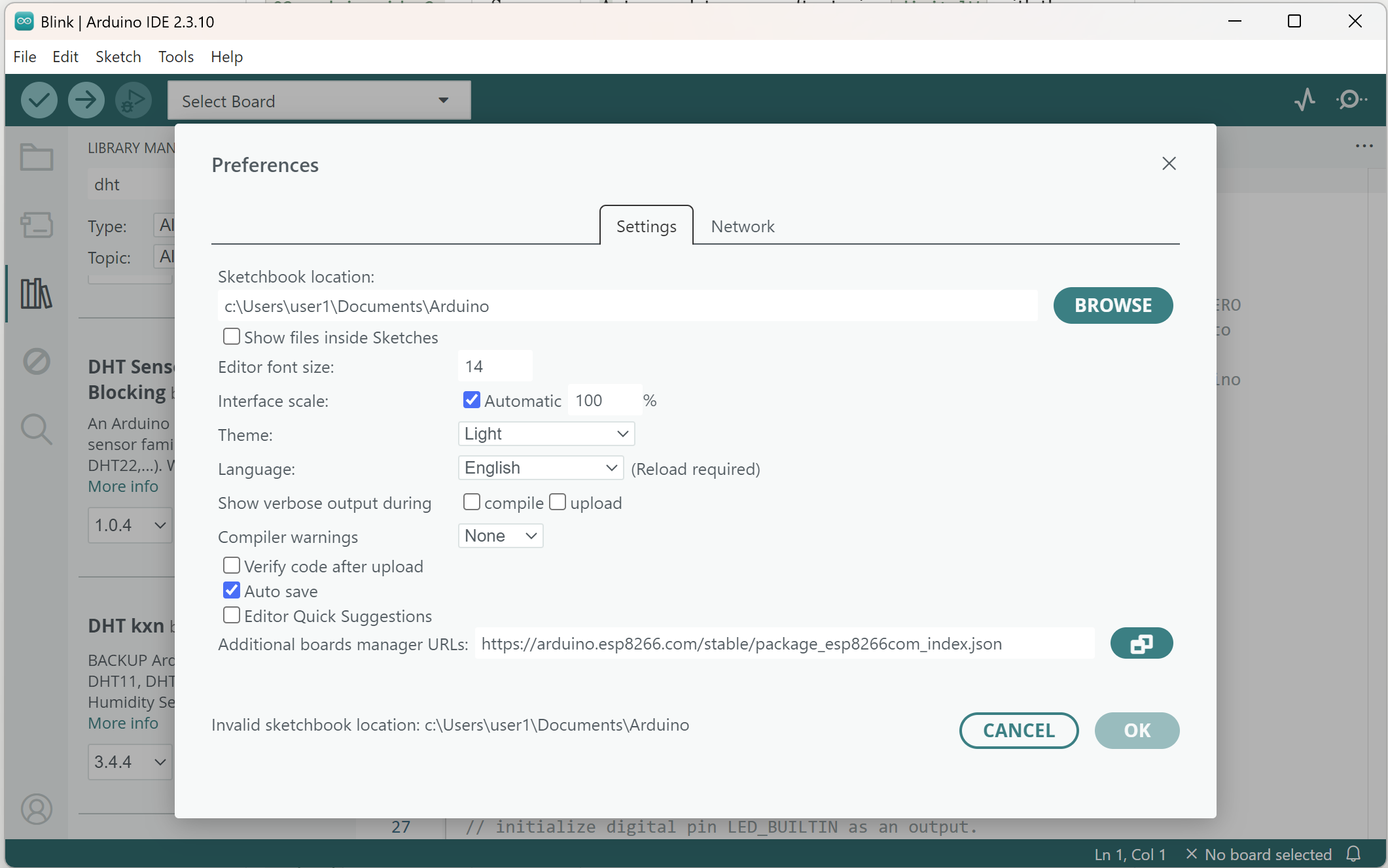
File → Preferences → Sketchbook location. If it already says Documents\Arduino, you are sharing 1.8's sketches and libraries folder. That is what you want.
Open a sketch you know from 1.8: File → Open, or Sketchbook in the sidebar. Verify. If headers are missing, Library Manager in IDE 2 can see the same Documents\Arduino\libraries folder. If it cannot, Preferences is pointing at a different sketchbook. Align it.
Do not copy libraries by hand from Arduino15 unless Library Manager cannot install them. User libraries belong under the sketchbook.
Cores and Additional URLs
1.8 Additional boards manager URLs live in 1.8 Preferences. IDE 2 has its own Preferences field. Copy the URLs across: Espressif ESP32, ESP8266 community, and any vendor JSON you added.
Then Board Manager in IDE 2 → install the cores you use. If IDE 2 already shares Arduino15 with 1.8, they may already show INSTALLED. Verify a board from each family you care about (Uno, then ESP32 if you use it).
If a core installs but the board name is missing, restart IDE 2. If ESP32 search is empty, the URL did not stick. Paste again, wait for index download.
Finding buttons you used in 1.8
| 1.8 habit | IDE 2 |
|---|---|
| Verify checkmark | Same, toolbar |
| Upload arrow | Same, toolbar |
| Tools → Board | Toolbar board picker, or Tools → Board |
| Tools → Port | Toolbar, or Tools → Port |
| Tools → Serial Monitor | Toolbar / bottom pane |
| Tools → Serial Plotter | Toolbar / Tools |
| Sketch → Include Library → Manage Libraries | Left sidebar library icon, or the same menu |
| Boards Manager | Left sidebar board icon, or Tools → Board → Boards Manager |
| Preferences | File → Preferences (Windows) |
Serial Monitor docking is the one that throws people. It is at the bottom, not a second window. Baud still has to match Serial.begin.
Settings worth switching on
IDE 2's Preferences dialog has two options I turn on during any migration. Show verbose output during compile prints every command the compiler runs, which is noisy day to day but invaluable when an error makes no sense. Compiler warnings controls how many hints the compiler gives you about suspicious code, and setting it to All catches things like a variable you declared and never used. A warning is not a failure, so the sketch still builds. It is the compiler tapping you on the shoulder.
If a sketch behaves differently between the two IDEs, verbose output is how you find out whether each one is really using the same core and library versions. Compare the paths printed in the log, and you will usually see the difference within a minute.
What does not carry over
Sketches, libraries, and installed cores all move across cleanly. Old 1.8 tools are the exception. Plugins that appeared under the Tools menu of 1.8 were Java programs built for that editor, and IDE 2 cannot load them. The best-known example is the ESP32 sketch data upload tool. IDE 2 has its own extension system, so before you uninstall 1.8, search for an IDE 2 version of any plugin you rely on. If none exists, keeping 1.8 around for that one job is a perfectly reasonable answer, and the section on when to uninstall covers it.
Keyboard habits transfer better than the menus do. Ctrl+R still verifies and Ctrl+U still uploads, which surprised me in a good way. Spend one session on the toolbar buttons instead of fighting muscle memory, and the new layout starts to feel natural.
Compile the real project, not Blink
Open the messiest sketch you ship. Select the real board and port. Verify. Fix missing libraries. Upload. Open Monitor and confirm the boot banner if you have one.
If it compiles in 1.8 and not in 2, read the first error. Common causes: core version newer in 2, library duplicate, or a 1.8-only plugin that never ran in the compile (so you did not notice). ESP32 core 3.x vs 2.x API changes show up here. You can install an older core version in Board Manager if you must freeze a project.
When to uninstall 1.8
After:
- The sketches you care about upload from IDE 2.
- Extra URLs and cores you need are in IDE 2 Preferences / Board Manager.
- You have a note of any 1.8-only plugin you still need (and a plan: keep 1.8 for that one job, or drop the plugin).
Uninstall 1.8 from Windows Settings. Sketchbook and Arduino15 stay. IDE 2 keeps using them.
If you still need 1.8 for one CNC plugin, leave it. Pin IDE 2 to the taskbar so you stop opening the wrong one.
Troubleshooting
| Symptom | Likely cause | Fix |
|---|---|---|
| Sketchbook empty in IDE 2 | Different Preferences path | Set Sketchbook location to Documents\Arduino |
| Libraries missing | Nested folders, or other path | Check Documents\Arduino\libraries. Restart |
| ESP32 gone | URL not copied | Paste JSON into IDE 2 Preferences |
| Upload works in 1.8 only | Wrong board in 2, or port | Match Tools → Board to 1.8. Same COM port |
| Both IDEs confuse Serial | Two windows, one port | Close 1.8 when using 2 |
Wrap-up
Install IDE 2 beside 1.8. Share the sketchbook. Copy Additional URLs. Reinstall or reuse cores. Compile the real project. Uninstall 1.8 when you do not need it. Your sketches come along unchanged. What you are really learning in the move is where the menus went.
Hack The World and Make Awesome.