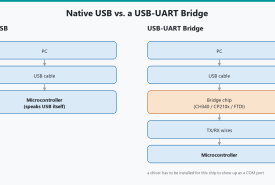
Why Arduino IDE 2 shows an empty Tools → Port menu, how USB-serial chips and cables actually work, and a Windows-first path through Device Manager, CH340/CP210x/FTDI drivers, ESP boot modes, and port conflicts.
Download the real Arduino IDE 2 for Windows 11, choose MSI vs EXE vs ZIP, get past SmartScreen and USB drivers, finish the first-launch core download, and confirm Blink can compile.
What Arduino actually is, why it took over as the default platform for learning electronics, and a first look at the five boards you'll see most in this series, from the classic Uno to the Leonardo.
Install Arduino IDE 2, learn the window, add boards and libraries, compile, upload, use Serial Monitor and Plotter, and fix the problems that make a good board look broken.
Control an ESP8266 With Amazon Alexa! Over the last year or so I have became captivated with anything and everything ESP8266 related, and rightfully so. This little WiFi module is everything I have been hoping for in a development board for years. It’s small and compact, and has built in WiFi, as well as several G...
Installing Raspbian To An SD Card Welcome back to another installment of The Workbench . In this episode I walk you through the process of installing the latest version of Raspbian onto an SD card for use with a Raspberry Pi. This is the first episode in a series of videos in which I cover the basics of getting a Ra...